E-Commerce with Hybris

People are accustomed to buying goods online. If a company sells products to individuals, we call it B2C for Business To Consumers. If a business sells to other businesses – it’s B2B. Having an online store allows to sell around the clock regardless of the consumer’s location (at least within the country) as long as he or she is connected to the Internet. People spend some substantial time online and sellers are trying to reach their clients via all possible channels and devices being that a regular HTML Web page, a social network, a mobile application on any device with embedded browser. Still, some people aren’t Internet savvy and business will continue using more traditional channels like printed mail order catalogs. This is what the multi-channel marketing is about. Ideally, a business should be able to combine marketing the products with selling them right there. If you’ve seen the product commercial on Facebook or your mobile phone the storefront should be there too.

Ingredients of an online store

If I’d ask you to give me an example of an e-commerce site, most likely you’d answer Amazon or eBay. Agree. But what’s needed for building an e-commerce system? Let’s come up with a list of building blocks and solutions that Joe Smith, a CIO of the Best Stuff, Inc. would need to create an e-commerce portal:

– A shopping cart
– A catalog
– Integration with several payment systems
– Order management system
– Full text search
– High-load solutions
– Selling through social networks
– Ability to create UI supporting variety of desktop and handheld devices
– Integration with warehousing software
– Data feeds from external systems
– Consumers reviews, locator services, Web analytics
– Live video chats with customer supports

This list is not complete. Starting developing such a complex system from scratch would be insane unless you have unlimited budget and no deadlines to meet. On the other hand, trying to find a Swiss army knife solution usually translates into purchasing super expensive software with 80% of the functionality that you’ll never use. The truth is somewhere in the middle, especially in the age of Software-As-A-Service (SaaS) where you can subscribe to only what you need.

Hybris ingredients

Our company, Farata Systems has an e-commerce team that works with the Hybris software suite. For detailed comparison reviews of the e-commerce solutions refer to Gartner or Forrester. I can just offer you a Hybris review based on our real-world experience.

When we were offered to work on our first Hybris project we had to google this name up. Still, we were hired because of our solid expertise in enterprise development using Java and Spring framework, which are pre-requisites for developing software with Hybris Multi-Channel Suite.

Hybris is a well designed modularized software built on top of Apache and SpringSource components, containers and servers. We’ve been given login credentials to be able to access product Wiki and rolled up our sleeves. The software comes with an installer that includes modified Apache Tomcat servlet container, Spring modules and a home-made ORM framework for data persistence.

Finding goods

Finding goods in your online store has to be easier than in a brick and mortar one. Say you want to buy an engagement ring, but not sure if it has to be made of a white gold with diamonds or something more modest. Writing strict SQL queries is not overly flexible, but the full text search (FTS) technique allows examine all words in each document in your database rather then specifying the column names in the database table. The FTS feature give lots of flexibility in creating stores which allow to quickly find the products that closely match your customer’s needs (e.g. diamonds of certain shape, size, price range etc.) Hybris ships with the FTS module based on the fast search engine Apache SOLR (a Lucene extension). The system periodically (say, every minute) runs the data indexing process. You write queries not in SQL, but in a special query language.

Customization

This tightly integrated software allows you to create and release in production a simple online store in less than a month. But a typical store or an auction requires implementation of lots of custom solutions. For example, let’s take order fulfillment. Hybris offers off the box the basic solutions supporting order management and consignment. But in our projects we had to implement fulfillment algorithm that would take into account the distance between the warehouse and the consumer and minimize the number of shipments. For example, the customer wants to purchase twenty large screen TVs. The system has found six TV’s in one of your stores and four in the other. Since we need another ten TV’s our custom algorithm sends a request to a warehouse to order these additional TV sets. As a result – the customer will get a shipment of all twenty items shipped in a least expensive way.

Such customized business logic is implemented in Java as beans of Spring framework, which is literally a fabric of the entire Hybris software. Your code always has access to Spring context object. By adding custom extensions you create the child context object with your Spring bean containing custom logic to place a distributed order of 20 TVs.

From the software architect perspective, the ease of extending existing Hybris entities is very appealing. For example, if you need to add customer reviews features, just add a couple of fields to the Product entity, create a new entity for ProductReview and link them together. Then add a row of those yellow stars to the storefront UI and you’re set.

User Interface

With Hybris you have a complete freedom of selecting the UI platform for your online store. So far we’ve been using HTML, JavaScript and JQuery framework. But we could have used Java, Flex, or Silverlight for the UI if this would meet our needs. Hybris uses Spring MVC that can present the data as JSP pages or send the raw data as XML or JSON to the UI tier – just parse the data and display them any way you like. If you prefer an easily customizable solution, Hybris includes a CMS module, which allows you to specify the Web page layout and change it dynamically during the run-time.

Product Maintenance

Yet another interesting Hybris module is called Cockpit, which becomes quite handy in environments where the information changes quickly and the customers need to see the latest product information. We even customized Cockpit for building our own administration tool for the online auction project.

Launching Server

The launch of your Hybris server can be configured to load only those modules that are needed for your store. Our fully loaded server starts within 2 minutes, which is not bad at all. The initial install of the Hybris server comes with the in-memory HSQLDB, which is fast, but not suitable for the real-world applications. We started with MySql Server and then switched to Oracle with very minimal manual tuning.

Payment processing

Integration with the payment gateway is probably the most critical component of any online store or auction. Hybris has its own payment module, but we’ve been asked to integration with another payment processing engine – Litle.com using XML as the data exchange format. Little accepts all kinds of credit cards, PayPal, eCheck, mobile payments, and bill-me-later option. Introducing another provider in your payment workflow can make a lot of business sense, but be prepare to find yourself in the middle of the finger pointing game until you finish the payment integration. Add some more cushion there if you are making project estimates.

Scalability

Hybris comes with a clustering solution from the box. Each node of your cluster can be configured to include only those Hybris extensions that it needs. For example, you can configure a cluster with one more for the administration module, three nodes for the store UI, and one node for the data indexing.

In March of 2012 Adobe has announced its partnership with Hybris. Adobe’s CQ5 will help in creating multi-channel digital marketing campaigns and building strong brands for online stores created by Hybris.

Room for improvements

Although our overall impression after using Hybris on a couple of projects is very positive, this software has room for improvements. I’m sure, Hybris management has their reasons for keeping its community closed, but it may hurt the adoption of the software. The product documentation is not too detailed and up to date. Hybris technical experts have to pay more attention to the developer’s forum. In many cases we’ve been using the source code de-compilers to find the answers to our questions. Since Hybris is built on top of Java EE, I’d like the future versions to include a JPA-based solution that would allow using the data persistence solution of our choice rather than a proprietary ORM.

Conclusion

While finding solutions in developing software with Hybris was difficult at time, we never hit the wall, which can be credited to the engineering team. Overall, it’s a solid platform for creating modern online stores and auctions.

When we started our first e-commerce projects with Hybris, we couldn’t find any publicly available online materials about this software written by people in the trenches. I really hope that this article will help anyone who’s still in the process of selecting the right e-commerce software package for their next generation online store.
Learning from Marriott

This morning I’ve received the following twit by @gregsramblings “The Marriott TV system is having issues. The attached screenshot made me laugh. 14yr old OS!”

The screenshot was showing the Windows 98 logo with a message that it’s shutting down.
It does look funny that a major hotel chain is using a 15-year old OS to support their TV broadcasting. But give it a second thought – is there a compelling reason to upgrade the Windows OS? For Marriott, this would translate into a multi-million project with questionable outcome?

Most likely, their guests would not even notice the change. I can only guess that the CIO of Marriott was not able (or haven’t even tried) to sell the OS upgrade to his higher ups.

Is the “Ain’t Broke Don’t Fix” policy always a smart strategy? It depends on how often Windows 98 gives troubles to Marriott’s TV system. Most likely, Microsoft charges premium to support outdated Window 98 software. But is there a need to support it?

I’m receiving offers to upgrade the software on my MacBook daily. Unless it’s a fix for a security hole, I just ignore it. Apple has released their Mac OS X Lion 18 months ago. I have not upgraded my OS as of yet and lived happily thereafter. Modern software requires more powerful hardware. I guess, Apple was not able to sell me the need for the upgrade from Snow Leopard to Lion.

Half of the enterprises are still using Internet Explorer 6. Attend any HTML5 presentation at any conference. The speaker will never forget to mention that certain features are supported by every Web browser except IE 6. The audience laughs. But people who run IT operations in any decent size enterprise seems to have bad sense of humor. They often can’t fund money for doing an enterprise-wide upgrade of Web browsers. Besides, creators of JavaScript frameworks advertise support of their features on any browser including IE6. Why bother?

When you live in a house, the kitchen or bathroom upgrades increase the reselling value of the house. But replacing carpet with hardwood floors or digging a pool in the backyard does not increase the value of the house (at least in the USA).

So should Marriott upgrade their Windows 98 to Windows 7? I’m not so sure. Unless the upgrade will offer some new TV services to their guests, I wouldn’t bother.

Adobe or HTML5?

I know, some people will say it’s apples to oranges. Some people will say Adobe is also pushing for HTML5. But I’m writing this for people who read the title of this blog correctly: Flex or JavaScript.

Disclaimer 1. I do both.

Disclaimer 2. I don’t care about game programming. I work for a company that does enterprise development.

In the enterprise IT circles Adobe is a whipping boy of 2012. Adobe has accepted this award, and only their cleaning ladies and janitors didn’t apologize for what their CTO and CEO did last November hiding behind the wide back of Danny Winokur. But let’s put emotions behind and get real.

Today, there are two types of the enterprise CIO’s: those who don’t care about developing for mobile and those who do. CIO’s who don’t care about mobile can be divided into two groups: smart and typical.
Smarts will start new Web projects selecting a technology that would allow them to easily go mobile if the life will force them to do so. And not so smart will just go HTML5 because this buzzword is an easy sell to CEO’s.

Let’s continue splitting hairs. Enterprise Web projects can be divided into two categories – Web pages and Web applications. Web pages can be divided into (you guessed it right) two categories – those don’t have to be blazing fast (just show them that Donate or Pay button), and those that must be blazing fast.
Further splits would involve Intranet vs Internet, and by reliability requirements.

Now the most important question, “Who do you care about the most?” As the saying goes, men who shave in the evening love their wives, and those who shave in the morning love their work. Who can you afford to love more – developers or the users?

Seven years ago the most popular examples of successful AJAX applications were Google’s gmail and maps. Most of the people were drawn into this Google state of mind forgetting that their own teams had less skillful developers and more modest budget than Google’s.

Today, people are choosing the technology to go mobile. In a meeting with a prospective client I’d start drawing on the white board. You have two choices… I’m not going to do it here, but learn from the past – don’t assume that what the big guys do is affordable to you too.

I’ve learned from a Facebook engineer presentation that their users login from 2500 different mobile devices. On the other hand, this article states that Facebook has bad experience with their HTML5 mobile application and they are creating an iPhone version in Objective-C. Sounds great. What about people carrying 2499 other mobile devices.

Do you have to make such choices? Do you have skillful teams of Objective-C, C++, and Java programmers or prefer to have the same code base in HTML5? How many concurrent users do you have? Do you have enough money to cater to all possible devices your users carry?

It’s up to you to decide. But for most of the enterprise mobile Web applications the choice comes down to selecting between Adobe AIR and JavaScript. If you select AIR, it’ll cover all your today’s intranet desktop needs and the same team will be able to port this app to iOS, Android and Blackberry devices. If you are ready to dive into JavaScript, just double the time allocated to the development cycle of your project. But you may save time in the long run cause your Web application will already work on lots of mobile devices, especially if you’ve been using responsive design principles.

As to myself, my typical week is split between Adobe AIR and JavaScript. And yours?

JavaScript’s Sharp

While JavaScript’s popularity grows daily, it’s not obvious if enterprise developers spoiled by predictable languages like Java or C# will fill comfortable with it. If they won’t – the cost of the JavaScript-based projects will remain high.

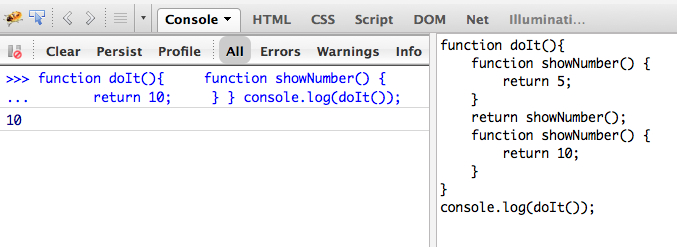
Just take a look at this code snippet on the right – I’ve been using Firebug,the Firefox add-on to run it. The code is on the right, and the result of invoking the function doIt() is on the left.

Yes, it outputs 10 on the console. If you don’t know why it did so, get ready do allocate a substantial time for doing a really thorough testing of your HTML-JavaScript application.

People say that if you cut your finger don’t blame the knife. True. Should we even use sharp knives? Yes, if we are very careful and responsible adults. But we shouldn’t give sharp knives to kids. And majority of today’s enterprise developers are kids playing with legos, a.k.a. frameworks. Unfortunately, you can’t get away with creating an enterprise Web application without programming in a raw language. This is when the fun begins. Let’s embrace it, but be careful.

P.S. If you want to know why the code above printed 10 and not 5, read an excellent blog by Angus Croll where I picked this code sample from.

An Elevator Pitch for Modernizr

Say, you’re creating a new startup. What’s one of the most important things you need badly? Money. But how do you convince someone to give you some cash? An elevator pitch. You need to think hard and produce 2-3 (not 20-30!) sentences that clearly explain what’s your product is about and why it’s better than tons of similar others.

This elevator pitch technique of being brief and up to the point is extremely important even if you’re not in the startup business. You always sell something even if there is no money involved. Let me stop beating around the bush.

There is a great little library that JavaScript developers must use – it’s called Modernizr. Now I challenge everyone who doesn’t know what it’s about to look at modernizr.com and try to figure it out from it’s main page.

Still have no clue after reading all this text? I don’t blame you. These guys created a great library, but they didn’t bother to sell it to you. It’s free – why bother selling, right? Wrong! If you like your product, spend some time trying to come up with an elevator pitch.
Have you read the section “Why use Modernizr?” Was it convincing enough? Do you feel the need to start using it? Actually, there are two important words buried in there: “feature detection”. This is it. This is the holly grail.

How to fix the text? I’d removed all the text from this page except the links and replaced it with just one statement:

Modernizr is a tiny JavaScript library that allows your JavaScript to detect if the latest HTML5 features are supported in the user’s browser. On the Web page load, it creates an object with dozens of properties indicating if particular features (e.g. canvas or audio) are supported so you can branch out your JavaScript program accordingly.

Having said that, I want to take my hat off to the creators of this little gem Modernizr.

Good bye, Google Chrome!

I’ve been using Firefox on my MAC as my default system browser for years until I got really irritated with the need to kill it once in a while after it became non-responsive. Switched to Google Chrome, but was still running Firefox for testing of my HTML/JavaScript code with the great add-on Firebug.

It looks like its time to say good bye to Google Chrome. Periodically, it just start rendering Web pages blank. I found a cure that works sometimes – grab the corner of the window and start slowly resizing it. You might get lucky and find the size that Chrome likes and start rendering the content again. Being an enterprise developer I can’t imagine releasing an application into production that once in a while shows a blank screen to the users. I have no idea how Google can get away with it.

You may suggest that I should file a bug. But what do I write in there? It doesn’t render the content once in a while? Steps to reproduce: just freaking run Chrome for a couple of days with a dozen of opened tabs.

What’s next? Safari. Let’s see what the future holds. Keeping my fingers crossed. If you know of any Safari surprises, please let me know. I’ll still be using great Developers Tools of Chrome though – it’s a great tool.