Recently I wrote a blog showing how to use the WebSocket protocol to push the data from a Java server to a JavaScript client. This time I’ll keep the same code on the server, but the client will be written in Dart. For this example I was using GlassFish 4.1 server, and IntelliJ IDEA 14.1 with installed Dart plugin. I also have Dart 1.9.1 SDK. My goal was to create one Web application deployable module that would contain both Java and Dart code.
I’ll be brief assuming the the reader has some familiarity with IntelliJ IDEA IDE and the structure of Dart projects. Repeating the same exercise in Eclipse IDE should be a trivial task too.
By the time I was creating this app, I already had an IntelliJ IDEA project with multiple Dart modules. So I wanted to add a new Java module with Dart support to the same project. If you prefer creating a new IDEA project from scratch, instead of creating a new module create a new project. Here’s how I did it:
1. Create a new GlassFish configuration (IDEA menu Run | Edit Configurations) pointing at the existing GlassFish installation.
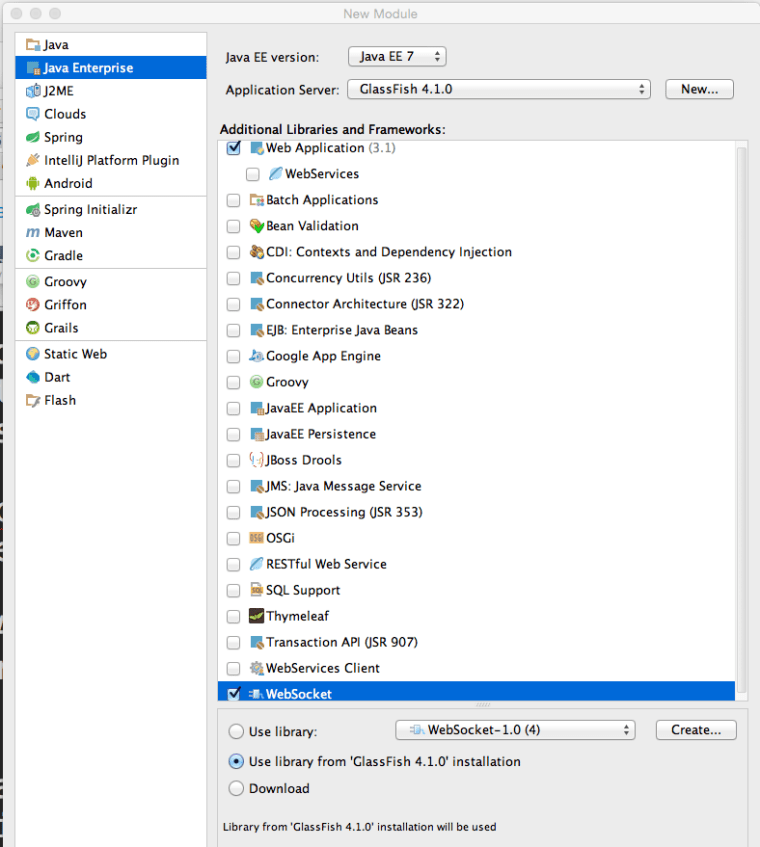
2. Create a new module of type Java Enterprise selecting GlassFish as an application server Web Application and WebSocket as additional libraries. IDEA will create a project with directories src and web (the latter will contain the WEB-INF dir). I called my module GlassfishWebsocketDart. IDEA will also generate index.jsp, which you can delete.
3. Go to the Project Structure (Cmd ; ) and add GlassFish, GlassFIsh WebSocket, and Dart SDK as dependencies to the module GlassfishWebsocketDart.
4. Create (or copy from an existing Dart module) the files pubspec.yaml and pubspeck.lock into the root dir of your module.
5. Create index.html and main.dart in the web dir. The file index.html can look like this:
<!DOCTYPE html>
<html><head>
    <meta charset="utf-8">
    <meta http-equiv="X-UA-Compatible" content="IE=edge">
    <meta name="viewport" content="width=device-width, initial-scale=1.0">
    <meta name="scaffolded-by" content="https://github.com/google/stagehand">
    <title>hello</title>

</head>

<body>

  <div id="output">dart uber</div>

  <script type="application/dart" src="main.dart"></script>
  <script data-pub-inline src="packages/browser/dart.js"></script>
</body></html>
My file main.dart looks as follows:
import 'dart:html';
main() {
var output = querySelector('#output');
WebSocket ws = new WebSocket('ws://localhost:8080/GlassfishWebsocketDart_war_exploded/clock');
ws.onOpen.listen((event){
output.text = &amp;quot;Connected&amp;quot;;
});
ws.onMessage.listen((event){
output.text = event.data;
});
}
6. Open main.dart in the editor and IDEA will show the option Enable Dart support – click on it.
7. Right-click on the pubspec.yaml and run pub build (select the debug mode). It’ll create the folder build with files and dart packages required for deployment.
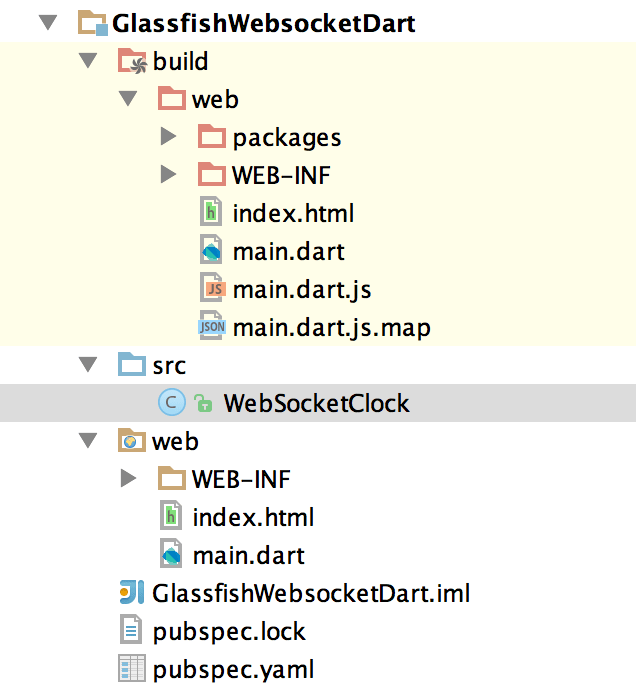
8. Copy all the files from the build/web dir into the web dir located in the root of your module.
9. In the src directory create the following file WebSocketClock.java
import javax.websocket.OnOpen;
import javax.websocket.Session;
import javax.websocket.server.ServerEndpoint;
import java.io.IOException;
import java.time.LocalTime;
import java.time.format.DateTimeFormatter;
import java.util.Set;
import java.util.concurrent.Executors;
import java.util.concurrent.ScheduledExecutorService;
import java.util.concurrent.TimeUnit;

@ServerEndpoint("/clock")
public class WebSocketClock {

    static ScheduledExecutorService timer =
            Executors.newSingleThreadScheduledExecutor();

    private static Set<Session> allSessions;

    DateTimeFormatter timeFormatter =
            DateTimeFormatter.ofPattern("HH:mm:ss");
    @OnOpen
    public void showTime(Session session){
        allSessions = session.getOpenSessions();

        // start the scheduler on the very first connection
        // to call sendTimeToAll every second
        if (allSessions.size()==1){
            timer.scheduleAtFixedRate(
                    () -> sendTimeToAll(session),0,1,TimeUnit.SECONDS);
        }
    }

    private void sendTimeToAll(Session session){
        allSessions = session.getOpenSessions();
        for (Session sess: allSessions){
            try{
                sess.getBasicRemote().sendText("Local time: " +
                        LocalTime.now().format(timeFormatter));
            } catch (IOException ioe) {
                System.out.println(ioe.getMessage());
            }
        }
    }
}
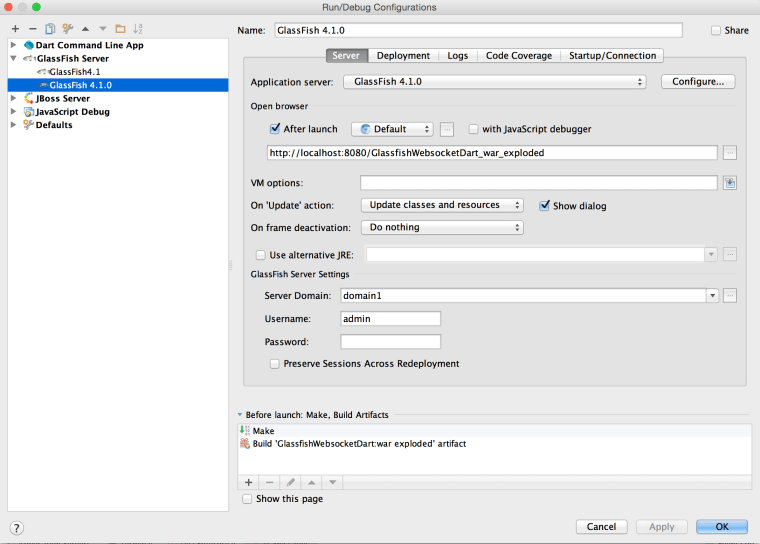
10. IDEA can deploy Java web apps in the exploded mode (default) or as an WAR archive. Open the GlassFish configuration (menu Run | Edit), and it should look like this:
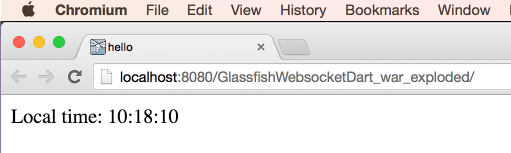
11. Run your GlassFish and you should see the server pushing the local time every second. The Chromium browser runs the client’s code in its Dart VM, which properly runs WebSocket client communicating with the Java server.
You may ask, “Will this app work in other browsers that don’t have (and will never have) Dart VM?”. Good question. Theoretically the last two lines in our index.html file should check the presence of Dart VM and replace the references to main.dart with a reference to the JavaScript main.dart.js that was generated by the pub build process.
  <script type="application/dart" src="main.dart"></script>
  <script data-pub-inline src="packages/browser/dart.js"></script>
In practice this may not happen, and you’d get a 404 on “missing” dart.js. Now you have two choices:
a) Manually replace the above two lines with this one:
<script src="main.dart.js"></script>
b) Add a dependency to your project to use the transformer dart_to_js_script_rewriter to do this replacement automatically. Your modified pubspec.yaml should look like this:
name: 'glassfish_websocket_dart'
version: 0.0.1
description: >
  A web app that illustrates dart, websocket, and glassfish.
environment:
  sdk: '>=1.0.0 <2.0.0'
dependencies:
  browser: any
  dart_to_js_script_rewriter: any
transformers:
  - dart_to_js_script_rewriter
Now run the pub get and pub build and only the JavaScript version will be used. This should be done only if you decide to deploy my useful application in production.
The other improvement that can be done are to create a deployment artifact that builds a WAR file that will include the content from the Dart build folder as well as compiled Java classes. And those who already cut the IDE umbilical cord should automate build and deployment with gradle and gulp.
In April, I’ll be making the presentation “Dart for Java developers” twice. On April 14 I’ll do it online at the New York Dart Users Group, and on April 23 I’ll do a live presentation for the New York Java SIG.
Update for MAC OS users: After upgrading to 10.10.3 GlassFish doesn’t start unless you change the startup line to
/Users/yfain11/glassfish4/glassfish/bin/asadmin start-domain –verbose





 yakovfain.com