What Java annotations and your luggage have in common

Yesterday, I was teaching my Sunday online Java class. One of the topics was Java annotations. I was explaining that a program’s metadata is the data about your code. Any Java class contains its metadata, and you can write a program that “asks” another class, something like “What methods do you have?”. After explaining how to declare a custom annotation @MyJDBCExecutor I gave a code snippet that may use it:


@MyJDBCExecutor (sqlStatement="Select * from Employee”)
 public List getEmployees(){
      // The code to get the the data from DBMS goes here,

      // result set goes in ArrayList, which is returned to the 

      // caller of the method getEmployees()

      …   
      return myEmployeeList;
}

One student asked me a question, “How you can access the value of the sqlStatement from inside the method getEmployees()?” This was a clear signal that I didn’t do a good job of explaining what metadata is for. I started to think of an example from the real world illustrating metadata, and this is what I came up with.

luggage

When you check in your luggage at the airport, they put this sticker tape that includes the luggage ID, destination, the airline carrier and the flight number. This can be considered a metadata about your piece of luggage. It’s meant to provide some additional information about your bag and is supposed to be read and interpreted by those who are handling the luggage, not by the luggage itself.

If there is a pair of jeans inside your luggage it could care less what the sticker on the bag reads. On the same note, the code from inside the method getEmployee() is not supposed to read and interpret the data that was written on its “sticker” (a.k.a. annotation).

Software developers who create custom annotations have to create another piece of software (annotation processors) that would introspect your class, find and interpret all annotations that are present and perform the appropriate action. In the ancient pre-Java6 times, there was a special tool for that called APT. Now it’s deprecated because its functionality was incorporated inside the javac compiler itself. But this is another story. I hope my analogy with luggage stickers will help junior Java developers in understanding of the very important concept of metadata.

If you are teaching or studying Java, feel free to download the slides to my Java training at this site.

Configuring Eclipse with Apache Tomcat and Ext JS

While Eclipse IDE is not the best one for JavaScript developers, it’s the most popular IDE among enterprise Java developers. If an enterprise Java developer needs to start developing in JavaScript, the first question comes to his/her mind is “Can I stay with my familiar Eclipse”.

At this point some people will start thinking, “Doesn’t he know that IntelliJ IDE or WebStorm are the best for JavaScript?” I know. I was not sitting under the rock. But you may be surprised, but having your project manager spend $50 on the WebStorm license may be mission impossible.

But let’s talk not just about any JavaScript, but about Ext JS from Sencha that includes megabytes of the source code, which will keep Eclipse busy for a while. All of a sudden, it’ll start doing its indexing spiel, which will drive you crazy.

Sencha engineers created an Eclipse plugin, with context sensitive help that doesn’t put Eclipse into this indexing mode. They solved this problem by creating a special type library file (ext.ser) supporting code assistance in Eclipse. This solution will work until some of the Ext JS API changes, after that Sencha should update the type library file.

After that, Sencha marketing people put it in a gift box titled “Sencha Compete” with a little price tag that read $900. To be fair, this box has other stuff too, but you can’t just purchase Sencha Eclipse plugin, say for $50. Spending your own $50 may not be the option in large corporations that are limiting what you can install on the company computer.

In any event, I’ll share with you how Ext JS developers of Farata Systems deal with this situation when they have to work in Eclipse IDE with Ext JS. Our developers usually need to program the server side in Java hence they need to deploy the code under one of the Java servers, e.g. Apache Tomcat. They use different setups and I’ll show you a couple of them. you’ll see how to to configure Tomcat inside the IDE and then add Ext JS to your Web applications.

Installing Eclipse for Java EE Developers

We’ll use the “Eclipse IDE for Java EE developers” version of this most popular IDE among Java developers. It’s available free of charge at Eclipse Downloads site. The installation comes down to unzipping of the downloaded archive. Then double-click on the Eclipse executable, and it’ll start.

Apache Tomcat

http://tomcat.apache.org%5BApache Tomcat is probably the most popular free and open source server used by Java developers for deploying Web applications. Besides being a Web Server, Tomcat also contains Java Servlet container.

Get the latest version of Apache Tomcat from the Download section at http://tomcat.apache.org. At the time of this writing Tomcat 7.0.39 is the latest build, so download the zip file with the Tomcat’s Binary Distributions (Core). Unzip the file in the directory of your choice.

Even though you can start Tomcat from a separate command window, the more productive way is to configure Tomcat right in the Eclipse IDE. This will allow to deploy your applications, and start/stop Tomcat without the need to leave Eclipse.

To add a server to Eclipse, open Eclipse Java EE perspective (menu Window | Open Perspective ), select the menu File | New | Other | Server |Server | Apache | Tomcat v7.0 Server, select your Tomcat installation directory and press Finish. If you don’t see Tomcat 7 in the list of Apache servers, click on “Download additional server adapters”.

You’ll see the Tomcat entry in the Eclipse Project Explorer. Go to Eclipse menu Windows | Show View and open the Servers view. Start Tomcat using the right-click menu.

TIP

By default, Eclipse IDE keeps all the required server configuration and deployment files in its own hidden directory. To see where exactly they are located in your computer, just double-click on the name of Tomcat in the Server view. The server path field contains the path. Keep in mind that while Tomcat documentation defines webapps as a default deployment directory, Eclipse uses wtpwebapps directory instead. If you prefer to deploy your Eclipse projects under your original Tomcat installation path, select the option Use Tomcat Installation.

In the next section you’ll learn how to create Dynamic Web Projects in Eclipse, where you’ll need to specify the Target Runtime for deployment of your Web applications. This newly installed and configured Tomcat server will serve as a deployment target for our sample projects.

Dynamic Web Projects and Ext JS

Eclipse for Java EE developers comes with http://www.eclipse.org/webtools/%5BWeb Tools Platform] that simplifies development of Web applications by allowing you to create so-called Dynamic Web Project, which will be specifically created for deployment under a particular Java server – Apache Tomcat in our case.

To create such a project select Eclipse menu File | New | Other | Web | Dynamic Web Project. It’ll pop up a window similar to shown below. Note that the Target Runtime is Apache Tomcat v7.0 that we’ve configured in the previous section.

fig_06_04

Upon creation, this project will include several directories, and one of them will be called WebContent. This directory it serves as a document root of the Web server in Eclipse Dymamic Web Projects . This is the place to put your index.html and one of possible places to keep the Ext JS framework.Create a subdirectory ext under WebContent and copy there all files from the Ext JS distribution. The app directory should also go under WebContent.

Unfortunately, Eclipse IDE is infamous for slow indexing of JavaScript files, and given the fact that Ext JS has hundreds of JavaScript files, your work may be interrupted by Eclipse trying to unnecessary revalidate these files.

If you don’t have Sencha Eclipse plugin, there is a couple of solutions to this problem (we’ll use the first one).

1. Exclude from Eclipse build the following Ext JS directories: ext, build, and packages.

2. Don’t copy the Ext JS framework into your Eclipse project. Keep it in the place known for Tomcat, and configure as a loadable module.

To implement the first solution, right click on the properties of your project and select JavaScript | Include Path. Then switch to the Source tab, expand the project’s Web content and press the buttons Edit and then Add. One by one add the ext, build, and packages as exclusion patterns (add the slash at the end).

fig_06_05

For the second solution, In this case you’ll need to add your Ext JS folder as a static Tomcat module. Double-click at the Tomcat name in the Servers view and then click on the bottom tab Modules. Then click on Add External Web Module. In the popup window find the folder where your Ext JS is (in my computer it’s inside the Library folder as in below screensot) and give it a name (e.g. /static/extjs-4.2).

Now Tomcat will know that on each start it has to load year another static Web module known as /static/extjs-4.2. If you’re interested in details of such deployment, open up the file server.xml located in your Eclipse workspace in the directory .metadata/.plugins/org.eclipse.wst.server.core/tmp0/conf.

To ensure that you did everything right, just enter in your browser the URL http://localhost:8080/static/extjs-4.2, and you should see the Ext JS Welcome screen.
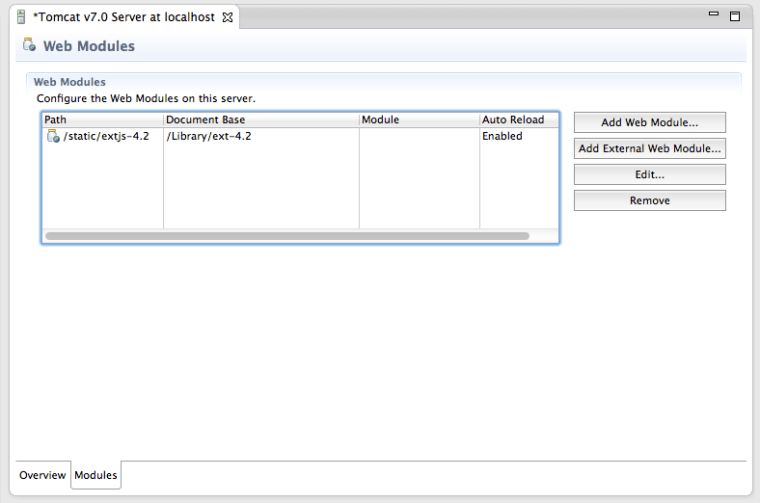
fig_06_06

In both of these solutions you’ll lose the Ext JS context sensitive help, but at least you will eliminate the long pauses caused by Eclipse internal indexing processes. Again, developing ExtJS code in Web Storm IDE or IntelliJ IDEA IDEs would spare you from all these issues. To see how to configure IntelliJ Idea with Ext JS, see this video in our Youtube Channel.

P.S. If you know of other and better ways of working with Ext JS inside Eclipse IDE, please share it with everyone by leaving a comment at this blog.


Will speak at the Java Conference in Ukraine

Will make two presentations at two-day conference JEEConf in my home town Kiev, Ukraine at the end of May. It’s going to be the largest event for Java developers (about 1000 attendees). I’ve participated in this conference last year, and will go there again with pleasure. Below are the descriptions of my two talks.

1. Surviving as a professional software developer

Last year I made a presentation on how to become a professional software developer (it’s in Russian). This presentation is a sequel. Yakov will present his no-BS point of view on how enterprise IT shops live and operate. He’ll talk about communication skills, bad attitude, the team work, those stupid and useless IT managers, and how the life is unfair if young prodigies have to debug old and poorly-written code. This is not a technical presentation.

2. Speed up your Web applications with HTML5 WebSockets

HTML5 specification includes the communication protocol WebSockets, which is getting more and more popular in the Wall Street real-time Web applications. WebSockets API is include in the upcoming Java EE 7 specification. WebSocket offers solution to the problems of latency, scalability and performance associated with HTTP based solutions like polling, long-polling and HTTP-streaming. Online auctions, financial trading applications, and multi-player games can benefit from implementing WebSockets. This session starts with a brief overview of traditional HTTP protocols followed by covering of how WebSockets works. You’ll see how using WebSockets removes the overhead of heavy HTTP request and response headers. Finally, we’ll review the code of the Web application, where WebSockets is used for the data exchange between HTML-based front end and the latest build of the Java server GlassFish 4.

Java is Better Than JavaScript

Tоday I was participating in a discussion on one Java forum – the question was if Java is easy or difficult programming language to learn. IMO, Java is not difficult to lear, to teach, and to use. It’s a strongly-typed compiled language with tools that help you out to identify most of the error before you even run the program.

While participating in this discussion I was writing code in a different programming language called JavaScript, which gave me a chance to illustrate that lots of things Java developer take for granted, while there are people who work in a more hostile environment called JavaScript.

I had a working program, and decided to add JavaScript handler function to illustrate HTML form submission with jQuery for our upcoming book. I’ve been writing this code in Eclipse-based IDE called Aptana. I’ve added this handler for the submit event to a Donation form:

$('#donate-form-container').submit(function(){
  var formData = $(this).serialize();
  console.log("The Donation form is serialized: " + formData);
  returm false;  
});

Ran the program – it rendered the Web page, HTML looks fins, but nothing worked. IDE didn’t give any errors. Started a browser debugger – Firebug. Now I’ll going to put a breakpoint in this newly added function and find the problem. How hard could it be? I’ve added just this little fragment to a working program. Easy Peasy.

Oops. Where is my main.js? Nowhere to be found. Only jQuery script is available.

s1

Was my main.js even downloaded? Let’s check the Network tab. Yes, it’s here:

s2

After applying deductive reasoning (as in Sherlock Holmes stories) I figured out that the script has arrived to the browser, which instead of adding it to the DOM, showed a middle finger without explaining why. As any normal person, I started to to find who someone else to blame. May be this Firebug is buggy and just doesn’t want to show my nice script? Tried Chrome with Developer Tools – same story. The script arrived, got the finger and I have nothing to debug.

Well, there is no one else to blame. Let me just re-read my own code. Man, I misspelled the word return and wrote “returm false;” instead, which deserves a capital punishment. Changing m to n did the trick, and now both Chrome and Firefox are happy to add my JavaScript code to DOM.

What’s the moral of this story:
1. Java developers should know that they take lots of things for granted and should not complain that their life is difficult!
2. The fact that it takes less code to write Hello World program in JavaScript doesn’t mean that it’s an easy programming language. Don’t trust me? Watch this.

Run Away From Information!

In the past people would go to professionals because of the lack of information. Now they go to profies because of its abundance. This happens everywhere. If 20 years ago you had stomachache, you’d go to a doctor. Today, you go to Google to find out what helped other people when they had stomachache. After spending several hours trying to narrow down the symptoms so they’d match yours, you’d give up and go to the doctor. OK, I can understand such a pattern.

But people don’t stop there. This is how it works more often than not:

1. Got stomachache.
2. Go to Google.com and enter “I got stomachache”.
3. Several hours later, call your doctor and make an appointment.
4. Visit your doctor and get the prescription for XYZin to be taken twice a day.
5. Go to Google.com and enter “XYZin”. Confirm that it helped to most of the people with stomachache. Pretend that you haven’t even seen those two nasty posts about a cousin Vinnie why died from XYZin and about the little Mary who’s still in coma after taking three pills of this medicine.
6. Go to the pharmacy, get XYZin and take it once a day – people on Google say it’s good enough.

Am I right or am I right, honestly?

Yesterday, I started teaching my online Java class. There are tons and tons of free online Java tutorials, videos, blog posts, and inexpensive books. But still, thirty people from around the world decided to pay $500+ each so I’d be leading them through this humongous waterfall of the information so they could get from zero to hero the most efficient way. Needless to say, that before enrolling into my class all these people spend hours studying my credentials before parting with their hard earned money. Fine. I can respect this.

For each of my groups I create and online forum so students can communicate and help each other. One of the first messages posted in this forum was a list of links to various online tutorials and videos of other Java lecturers. Some of the people also asked me to review those links and provide my opinion if they are useful or not.

Dear students, during the last 15 years I’ve read, watched, analyzed, wrote, commented, responded to comments, presented on anything and everything related to Java. I’ve sifted through all this information, squeezed it out and created my own concentrated and healthy Java juice. I successfully tought Java to a couple of thousand of people. Please take my XYZin. You won’t be disappointed.

JSON and Condoms

This morning I was discussing the JSON data format with the co-authors of our upcoming book Enterprise Web Development (you can read its draft at http://enterprisewebbook.com/). We were discussing pros and cons of using the JSON format in the Web and the role of the JavaScript eval() function in the history of the Web development. As a result of this discussion, some of the new content can be added to the book section on JSON, for example:

“Usually, JSON-related articles and blogs are quick to remind you about the evil nature of the JavaScript function eval() that can take any JavaScript and execute it. The JSON.parse() is pictured as a protection against the malicious JavaScript that can be injected into your appplication’s code and then executed by eval() by your Web browser. The main argument is that JSON.parse() will not be processing the incoming code unless it contains valid JSON data.”

 But our discussion had a part that won’t make it into the book (O’Reilly’s editors are pretty strict), but can be shared with you in this blog. Protecting your application’s fragile body from being infected by means of eval() can and should be done outside of your application code by using HTTPS protocol and eliminating the cross-origin scripting by routing all requests to third-party data sources via proxying such requests through your own hosts. If the previous statement seems to be to complicated for understanding, I’ll give you another explanation that any adult software developer will understand.


If a man puts on a condom before having sex with a woman domestic partner, it’s like calling JSON.parse() – both are guaranteed that no malicious stuff will be injected. But if a man approaches a woman domestic partner without a condom, but holding a piece of paper signed by a venereologist certifying that this man is healthy – it’s like allowing using eval(), but providing protection at the security layer of your Web application.

Got it?

How to Make Your Brain Rest

If you’re like me, your brain works hard during the day switching from one activity to another: solving issues, programming, interviewing, attending meetings, dealing with customers. If you had “one of these days”, by 5PM you might hear this permanent buzz in your head. I’ve read somewhere that a typical person thinks about something each and every moment while awake. Your thoughts may be jumping  from one subject to another, but your brain works non stop.

So how to make your brain relax? You need to switch to a different activity that will keep you occupied. Based on my observations, people use workouts, meditation, or booze to clear their minds. 

I’m not into sports, don’t like gyms, and my cycling machine is just sitting in the basement hopelessly waiting for me. I don’t know how to meditate. I don’t consume any alcohol while working.

I found a solution for myself, which may work for you too – I’m listening to audio books. It can’t be any audio book though. The trick is to listen to those books only that keep you focused on listening 100%. My personal discovery is hard-boiled detective stories by Lee Child, specifically the series about Jack Reacher.  

I’m on my third novel now and it works just fine. Not that I knew beforehand  that it’s a good way to relax, but my during my recent visit to Miami my friend Matt told me that he’s hooked on Jack Reacher stories, and I decided to give it a try. But for reading you have to sit or lie down in a quiet place, while listening can be done anywhere – while walking on the street, while driving a car or riding on the bus.

The first story was very interesting, but I was trying to listen to in in my usual multi-tasking mode  while answering emails or browsing the Web. Pretty quickly I realized that it’s simply not possible. Not listening for 30 seconds makes you miss an important detail of the crime or investigation. Isn’t it what my brain needs? It has to be occupied with an activity that won’t allow switching to anything else! 

The good news is that the series on Jack Reacher includes 17 books, and each one is about 14 hours long. The bad news is that this series will end soon, so I’ve started to look for another author that’s as good (for me) as Lee Child.  My old friend Sergey from Israel suggested another author – Harlan Coben. If you know of someone else – please let me know. 

Enough of blogging already. Yesterday I left Jack Reacher handcuffed on the truck with a kidnapped FBI agent. Sorry guys, gotta put my headphones on and cook eggs for breakfast.

JavaScript for Java Developers at Devoxx 2012

Last week I made a presentation “JavaScript for Java Developers” at the conference Devoxx in Belgium. The presentation was well received. My special thanks to Peter Pilgrim who posted a nice feedback in his blog.

Now I’m getting requests for the slides of this presentation, and they are available for download. But I can offer you something better than these slides. We started writing a book for O’Reilly “Enterprise Web Development: From Desktop to Mobile”, and the current raw version (non-edited bits and pieces) of some of its texts is available for free at EnterpriseWebBook.com.

We’ve created a Git repository for all book materials, and started pushing the new content there daily. After each push we run a script that generates the new HTML version for EnterpriseWebBook.com. The Chapter 2 titled “Advanced Introduction to JavaScript” will be completed by the end of this week, and it covers all the materials presented at Devoxx, but in a more detailed fashion.

Your technical feedback is greatly appreciated. Please don’t suggest fixing missing commas – leave it to professional copy editors from O’Reilly. But if you want to praise or criticize the book materials from the technical point of view, feel free to send me emails directly at yakovfain at gmail.com.

Non-Technical Notes From Devoxx 2012

The Java conference Devoxx 2012

It was good. It was really good. It was created by a team who cared. Java developers are not stupid. They see the attitude of the organizers. Devoxx is for real. 195 speakers. 3400 attendees.

During the last couple of months I’ve attended two largest Java conferences: JavaOne made by Oracle and Devoxx made by the team of enthusiasts lead by the fearless leader Stephan Janssen. JavaOne 2012 was better than JavaOne 2010. It was not as good as some of the Sun’s JavaOne conferences, but this year Oracle deserves a credit for delivering a good corporate event promoting one of their products. On the other hand, the Devoxx organizers have the only thing to prepare and promote – it’s Java ecosystem.

With all my respect to Oracle, I have to say that Devoxx became the #1 conference for Java Developers in the world. It’s better. As simple as that. Devoxx already became a brand. There is just Devoxx (3400 attendees), Devoxx France (1200 people), Devoxx Kids, and the next March the Devoxx UK will be launched. If Devoxx wouldn’t start establishing its presence at the kids playground, I’d suggest to add an extra “x” to the end of their brand name just to make the message a little stronger 🙂

The Devoxx conference can afford not selling you anything. It allows Google speakers. I’ve attended several presentations made by Google developers – they were really good. Devoxx is inexpensive (mainly thanks to Oracle and Google).

The venue is great. It’s the second largest in Europe movie theater called Multiplex. The theater itself has a top notch video equipment, but the creativity of the Devoxx team made it even better. Each auditorium (a.k.a theater) has a large monitor by the entrance announcing the next presentation in an animated form.

After attending a presentation people could vote using the NFC boards embedded into their wristbands. The NFC device would send an HTTP Post request to a little board of the Raspberry PI device which ran node.js server that would saves the votes in Mongo DB. This Raspberry PI device costs $35 and runs on Java.

Unfortunately, Java community is losing women. Only 4% of the Devoxx attendees were women. It’s bad, but I don’t see any solution for this. In my opinion, the set of technologies that a modern Java developer has to know is too broad and complex. Most of the working Java women can’t afford the luxury of spending nights on self-studying – they have to take care of kids and their husbands that learn Scala after dinner. I can only beg, “Dear ladies! Please, please learn Java programming. The money is here. Money bring independence… if this is what you want. ”

All presentations were video recorded and will be available on Parleys for subscribers by the end of this year. By the way, this time all the videos will be delivered using HTML5 technologies: the Flash Player is out.

Here’s more of my non overly technical motesfrom Devoxx. Steven Chin has arrived to the keynote stage on his motor bike. He’s been traveling through 12 countries to get here (see http://steveonjava.com/nighthacking/ for the map and his interviews). But I’m pretty sure that the union-lawyer-controlled USA would’t allow the running bike on stage.

I’ve attended several presentations related to Web applications security. This subject will only become more and more important over the years, and I strongly recommend to get educated in this area.

Chrome beta: JavaScript can access directly Microphone and WebCam API. IMO, this is very important development, which should convince some swingers to go HTML5 as opposed to native mobile applications.

During one lunch I met a strong Flex developer I knew. He doesn’t want to throw away five years of his investment in Flex. I tried to convince him that this was not a throwaway – any new technology you learn makes you a stronger and better software developer. We have to learn something new all the time – this is the rule of our game.

IMO, the overall interest to HTML5/JavaScript is a lot higher in Europe than in the US. The fact that a session on JavaScript unit testing fills a 400-seat auditorium speaks for itself. The angular.js talk had people sitting on the steps in the isles. My session “JavaScript for Java Developers” was attended by 300 people. While listening to the questions from the audience at similar presentations at JavaOne in San Francisco, I had a feeling that American Java developers were not overly familiar with what’s going on with HTML5.

At Devoxx, I’ve attended a couple of non-technical presentations too. No, it was not about agile methodology – I’m way too skeptical about this whole Kanban/Scrum movement. These were the presentations about software development in general, and the rooms couldn’t fit all the people who wanted to be there. I’m really interested in observing the lives of enterprise software developers, and have an opinion on this subject. I’ll be submitting proposals to speak on this subject next year.

Finally, about the country, where Devoxx takes place. To put it simply, you can’t go wrong with Belgium. Make it a learning vacation. Antwerp is just a short two-hour train ride from Amsterdam or Paris. The round-trip railway ticket to Gent and Brugge costs less than 30 Euros. Be creative! The Belgium beer variety is second to none, and they have plenty of good restaurants and hotels. Belgians have a good sense of humor too. The hotel I was staying in had a bar. I couldn’t help it and took a picture in the men’s toilet there.

Isn’t it something? At least it’s a very positive way to finish a blog post about a technical conference – don’t you think so?

The Framework Coder on the Tractor

My previous post “The Degradation of Java Developers” sparked several interesting discussions. One of the major topics was if today’s developer has to know what’s going on under the hood of a particular framework. To be more specific, if Hibernate, a popular object-relational framework, can hide from your how the database objects are being created or manipulated, why learn SQL? One reader stated, “First of all, Hibernate (JPA, actually) is a step forward since it reduces most of the boilerplate SQL of the obvious kind. In applications with around 100 tables in the SQL database it is not challenging to explicitly write data access objects by hand.”

I can agree with this to some extent, especially when we talk about such mature and stable framework as Hibernate. But this framework was created to spare the programmer from writing tons of mandane SQL and JDBC code. Hibernate might help you here, but it’s hard to imagine that if the storage consists of 100 database tables no queries created by Hibernate have to be fine-tuned and optimized. In such cases if a person who uses Hibernate doesn’t know SQL – it turns him into a useless team member.

About two months ago I was making my usual morning promenade along the beach. Every morning a couple of tractors are moving back and force leveling the beach surface destroying the sand castles and burying butts and seaweed. All of a sudden, one of the tractor’s wheels got stuck in the sand.

The driver started angrily pushing the pedal or whatever else there is to push, making the tractor move back and forth slowly but surely getting deeper and deeper into the sand. When the tractor’s belly was literally laying on the sand, the driver realized that he won’t be able to get the vehicle out of the sand himself.

I was observing the entire show from the beginning of submerging till the moment he started to call for help using his cell phone. This is when I took the picture. What struck me the most was that during all this time the driver didn’t even bother to step down from the tractor to do anything manually to prevent the submerging. He didn’t bother and he was not trained for these kinds of situations. I assume he was told to call the office in case of any extraordinary situations. Houston, we got a problem!

Do you see the analogy with a framework coder who doesn’t know how things work under the hood? I clearly do. I also know that among the tractor drivers that are working on that beach there are people who know how to fix these situations without calling for a tow truck.

On the same note, each team of programmers includes a person who knows how to fix everything starting from fine tuning SQL all the way to fixing broken builds or writing manual piece of code that performs better than a framework.

Some developers who use open source frameworks know that if there is a bug in the framework or some feature doesn’t exist they file the bug or request for improvement with the vendor and then happily report to their managers that we have to wait till the vendor will fix it. But there are people who understand the words “open source” literally. Yep, they open the sources, read the code, subclass the problematic classes and make the fixes on their own.

The question is if IT managers understand and promote those people who are not afraid to roll out the sleeves. It helps if the software developers know how to manage the manager. But this is a topic for another blog.

P.S. Replacing SQL with a 500-page long JPA spec “to make my life easier” is not a good idea unless you really need various types of data storage. In 99% of the today’s enterprise applications it’s not needed. But my kudos to the Sun/Oracle tandem for brainwashing millions of Java developers into believing that learning JPA is better than learning SQL.