PRISM, Government, and Software Developers

In 2013 having a landline phone number is bad. It doesn’t give anything but these annoying calls from telemarketers. The only reason I keep it is that it’s a part of the internet-phone-tv package provided by a phone company for cheap.

During the last week I started getting about 10 marketing calls a day, which I don’t pick, but they interrupt whatever else I do. So I decided to visit the National Don’t Call Registry, register my phone number online, and if after 31 day after registration someone still calls me, I have a right to complain to the government. Cause my government cares about me!

I have even a better idea. Since the government records all the phone numbers and the lengths of calls of businesses, why won’t they simply disconnect the numbers after say a thousand people picked their calls and hung up within 5 seconds? Hey government, get the PRISM program a real assignment!

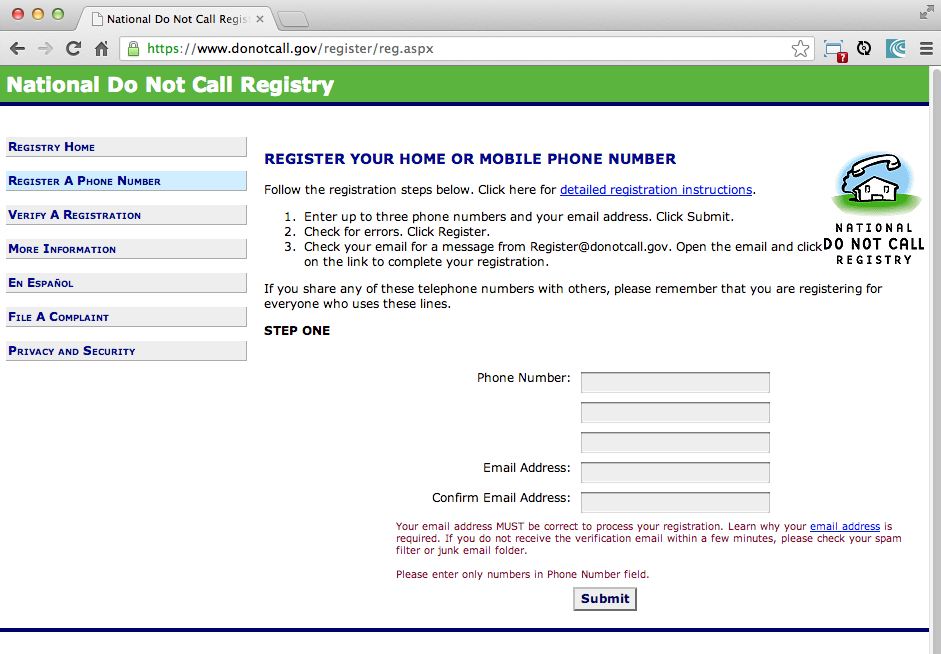
Actually, I decided to write this blog for a different reason. Every time I run into an idiotic Web design, I want to share this with as many people as possible. Now take a look at this registration form, where I was supposed to enter my phone number.
dontcall

This is one of my favorites. The goverment has enough money for the PRISM program, but not enough for hiring decent Web developers. How should I enter the phone number? You pick:

1-212-333-5555
(212) 333-5555
2123335555
12123335555

In 2013 you can’t ask people to worry about the phone input format! If you are really smart and a detail-oriented person, you’ll read the small print in red “Please enter only numbers in Phone Number Field”. Not only that dumb Web developer knew how to strip away the dashes, spaces, and parens from the HTML form field, he doesn’t even not how to display that message in red in larger font and before the field itself!

No biggies. American citizens have time. They can experiment and somehow figure out the right format.I can tell you even more. That dummmy government employee didn’t even care about validating the input! You know these red borders that may appear in the fields with invalid entries? I’ve seen those too.

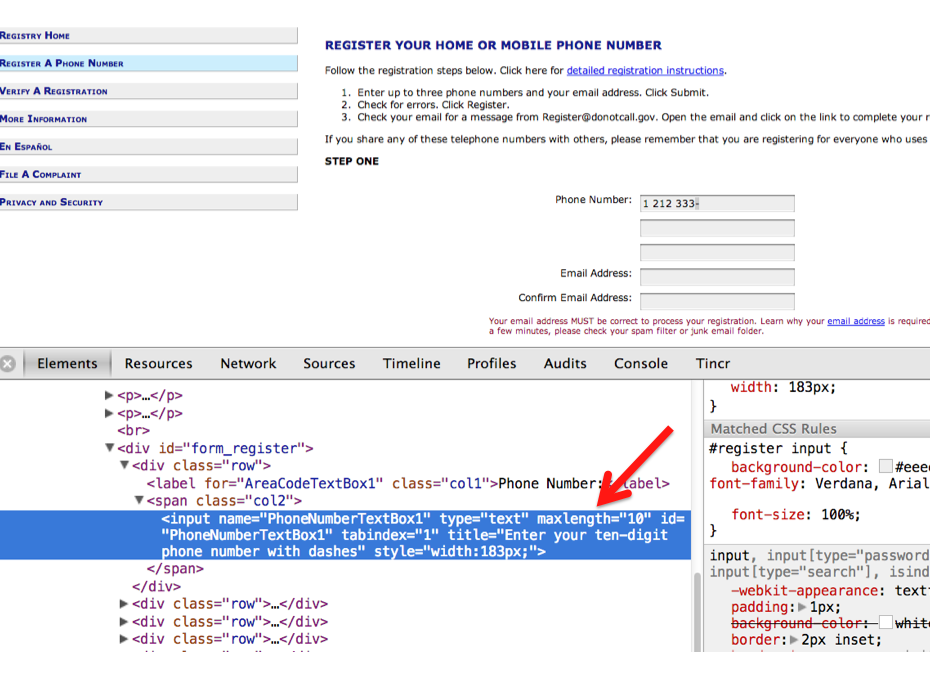
But this coder did not bother. Guess what he did? In the page markup he just specified that the length of the field has to be 10 characters. As simple as that. I’ll show you the code fragment from that page (no worries, you’ll get it even if you have no clue about Web programming). Check this out:
dontcall3

Any characters the user enters after the first ten will be quietly cut off. If the server-side code was written by the programmers of the same quality, the crippled phone number will be entered into the database.

I request the US Government to reveal the whereabouts of this software developer, the QA tester, and his manager. If any of them is a US Citizen, their passports have to be revoked forever and they should be sent to Cuba by the Aeroflot flight #150.

HTML5 book. The Eplogue. Take 2.

Even though this book is about HTML5, the authors would rather work with compiled languages that produce applications to run in virtual machines. Such software platforms are more productive for development and more predictable for deployment. While writing this book we were often arguing about pros and cons of switching to HTML5, and so far we are concerned that the HTML/JavaScript/CSS platform is not ready for developing of the enterprise applications just yet. We live in the era when amateurs feel comfortable creating Web sites and that JavaScript provides flexibility and customization the Access and Excel provided in the old good PC times.

Till this day Microsoft Excel is the most popular application among business users in the enterprises. They start the application locally, it has a local storage that enables work in the occasionally-connected scenarios. Both the data and the code are physically located close to the user’s heart. Microsoft Excel allows the users to have her own little pieces of data and amateurish-but-working-code (a.k.a. formulas) very close and personal. Right on the desktop. No need to ask these IT prima donnas for favors. No dependencies on the connectivity or some mysterious servers being slow or down. The most advanced business users even learn how to operate MS Access database to further lessen the dependency from IT.

But there is only so much you can do with primitive tools. Visual Basic was “JavaScript” of the nineties – it had similar problems, but nevertheless had huge followings. Now the same people are doing JavaScript. If we don’t break this cycle by adopting a common to all browsers VM, we are doomed for going through the generation after generation of underpowered crap.

Recently, one of our clients from Wall Street sent us a list of issues to be fixed in an Web application that we were developing using Adobe Flex framework (Flash Player was the VM, where this application ran). One of the requested fixes was “remove a random blink while a widget moves in the window and snaps to another one”. We’ve fixed it. You may argue that Flash Player as any browser’s plugins are going away. But the bar set by Flash based enterprise applications is set pretty high. We hope that future enterprise Web applications developed with HTML6 will raise the expectations in the user experience area. The time will come when HTML widgets won’t blink in any of the major browsers.

We wrote this book to help people with understanding of what HTML5 applications are about. But make no mistakes – the world of HTML5 is not a peachy place in the future preached by educated and compassionate scientists, but rather a nasty past that is catching up bringing the mob with it.

It’s a past and it’s the future. The chances are slim that any particular vendor will win all or even 80% of the market of the mobile devices. In competitive business, being able to make an application available ONLY to 80% of the market is not good enough, hence the chances that any particular native platform will dominate in the Web developers are slim. HTML5 and related technologies will serve as a common denominator for mobile developers.

The authors of this book have more than 100 years of combined experience in development of enterprise applications. Over these years we’ve learned that the saying “Today’s on Wall Street, tomorrow on Main street” works. IT departments of financial companies are very pragmatic in selecting tools for development of their software. Especially, we’re watching the platforms used for development of financial trading applications – they must be fast, reliable, and any delays in processing or clumsy UI may lead to substantial money losses. Besides, the development cost dramatically increases if an IT organization sets a goal to offer their trading application to the entire mobile market, which is a moving target today and will remain the same in the foreseeable future.

Check out the trading application tradeMonster. It has been developed using HTML5 and uses the same code base for all mobile devices (they use Flash Player in the desktop version). Yes, they have created native wrappers to offer this application in Apple or Google’s application stores, but it’s still an HTML5 application nevertheless. You can create a paper trading account (no money is involved in trading) and test their application. If you like it, consider using HTML5.

Enterprise IT managers need a cross platform development and deployment platform, which HTML5 is promising to be. Take with a grain of salt all the promises of being 100% cross-platform made by any HTML5 framework vendor. “With our HTML5 framework you won’t need to worry about differences in Web browsers”. Yeah, right! HTML5 is not a magic bullet, and don’t expect it to be. But HTML5 is for real and may become the most practical development platform for your organization today.

Hack: iPhone, USB, Macbook, Web Server

If you are developing a Web application for a mobile device, it’s great if you can run it on  a real device. Sure enough, you can deploy your app on the remote publicly available server and then enter the URL of that server from your mobile device. This strategy works for any mobile device.

But I had a more specific case: I have two Apple devices: MacBook (my development machine) and iPhone – my mobile device.  I wanted to connect to the Web Server running on my MacBook from my iPhone connected to the USB port of MacBook. To put it simple, I wanted to eliminate the step of deploying the Web app on a remote server.

I’ll share with you all experiments I’ve done this morning till I made it work. I’ll appreciate your feedback if can offer some explanations of the Web server weirdness I had to overcome.

1. Both devices have to be on the same Wi-Fi network.

2. You need to know the IP address of your MacBook on this local network – this is the part of the URL to enter in the browser of your iOS device. There are two ways of finding this IP address: either open System Preferences | Network – the IP address is shown right under the Wi-Fi connection or run the Network Utility to see it there. In my case it was 10.0.1.3.

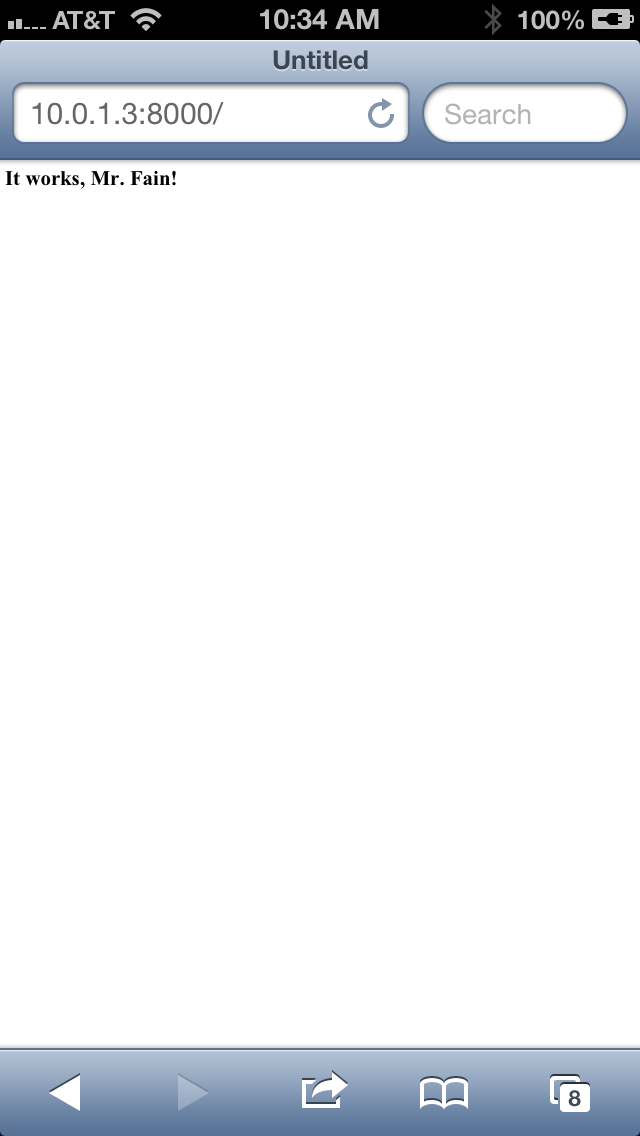
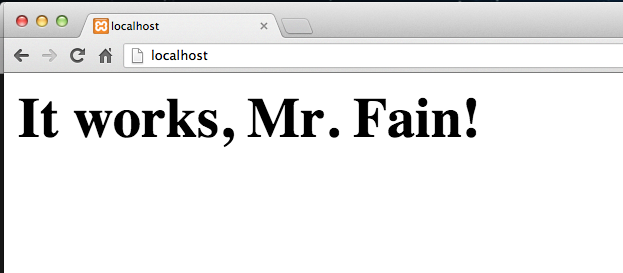
3. Start the local Apache Web Server that comes with Mac OS.  Prior to Mountain Lion doing that was easy – System Preferences | Sharing | Web Sharing.  Now Apple removed this option, but Apache Web Server is still there. you can start it from the Terminal as “sudo apachectl start” and stop with “sudo apachectl stop”.  After start, enter http://localhost, and you’ll get this given you’re Mr. Fain: webserver

4. The document root directory of this server is /Library/WebServer/Documents. This is where you need to deploy your HTML files.

5. Here’s the problem: if you’ll try to access this Web server from your iPhone (e.g. http://10.0.1.3), you’ll get the error “Safari Cannot open page because it could not connect to the server”. Adding the port 80 to the URL didn’t help.  The interesting part is that when I tried to start another server on my computer – it was Apache Tomcat running on port 8080, I was able to connect to it from my USB-connected iPhone. This gave me a hint there there is something wrong with the port 80.

Disclaimer 1. I still don’t know what kind of setting should be changed on the Web server to allow such connection. If you do – please share.

6. Change the default port where your Apache Web server runs. Change to the directory /etc/apache2 and edit the configuration file httpd.conf  using  “sudo nano httpd.conf”.  Find the line that reads “Listen 80 ” and change 80 to another port number, for example 8000.

Now my iPhone can reach my local Web server via the USB connection by entering the URL: 10.0.1.3:8000.

Update: I just got a hint that instead of IP you can use the computer name shown on top of the Sharing screen in System Preferences. In my case the URL would look like http://Yakov.local:8000

photo

What’s left?  To deploy your Web applications under any Web server that runs on any port but 80.  It doesn’t have to be  internal Apache Web server.  As I said before, you can  use Tomcat or  any easy to install and start Apache Server packaged with XAMPP (again, change the port).

Disclaimer 2. I don’t know why the internal server that comes with Aptana IDE and runs on port 8020 still doesn’t respond to my iPhone-USB setup.  If you do,  please let me know.

But the good news is that you don’t have to use the internal Web server with Aptana IDE. you can configure it to use Apache Web – I’ve described the process in Chapter 5 of our upcoming book on Web development in the sidebar “Configuring Aptana IDE to use Apache Web Server”.

Do you know if a similar setup is possible with Android devices without the need to install any heavy SDKs?


HTML5, PowerPoint, and the Real World

If you are going to attend any HTML5 conference, most likely you’ll see some of the speakers using Web browsers for presentation slides. The audience likes it cause it’s cool. A month ago one of our software engineers presented this way at the conference for Web developers.

There is an extra benefit in using such html-based slides especially when your presentation is about Web applications. Just think about it, when the time comes for a demo, you are not leaving the Web browser – the next “slide” has the URL of your demo right in the address bar of your browser and you do the demo right there. Hit the right arrow, and the demo turns into a slide again. Isn’t it cool? Yes it’s cool, but not practical.

Because everything else in not as cool and requires a lot of work comparing to Microsoft’s PowerPoint or Apple’s Keynote. Say, you want to add an image to the slide, make it smaller, and move it to the top right corner of the slide. In Powerpoint your hand just does it automatically. In HTML slides it’s a project. How about font manipulations? In Powerpoint you don’t even think about it – you just do it. In HTML slides it’s a project.

Animations? Which one you want? Just pick one from a dozen that are readily available in PowerPoint. You want the image to fly from the top, bounce a couple of times and settle in the middle? Takes 10 seconds to pick the image, 20 seconds for testing, and another 5 second to remove this flashy-bouncy-flying effect cause it would make your audience dizzy. I’m sure this will be easy in the HTML6 era, but the HTML5 tooling is not there yet.

How about embedding media into slides? OK, ok, you got the message.

Next week I’ll need to find some time to migrate that HTML presentation into the tried and true PowerPoint slide deck. Yes, I’ll be switching from PowerPoint to the Web Browser when the time will come for the demo. This is a drawback. But every other aspect of making a presentation in PowerPoint or Keynote is superior to HTML.

I’m observing the same situation in the enterprise world, where some IT managers are diving into new HTML5 project without thinking about the consequences. If you guys want to be cool, just dive right into the cold water.

If you want to develop an application that will contain 100% of the required functionality – wait a couple of years for HTML5 tooling to mature. But if you want to be cool now, eliminate half of the required functionality and do your 100-screen enterprise Web application in HTML5.

Today, at the meeting with a prospective client I said that if you decide to implement the same functionality in HTML5 vs. a mature platform with a compiled language and predictable VM, multiply the development time by two. Now I’m thinking I was wrong. The time should be tripled.

Starting XAMPP Apache from Aptana IDE

In the first five chapters of the upcoming book on Web development we use Aptana IDE. It’s free, easy to use, has a simple internal Web server, and is Eclipse based. All this makes it a perfect IDE for teaching Web development with HTML and JavaScript. While working on a jQuery.ajax() code sample for the upcoming book, I wanted to show how to make an AJAX POST request to the server side script with the manual form serialization. Since knowledge of Java is not a requirement for reading this book, I found myself in an unfamiliar territory of using PHP.

Disclamer: I’m not a PHP developer, and have no intention to become one.

I just needed a simple script that would echo the data it received. Writing such a script is not a rocket science, but now I need a Web server that would support PHP, which means pretty much any server other than the toy one that comes with Aptana.

xampp_UI

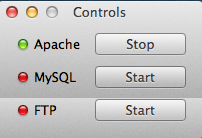
OK, I’ve installed the XAMPP package that includes Apache Web Server and supports PHP. It comes with a nice little UI with the buttons to start stuff. It’s shown on the right and can turn on/off Apache, MySQL, and FTP with a click of a button, which is perfect solution for everyone, but me. Remember, I want to do it from Aptana, and not from and external UI panel. But first things first, let me check that my PHP script even works under Apache.

This part went through fine. I created an Aptana project right under the document root of Apache, which is the htdocs folder, put there helloworld.php, html, JavaScript – he whole shebang. Then I opened the Web browser, paster the URL there, and it worked like a charm – I’m da man!

But the fact that I had to leave Aptana bothered me and I decided to configure an external Web server in this IDE. I did similar thing in Eclipse and Apache Tomcat a million times, but this is different – I needed to start a prepackaged Apache Web server from XAMPP.

First, I learned how to do this from a command line in the Terminal Window (I use MAC OS):

To start apache do this: sudo /Applications/XAMPP/xamppfiles/xampp startapache

To stop apache do that: sudo /Applications/XAMPP/xamppfiles/xampp stopapache

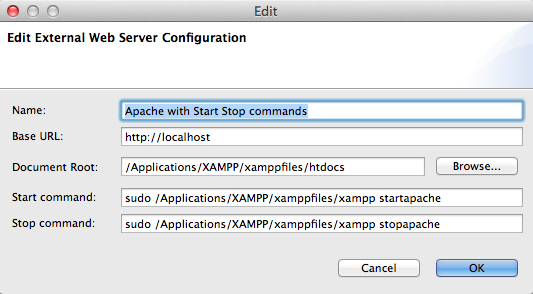
But I knew it wouldn’t be that easy to do from the IDE, casu when I do stuff as a sudo user, I get a command line prompt to enter the admin’s password. OK, let’s try and see what happens. Right-click on the Aptana’s project, then Run Configurations, then the link Configure next to the “Use selected server”. Then I’ve entered everything about my Apache Web server:

ApacheServer_Aptana

Aptana has created the Servers view with this server entry, but when I tried to start the server by clicking on the green play button it gave me this error: “no tty present and no askpass program specified”. I knew it! Aptana doesn’t know where to ask for the sudo’s password!

How can I turn this stupid password off? Google helped – there is a system file /etc/sudoers that has to be edited to allow certain users to sudo without being bothered with the password. Can’t edit it – not enough permissions. That’s an easy one. The unix command chmod works fie on Mac. Being a lazy person I did sudo chmod 777 sudoers. It did the job, but it was a mistake – stay tuned. Opened the file, figured out that I need to uncomment one line and specify my ID with the NOPASSWD option.

OK, but the warning in this file reads “# This file MUST be edited with the ‘visudo’ command as root. Failure to use ‘visudo’ may result in syntax or file permission errors that prevent sudo from running.” Uuuh, getting dangerous, nice! I still remember a couple of vi commands – did the editing in the Terminal window, saved the file… and got the error message that the “/etc/sudoers is mode 0777, should be 0440 “. Man, that was my laziness with chmod 777. Let me change it to 440. Not that easy now! It doesn’t allo me to change the permissions back. Am I screwed or what? Did a backup to my external disk last week – shouldn’t be difficult to recover the original file sudoers.

But let me google first – it helped again – was there a life before Google? Some kind soul suggested to run Disk Utility, which has a button “Repair Disk Permissions”. It repaired a bunch of files including this one keeping my corrections intact.

Voila! Now I can start my Apache Web Server without leaving Aptana IDE by clicking on the Play button in the Servers view! Great! But how to stop it? Eclipse IDE has a red little square next to Play? The right-click menu doesn’t exist in the Servers view in Aptana Studio 3 IDE – I guess their developers are as lazy as I am. I’m not going to continue my research though. Nough! If anyone knows how to stop the server started from Aptana IDE – please do let me know.

Four chapters submitted to O’Reilly

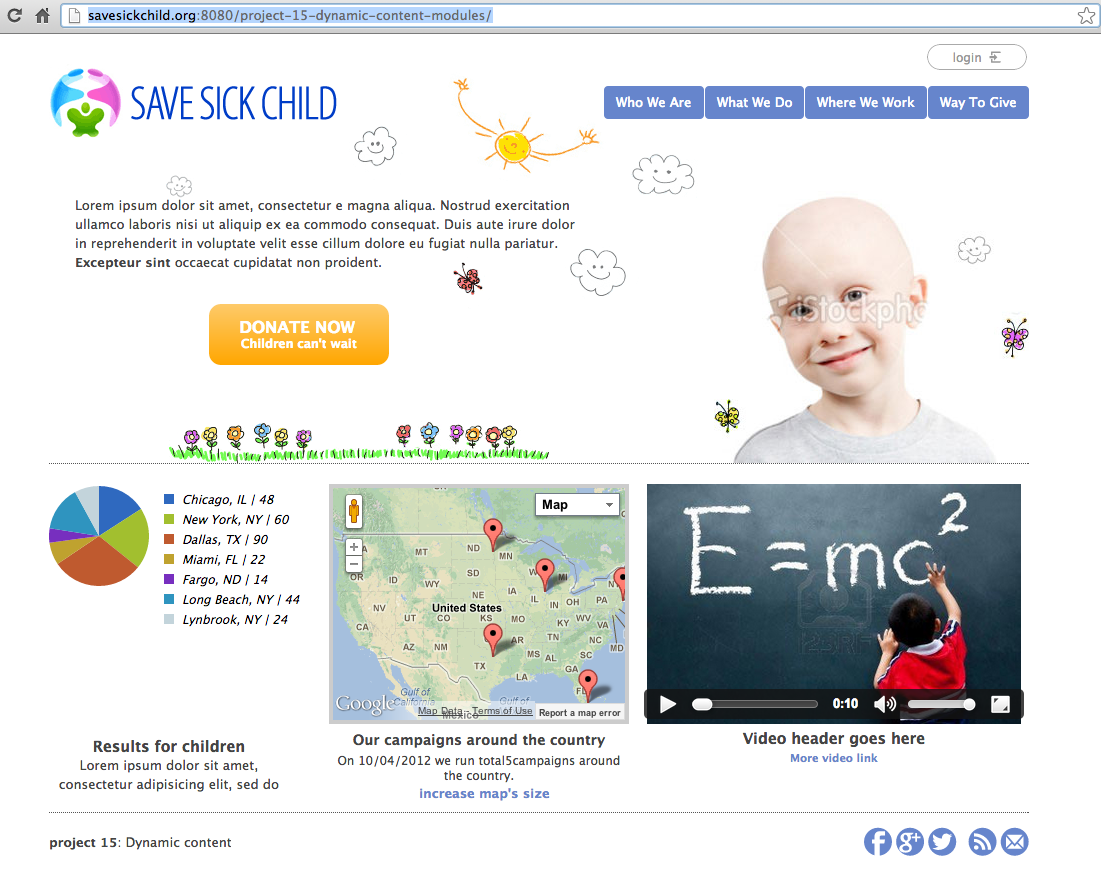
We have submitted the drafts of four chapters of the book “Enterprise Web Development: from Desktop to Mobile” to O’Reilly for review and editing. This is a pretty hands-on book as we are developing an application Save Sick Child while explaining various techniques and technologies. The readers will get a new independent working application every time we add a new piece of functionality (e.g. login, donation form, video, Google maps, charts, auction, etc.). These projects will be published on the dedicated Web site savesickchild.org. For example, this is a sample application illustrating modularization of the JavaScript-based UI.

ssc15

The following chapters are submitted to the publisher, but the raw texts are available for you to read now on the github at https://github.com/Farata/EnterpriseWebBook:

Chapter 2. Advanced Intro to JavaScript
Chapter 3. Mocking up Save Sick Child
Chapter 4. Using AJAX and JSON
Chapter 9. Replacing HTTP with WebSockets

Currently we are working on the chapters on responsive design, test-driven development and modularization of the JavaScript applications. We’re making these unpolished chapters available for you to read hoping to get valuable technical feedback from you. Please do let us know if you see some bugs or inefficient solutions in the code samples. We really really appreciate it.

JavaScript for Java Developers at Devoxx 2012

Last week I made a presentation “JavaScript for Java Developers” at the conference Devoxx in Belgium. The presentation was well received. My special thanks to Peter Pilgrim who posted a nice feedback in his blog.

Now I’m getting requests for the slides of this presentation, and they are available for download. But I can offer you something better than these slides. We started writing a book for O’Reilly “Enterprise Web Development: From Desktop to Mobile”, and the current raw version (non-edited bits and pieces) of some of its texts is available for free at EnterpriseWebBook.com.

We’ve created a Git repository for all book materials, and started pushing the new content there daily. After each push we run a script that generates the new HTML version for EnterpriseWebBook.com. The Chapter 2 titled “Advanced Introduction to JavaScript” will be completed by the end of this week, and it covers all the materials presented at Devoxx, but in a more detailed fashion.

Your technical feedback is greatly appreciated. Please don’t suggest fixing missing commas – leave it to professional copy editors from O’Reilly. But if you want to praise or criticize the book materials from the technical point of view, feel free to send me emails directly at yakovfain at gmail.com.

Mobile vs Desktop Web Usage

It doesn’t take a rocket scientist to figure out that a substantial portion of the world population is using mobile devices to access Web. For IT managers this means that they have to allocate money for projects to develop mobile versions of their Web applications to avoid losing customers. But how many customers could you potentially lose? Let’s look at some numbers offered by the statcounter.com

Generating the graph for the Worldwide region shows that 12% of the Web usage is done via mobile devices. So if you are running global Internet operations this number represents the potential number of customers that you might lose unless your business is accessible from smartphones. This number is pretty impressive, isn’t it?

But what about businesses whose customers live in the USA, a technologically advanced country? Changing the region to USA shows that only 11% are accessing Web online. We are lagging behind. What about the leaders of the European Union? In both Germany and France only about 5.5% access WEB from smartphones. An infamous Greece has only 3% of mobile Web users. China shows 5.7%, Israel – 5.5%.

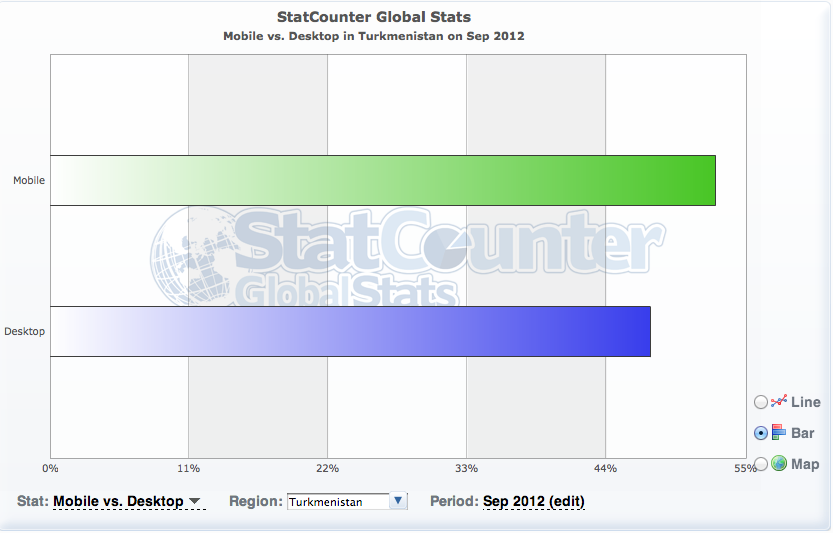
So who should be heavily investing into development of the mobile solutions? I’ll tell you in a minute. If your customers live in India, you must immediately start moving your Web apps to the mobile space: 53% of Indians are Web surfing from the mobile devices vs. 47% that are still using desktops. Surprised? Turkmenistan show the same numbers. In Zimbabwe 48% browse Web from mobile phones.

Conclusion. Some countries with poor economies have missed the PC revolution, but they are trying to catch up in the mobile space. Unfortunately, the chances are slim that losing them as customers will harm your business. So get the statistics for your region of interest while working on the IT budget for the next fiscal year. But keep in mind, that 10% is a pretty substantial number already, and it’ll only grow.

Categories Web

What Makes a Web Application Enterprisey?

We’re starting writing a book for O’Reilly that’s titled “Enterprise Web Applications: From DeskTop to Mobile”.  The book will be available under Creative Commons license, which means you can read it and provide your feedback from the get go. Here’s the github repository where we’ll keep the current version of the book. In the morning we had a discussion about the meaning of the word Enterprise applied to Web applications. Below is the draft we came up with and we ask your input – would you agree or have a different understanding of the meaning of the term “Enterprise Web Application”.

The easiest way to do this is by example. Creating a Web application that will place process orders is not the same as creating a Web site to publish blogs. Enterprise applications include company specific workflows, might need to be integrated with number of internal systems, data sources and processes.

Google Doc would not be enterprise Web application. But Google appliance integrating search operating on company documents, databases, processes, tickets, and providing collaboration is – it integrates consumer/workforce front office with what the company does (back office).

Google Maps is not an enterprise application. But a Google map integrated within the company site used by insurance agents to plan daily route, scheduling, doing address verification and geocoding – can be considered and enterprise application.

Just using a Web application for business doesn’t make it an enterprise Web application. If you take Gmail as is, it won’t be an enterprise application until you integrate it into another process of your business.

Is an online game an enterprise application? It depends on the game. A multi-player online roulette game hooked up to a payment system, and maintaining users’ accounts is an enterprise Web application. But playing Sudoku online doesn’t look too enterprisey.

How about a dating Web site? If the site just offers an ability to display singles it’s more of a publishing site as there is not much of a business there. Can you turn a dating Web site into an enterprise application? It’s possible.

Some people will argue that an enterprise application must supports multiple user, high load, be scalable, have business and persistence layers, offer professional support et al. We don’t believe that a Web application should do all this to become qualify for the adjective enterprise.

Let’s keep the definition simple.

An enterprise Web application is the one that helps an organization running its business online

In this book we are going to build a Save the Child Web application that will allow people to register, donate, find local kids that need help, match donors and recipients, upload images, videos and display statistics. Would these feature make Save the Child an enterprise Web application? Yes, our definition does not require an organization to be profitable. Our non-for-profit organization that collects donations for ill kids is our enterprise.

Categories Web

Talking to Publisher About New Book

I’ve contacted a publisher regarding possible publication of our new book. We’ve been working with these publishers in the past and they seem to be interested, which means the publisher started asking certain questions to see if such a book will have a market value. This blog is our response to these questions.

The question was caused by the proposed book title: “Enterprise HTML5: Desktop and Mobile”. What the word enterprise means in this title and is this book about HTML5? The title of the book can be changed to “Enterprise Web Development. From Desktop to Mobile”. IMO, HTML5 became a buzzword meaning a lot more than HTML. This book is more about Web development than HTML. The targeted audience is intermediate developers and the knowledge of HTML basics is assumed.

This book is mostly about developing for desktop and mobile in JavaScript and related technologies. Many enterprise development managers are facing (or will be soon) the need to make their applications or Web sites available on the plethora of devices used for accessing Internet. They need some kind of a roadmap for going mobile. There are different approaches for doing this. One approach is to create separate teams developing native applications for popular operational environments (e.g. iOS, Android, etc.) This approach can produce good results as long as they can afford creating and maintaining several versions of the same application. Another approach is to create an HTML5 application, which is will use modern versions of HTML, JavaScript, and CSS. This approach has different flavors though. One is to have the same codebase for both mobile and desktop version (this approach is also known as Responsive Design). Another – have two versions of the HTML5 code – one for desktops and the other for mobile devices. If you go with the latter approach, the next question arises – which JavaScript framework to use that will allow reusing as much of the code as possible and to minimize the learning curve. This book will allow you to compare JQuery and Ext JS – popular JavaScript frameworks for desktop development, and their mobile versions: JQuery Mobile and Sencha Touch. Is this an intermediate to advanced book? Which other books will compete with this one?

So let’s profile the books that are currently available on the Web market.

Most of the available books on the HTML/JavaScript market can be divided by three categories:

1. Tutorials on HTML, JavaScript, CSS or particular JavaScript frameworks. For example, Larry Ullman’s “Modern JavaScript. Develop and Design” or “JavaScript 24-hour trainer” are good JavaScript tutorials.

2. Cookbooks or design patterns. These books show code fragments helping to accomplish certain isolated tasks. O’Reilly’s “HTML5 Cookbook” or “JavaScript Cookbook” are good representatives in this category.

3. Advanced books. These cover advanced topics of a programming language (e.g. “Secrets of the JavaScript Ninja” by John Resig) or explain a certain aspect of development, for example “High Performance JavaScript” by Nicholas Zakas.

These are definitely useful books. But our book won’t perfectly fit into any of these categories cause it’ll have a little bit of everything. We’ll structure the materials around designing, developing, and re-developing a sample Web site using HTML, JavaScript, CSS, and popular frameworks. While working on this Web site the reader will learn the language/tools and compare different approaches to cross-platform development. Of course, if you didn’t work with JavaScript before, a chapter on JavaScript will be quite useful for you. But it’s an advanced introduction to JavaScript – we assume that you know what the loops are about and won’t give you a coverage of all types of loops in JavaScript. If you know JavaScript already – just skip this chapter.

On the other hand, such advanced concepts as callbacks or closures deserve better coverage, so we’ll spend some time explaining them. While developing a mobile version of the sample Web site in jQuery Mobile (and then in Sencha Touch), we’ll explain a bare minimum of this framework – just so you can complete this Web application. We are also planning to compare these JavaScript frameworks and highlight the issues that will allow larger Web sites to be written in an efficient and modular fashion.

So we assume that a reader of our new book has some background in programming, but it won’t be overly complicated to be included in the category of advanced books. I’d say that we’d like to write a practical book that will cover the entire cycle of the Web application development using the modern tools and techniques. This book will be written by software engineers from Farata Systems all of which work on real world Web projects.