Mixed Feelings and Java for Kids

Nine years ago I’ve written an e-book “Programming in Java for kids, parents, and grandparents“. If was a self-published book, which I offered for downloads free of charge. A year later fellow software developers from France translated it to French. Last year, a group of developers from Eastern Europe translated it to Russian language. All these versions are available for free, and I’m really glad that non-programmers of all ages can start learning this widely-used programming language without the need to have any serious background in programming.

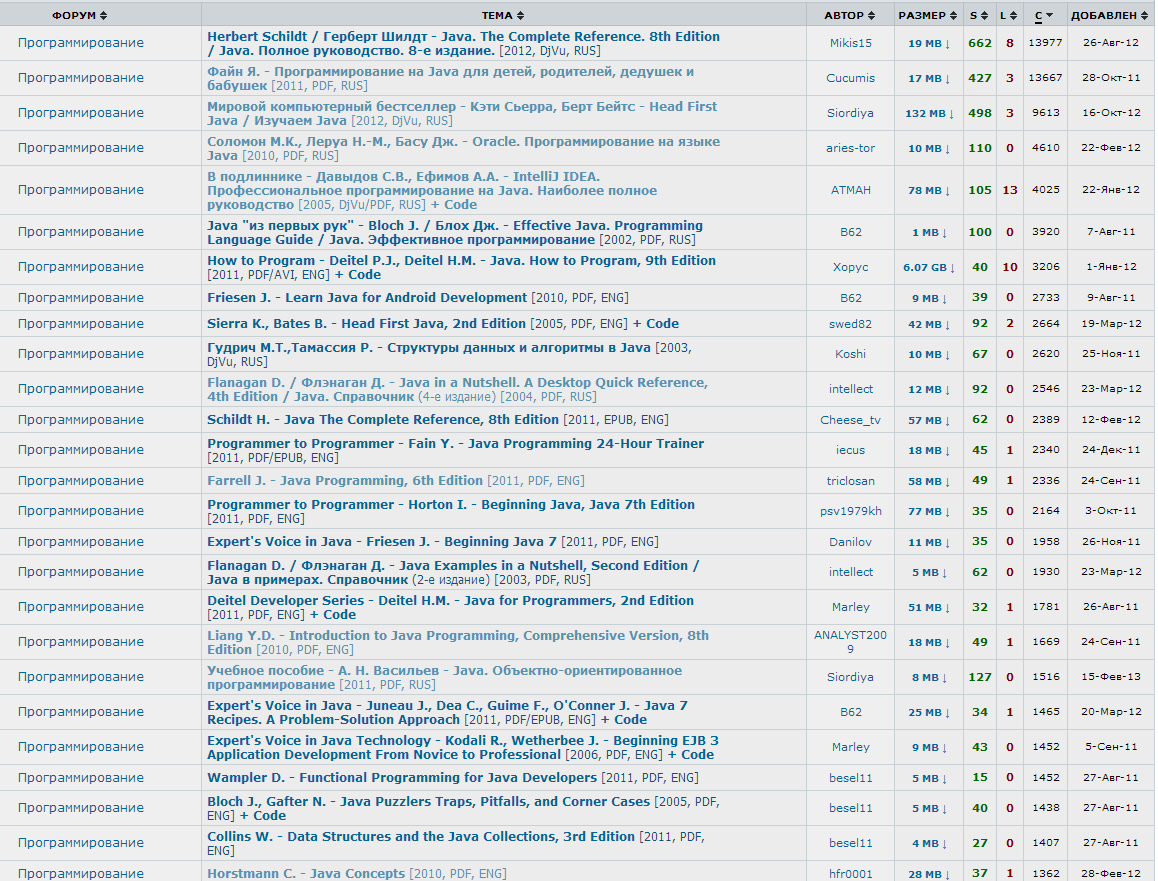
Today, I got a message that my book is pretty popular among Russian-speaking people. The Russian translation of my eBook is #2 with 13667 downloads from this site, and the original English version is #13 in this bestellers list.

2fd68a23

Only Herbert Schild is ahead of me at this point. Yay, time to celebrate! But there is a bitter taste in my mouth. The reason being that this statistics was taken from the torrent site rutracker – the main site for downloading of illegal content. I’m really glad to find myself among a very respectful group of Java authors, but most likely my book is the only one in this list that’s offered without violations of the copyright.

There was this joke that “Mixed Feelings is when your mother-in-law gets into a serious car accident while driving your new Mercedes”. It seems that I can offer a new definition of what the Mixed Feelings mean…

What Java annotations and your luggage have in common

Yesterday, I was teaching my Sunday online Java class. One of the topics was Java annotations. I was explaining that a program’s metadata is the data about your code. Any Java class contains its metadata, and you can write a program that “asks” another class, something like “What methods do you have?”. After explaining how to declare a custom annotation @MyJDBCExecutor I gave a code snippet that may use it:


@MyJDBCExecutor (sqlStatement="Select * from Employee”)
 public List getEmployees(){
      // The code to get the the data from DBMS goes here,

      // result set goes in ArrayList, which is returned to the 

      // caller of the method getEmployees()

      …   
      return myEmployeeList;
}

One student asked me a question, “How you can access the value of the sqlStatement from inside the method getEmployees()?” This was a clear signal that I didn’t do a good job of explaining what metadata is for. I started to think of an example from the real world illustrating metadata, and this is what I came up with.

luggage

When you check in your luggage at the airport, they put this sticker tape that includes the luggage ID, destination, the airline carrier and the flight number. This can be considered a metadata about your piece of luggage. It’s meant to provide some additional information about your bag and is supposed to be read and interpreted by those who are handling the luggage, not by the luggage itself.

If there is a pair of jeans inside your luggage it could care less what the sticker on the bag reads. On the same note, the code from inside the method getEmployee() is not supposed to read and interpret the data that was written on its “sticker” (a.k.a. annotation).

Software developers who create custom annotations have to create another piece of software (annotation processors) that would introspect your class, find and interpret all annotations that are present and perform the appropriate action. In the ancient pre-Java6 times, there was a special tool for that called APT. Now it’s deprecated because its functionality was incorporated inside the javac compiler itself. But this is another story. I hope my analogy with luggage stickers will help junior Java developers in understanding of the very important concept of metadata.

If you are teaching or studying Java, feel free to download the slides to my Java training at this site.

Configuring Eclipse with Apache Tomcat and Ext JS

While Eclipse IDE is not the best one for JavaScript developers, it’s the most popular IDE among enterprise Java developers. If an enterprise Java developer needs to start developing in JavaScript, the first question comes to his/her mind is “Can I stay with my familiar Eclipse”.

At this point some people will start thinking, “Doesn’t he know that IntelliJ IDE or WebStorm are the best for JavaScript?” I know. I was not sitting under the rock. But you may be surprised, but having your project manager spend $50 on the WebStorm license may be mission impossible.

But let’s talk not just about any JavaScript, but about Ext JS from Sencha that includes megabytes of the source code, which will keep Eclipse busy for a while. All of a sudden, it’ll start doing its indexing spiel, which will drive you crazy.

Sencha engineers created an Eclipse plugin, with context sensitive help that doesn’t put Eclipse into this indexing mode. They solved this problem by creating a special type library file (ext.ser) supporting code assistance in Eclipse. This solution will work until some of the Ext JS API changes, after that Sencha should update the type library file.

After that, Sencha marketing people put it in a gift box titled “Sencha Compete” with a little price tag that read $900. To be fair, this box has other stuff too, but you can’t just purchase Sencha Eclipse plugin, say for $50. Spending your own $50 may not be the option in large corporations that are limiting what you can install on the company computer.

In any event, I’ll share with you how Ext JS developers of Farata Systems deal with this situation when they have to work in Eclipse IDE with Ext JS. Our developers usually need to program the server side in Java hence they need to deploy the code under one of the Java servers, e.g. Apache Tomcat. They use different setups and I’ll show you a couple of them. you’ll see how to to configure Tomcat inside the IDE and then add Ext JS to your Web applications.

Installing Eclipse for Java EE Developers

We’ll use the “Eclipse IDE for Java EE developers” version of this most popular IDE among Java developers. It’s available free of charge at Eclipse Downloads site. The installation comes down to unzipping of the downloaded archive. Then double-click on the Eclipse executable, and it’ll start.

Apache Tomcat

http://tomcat.apache.org%5BApache Tomcat is probably the most popular free and open source server used by Java developers for deploying Web applications. Besides being a Web Server, Tomcat also contains Java Servlet container.

Get the latest version of Apache Tomcat from the Download section at http://tomcat.apache.org. At the time of this writing Tomcat 7.0.39 is the latest build, so download the zip file with the Tomcat’s Binary Distributions (Core). Unzip the file in the directory of your choice.

Even though you can start Tomcat from a separate command window, the more productive way is to configure Tomcat right in the Eclipse IDE. This will allow to deploy your applications, and start/stop Tomcat without the need to leave Eclipse.

To add a server to Eclipse, open Eclipse Java EE perspective (menu Window | Open Perspective ), select the menu File | New | Other | Server |Server | Apache | Tomcat v7.0 Server, select your Tomcat installation directory and press Finish. If you don’t see Tomcat 7 in the list of Apache servers, click on “Download additional server adapters”.

You’ll see the Tomcat entry in the Eclipse Project Explorer. Go to Eclipse menu Windows | Show View and open the Servers view. Start Tomcat using the right-click menu.

TIP

By default, Eclipse IDE keeps all the required server configuration and deployment files in its own hidden directory. To see where exactly they are located in your computer, just double-click on the name of Tomcat in the Server view. The server path field contains the path. Keep in mind that while Tomcat documentation defines webapps as a default deployment directory, Eclipse uses wtpwebapps directory instead. If you prefer to deploy your Eclipse projects under your original Tomcat installation path, select the option Use Tomcat Installation.

In the next section you’ll learn how to create Dynamic Web Projects in Eclipse, where you’ll need to specify the Target Runtime for deployment of your Web applications. This newly installed and configured Tomcat server will serve as a deployment target for our sample projects.

Dynamic Web Projects and Ext JS

Eclipse for Java EE developers comes with http://www.eclipse.org/webtools/%5BWeb Tools Platform] that simplifies development of Web applications by allowing you to create so-called Dynamic Web Project, which will be specifically created for deployment under a particular Java server – Apache Tomcat in our case.

To create such a project select Eclipse menu File | New | Other | Web | Dynamic Web Project. It’ll pop up a window similar to shown below. Note that the Target Runtime is Apache Tomcat v7.0 that we’ve configured in the previous section.

fig_06_04

Upon creation, this project will include several directories, and one of them will be called WebContent. This directory it serves as a document root of the Web server in Eclipse Dymamic Web Projects . This is the place to put your index.html and one of possible places to keep the Ext JS framework.Create a subdirectory ext under WebContent and copy there all files from the Ext JS distribution. The app directory should also go under WebContent.

Unfortunately, Eclipse IDE is infamous for slow indexing of JavaScript files, and given the fact that Ext JS has hundreds of JavaScript files, your work may be interrupted by Eclipse trying to unnecessary revalidate these files.

If you don’t have Sencha Eclipse plugin, there is a couple of solutions to this problem (we’ll use the first one).

1. Exclude from Eclipse build the following Ext JS directories: ext, build, and packages.

2. Don’t copy the Ext JS framework into your Eclipse project. Keep it in the place known for Tomcat, and configure as a loadable module.

To implement the first solution, right click on the properties of your project and select JavaScript | Include Path. Then switch to the Source tab, expand the project’s Web content and press the buttons Edit and then Add. One by one add the ext, build, and packages as exclusion patterns (add the slash at the end).

fig_06_05

For the second solution, In this case you’ll need to add your Ext JS folder as a static Tomcat module. Double-click at the Tomcat name in the Servers view and then click on the bottom tab Modules. Then click on Add External Web Module. In the popup window find the folder where your Ext JS is (in my computer it’s inside the Library folder as in below screensot) and give it a name (e.g. /static/extjs-4.2).

Now Tomcat will know that on each start it has to load year another static Web module known as /static/extjs-4.2. If you’re interested in details of such deployment, open up the file server.xml located in your Eclipse workspace in the directory .metadata/.plugins/org.eclipse.wst.server.core/tmp0/conf.

To ensure that you did everything right, just enter in your browser the URL http://localhost:8080/static/extjs-4.2, and you should see the Ext JS Welcome screen.
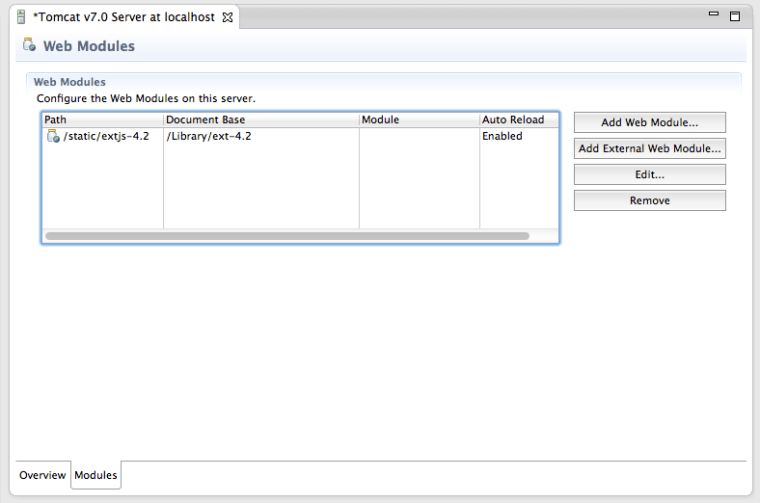
fig_06_06

In both of these solutions you’ll lose the Ext JS context sensitive help, but at least you will eliminate the long pauses caused by Eclipse internal indexing processes. Again, developing ExtJS code in Web Storm IDE or IntelliJ IDEA IDEs would spare you from all these issues. To see how to configure IntelliJ Idea with Ext JS, see this video in our Youtube Channel.

P.S. If you know of other and better ways of working with Ext JS inside Eclipse IDE, please share it with everyone by leaving a comment at this blog.

HTML5, PowerPoint, and the Real World

If you are going to attend any HTML5 conference, most likely you’ll see some of the speakers using Web browsers for presentation slides. The audience likes it cause it’s cool. A month ago one of our software engineers presented this way at the conference for Web developers.

There is an extra benefit in using such html-based slides especially when your presentation is about Web applications. Just think about it, when the time comes for a demo, you are not leaving the Web browser – the next “slide” has the URL of your demo right in the address bar of your browser and you do the demo right there. Hit the right arrow, and the demo turns into a slide again. Isn’t it cool? Yes it’s cool, but not practical.

Because everything else in not as cool and requires a lot of work comparing to Microsoft’s PowerPoint or Apple’s Keynote. Say, you want to add an image to the slide, make it smaller, and move it to the top right corner of the slide. In Powerpoint your hand just does it automatically. In HTML slides it’s a project. How about font manipulations? In Powerpoint you don’t even think about it – you just do it. In HTML slides it’s a project.

Animations? Which one you want? Just pick one from a dozen that are readily available in PowerPoint. You want the image to fly from the top, bounce a couple of times and settle in the middle? Takes 10 seconds to pick the image, 20 seconds for testing, and another 5 second to remove this flashy-bouncy-flying effect cause it would make your audience dizzy. I’m sure this will be easy in the HTML6 era, but the HTML5 tooling is not there yet.

How about embedding media into slides? OK, ok, you got the message.

Next week I’ll need to find some time to migrate that HTML presentation into the tried and true PowerPoint slide deck. Yes, I’ll be switching from PowerPoint to the Web Browser when the time will come for the demo. This is a drawback. But every other aspect of making a presentation in PowerPoint or Keynote is superior to HTML.

I’m observing the same situation in the enterprise world, where some IT managers are diving into new HTML5 project without thinking about the consequences. If you guys want to be cool, just dive right into the cold water.

If you want to develop an application that will contain 100% of the required functionality – wait a couple of years for HTML5 tooling to mature. But if you want to be cool now, eliminate half of the required functionality and do your 100-screen enterprise Web application in HTML5.

Today, at the meeting with a prospective client I said that if you decide to implement the same functionality in HTML5 vs. a mature platform with a compiled language and predictable VM, multiply the development time by two. Now I’m thinking I was wrong. The time should be tripled.

Project Boston

One suspect is dead, and the other is in custody. Life’s great? Let’s see.

Being an IT business owner I got used to consider any undertaking as a project. When I look at the entire Boston operation as a project, I consider it a failure. Here’s why.

1. Nine thousand of police officers, special agents and military personnel were trying to find and apprehend a 19-year old kid. How many law endorsement personnel would be required to deal with a terrorist group had a 100 people? Nine hundred thousand? The entire US Army? In software development we call this serious scalability problem.

2. I hate terrorists in general and these two in particular. After FBI got the #2 suspect, I was watching the crowd greeting all these heavily armed forces in the military vehicles. People were holding signs “You are our brave heroes”, and the heroes accepted these congratulation. I guess, it’s heroic to win the game where one team has 9000 players and another only one. I’m wondering how many thousands of armed people would be involved in Israel in a similar situation? Maybe it’s time to do some serious learning from our allies?

3. How much money this operation cost tax payers? Does anyone count money when a terrorists are involved or this is an all out war with an unlimited budget?

4. Take the shootout between two brothers and six armed police officers. What do we got? One dead and one wounded on each side, and the 19-year old kid ran over his brothers and escaped. Yet another failure.

5. Now let’s talk about the media coverage. CNN did a shitty job. They seem to be happy to get any piece of news to immediately air it. Young kids didn’t watch TV – they were listening online to the police scanner to get more reliable information from the first hands. Twitter did a better job than CNN.

I posted a tweet “Everybody who knew this #2 from Boston said he’s a great guy. It’s yet another evidence of how religion can turn a person into a zombie.” One of my followers responded, “Take off your CNN glasses and then try to see the real world. Who has killed millions in recent years?” Then he sent me a link to the article stating that as a result of military actions of the US Army more than a thousand kids were killed elsewhere. I can’t imagine a worse tragedy than when you kid dies. But this is war, and US Army had never planned a special attack to kill kids, woman, and civilians. But these brothers did exactly this.

I could somewhat understand what a relative of a recently killed innocent kid goes goes on a killing spree. But this was not the case. These brothers were living for years in the USA using and abusing its free society, and then someone turned them on, like zombies, like robots, which was enough for them to start the cold blooded killing in Boston.

Then our democratic society is discussing if this 19 y.o. zombie-killer should be read his Miranda rights. What do we expect to hear from this little monster? That Islam fundamentalist hate the USA and will do anything to harm us? We know that much. Two years ago Russian intelligence warned the FBI that the older brother became a follower of radical Islam. The FBI met with him several times, and didn’t find anything suspicious. But when the terrorist will give them the same information, it’s going to be more credible and valuable?

In cases like these there is another subject that usually goes unnoticed in the press: these brothers literally destroyed lives of their own families. These terminators don’t have any feelings for their own mother and father, sisters, and their families. Think about the future of the wife and kid of the older brother. He simply didn’t give a shit. He’s not a human.

Coming back to projects and resources… It’s like someone would have given an IT manager a one week project to complete and said to him, “We are giving you 9000 IT people that cost you nothing. They are professionally trained software developers, testers, Web designers, database administrators, and technical writers…” How do you like that?

The Project Boston didn’t fail for a simple reason: an old guy decided to check on his boat sitting in his backyard. If he didn’t do it, the younger terrorist would have died silently within a couple of days and would be found either when the boating season started or somebody would smell the corpse.

I really glad that these two terrorists will never hurt innocent people anymore, but this entire Boston project left a bad taste in my mouth.

The Workspace of a Modern Programmer

Ten years from now software developers will commute to work only if they’re invited to a corporate party or they have to work for an old fashioned client. Software professionals (not the average 9-to-5 workers) will have a freedom to equip home office to their taste. In our company we already work in this mode trying to minimize/eliminate the commute time as much as possible, and I’d like to share with your the home office setups from three concrete people of our company, circa April 2013.

But first I’ll touch on the monitor connectivity solutions that might be useful for some of you. Computer professionals should be having computers with more than one monitor. Hooking up the monitor number two is easy. Your laptop has this video output (VGA, mini DVI, etc.) that presenters use while delivering their powerpoints via projectors.

Every time I was working on a project for a Wall Street firm I got envy passing by these traders sitting in front of four monitors. So I decided to switch to the multi-screen mode in my home office too. I’m using a single MacBook Pro for everything I do (I do only a light programming these days). I’m not one of these geeks having a basement with a bunch of Linux servers buried under a pile of wires, connectors, and adapters. My MacBook Pro has CPU with 4 cores, lots of memory, and a large hard disk. It’s a two-year old machine, but so far Apple didn’t give me enough reason to give it as a gift to my wife and buy a new one for myself.

Now I have in my home office an 24″ Apple’s monitor plugged into my notebook, and I’m using a very inexpensive solution that allowed me to hook up yet another 22″ monitor that was collecting dust in my basement. This is how my desk looks today (click to enlarge).

SONY DSC

That little thingy to the left of my MacBook is a $39 Sabrent’s USB adapter with DisplayLink chip. It simply connects yet another monitor via the USB board (go to their Web site and update your visual driver). That’s all. It works. With this solution you may experience some flashes during the video plays on that monitor, but my colleague told me that they are working on the hardware acceleration for their MAC driver and Windows users shouldn’t experience this issue.

My setup is a relatively inexpensive solution, but I’m planning to upgrade my set up to be more inline with what’s right for working more productively. Being able to have more quality monitor real estate is important. The word quality is the key here. you can live with less CPU cycles, but poor quality monitor affects your eyes. So let’s not be cheap and earn some cash for a high-resolution 27″ monitor(s).

Let me show you a setup of my colleague at Farata Systems. He’s a team lead and heavy-hands-on developer. This is what he built in his home office.

my_setup_3
Is this nice or what? He’s connecting two Apple displays via the thunderbolt interface, and a Dell monitor via another inexpensive USB adapter based on the same DisplayLink chip. A 13″ notebook MacBookPro has enough juice to bring life to three screens. It’s a very neat and professional setup, and can serve as an exemplary desktop of a serious hands-on software developer.

Finally, I’ll show you a couple of more photos that were taken today in the home office of our top-notch software pro, my business partner Anatole. Don’t try to repeat this at home cause even if you will be able to replicate all this power, you might not know what to do with it. Luckily, Anatole knows, or so he says :).

DSC_0012

He likes MacBook Pro as a good solution if he’s going on vacation and needs to have a computer that fits in a briefcase. Anatole runs 20+ virtual machines on that box that you see under the table (2 CPUs, 8 cores, 32MB, 20TB raid storage). Having multiple monitors allows him to monitor most of the VMs without the need to use the mouse.

There is a drawback in such multi-monitor-multi-os setup though. When I call Anatole on Skype, there is a latency between the moment when he’s getting the call and finds the right instance of Skype to use. I forgot to tell you that the above photo reflects just the right side of Anatole’s home office. The left side is more compact, cause it’s about mobile development, so these screens are smaller by definition. If you are not sure what’s that thing between two iPads, it’s a 3D printer with the roll of plastic for printing 3d constructions.

DSC_0015

Once in a while I find myself in a corporate environment, where managers frown at developers who want to work from home complaining that they don’t have working environment as good as a typical cubicle where the employee could stay focused on work and be productive.

One manager told me that he hates when during the conference call a person dials in from home and the dog is barking in the back. Well, when Anatole will be dialing a meeting from his home office, you might be hearing the sound of Atlantic ocean. If this bothers you, hire someone who fits nicely in the cube.

Revolutionizing Internet Marketing

I was listening to the internet music on pandora.com. Sometime ago I was thinking of buying a $40 a year license, but never did.  Now, after playing several songs Pandora forces me to hear some commercial ads. It’s a typical model – purchase a license and we won’t be showing these ads.

pandora

This got me thinking. If I’m a cheap bastard who doesn’t even want to pay for really good Pandora’s service, what’s the point in showing me all these ads? I’m not going to buy anything anyway!  Don’t they use something called “target market” anymore?  Why wasting money for showing products to the people who are cheap?

I want to offer something that will revolutionize  internet and mobile software markets. Let’s turn it upside down: give the software for free to people who don’t like buying licenses, and those who paid will enjoy the ads! Sounds stupid, right?  The question is what’s more stupid: advertising to penniless losers or to people with money who are accustomed to pay for stuff?

Update. Ten days after writing this post I paid $36 for the yearly subscription to Pandora radio.

Programming Nazi

In the USA programmers earn more money than average workers. But the difference is not huge. It can be twice as much. Not outrageous. It seems that there is a (wrong) perception in the USA that programming is difficult and hence these eggheads deserve a better pay.

But the situation is different in developing countries where offshore programming is flourishing. The difference between the salaries of a young programmer and a young engineer can be 10 fold: $300 vs. $3000 a month. While it’s great that at least some people can earn decent money, I see some negative side effects. Some of these young well-off professionals are starting to believe that they belong to a higher caste, and regular people who didn’t learn programming are losers.

This is is not something I came up with out of the blue. I’m following the blogosphere in some of such offshore countries, and people openly make these statements. Here’s a comment that I’ve received to one of my blogs:

“People who work in the supermarkets are not capable of anything else. Only inadequate people can work there for a long time. A decent person will not keep this low paid job – he’ll find a way to earn more doing something else. Instead of working for pennies in supermarkets they can learn programming and make a decent living”.

In another article a programmer asks,”Please share your experience in finding love? Is it easy for you to pick up girls because of your high salary?”

IMO, this kind of mentality is really bad. You have to respect people even if they don’t know how to program computers.

There are lots of great people who like working in a supermarket or a post office. They will never become programmers and don’t have to be! Ideally, people should do the work they like. It may not be easy, but during a day a person can work at a cash register, and in the evening play violin in the philharmonic orchestra.

I realize, that the labor in the USA is more expensive than in most of the developing countries, and a cashier can make a living just by keeping one job. But considering yourself creme de la creme of society just because you know how to write if-statements is not only wrong, but dangerous. Being any nazi is dangerous both for a society and for the nazi.