RxJS Essentials. Part 6: The switchMap operator

In this article I’ll introduce the switchMap() operator. The previous articles in this series include:

1. Basic Terms
2. Operators map, filter, and reduce
3. Using Observable.create()
4. Using RxJS Subject
5. The flatMap operator

In the previous article of this series, I demoed the use of flatMap(). While flatMap() unwraps and merges all the values emitted by the outer observable, the switchMap() operator handles the values from the outer observable but cancels the inner subscription being processed if the outer observable emits a new value. The switchMap() operator is easier to explain with the help of its marble diagram shown next.
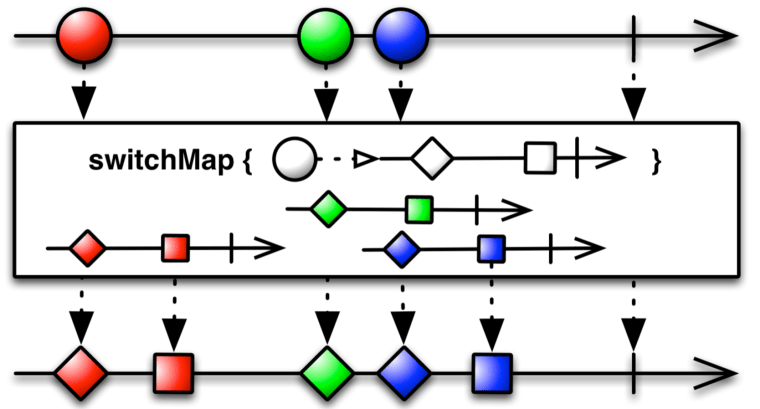
The outer observable emits the red circle, and switchMap() emits the item from the inner observable (red diamond and square) into the output stream. The red circle was processed without any interruptions because the green circle was emitted after the inner observable finished processing.

The situation is different with the green circle. The switchMap() managed to unwrap and emit the green diamond, but the blue circle arrived before the green square was processed. So the subscription to the green inner observable was cancelled, and the green square was never emitted into the output stream. In other words, the switchMap() operator switched from processing of the green inner observable to the blue one.

The following example has two observables. The outer observable uses the function interval() and emits a sequential number every second. With the help of the take() operator, we limit the emission to two values: 0 and 1. Each of these values is given to the switchMap() operator, and the inner observable emits three numbers with the interval of 400 milliseconds.

let outer$ = Rx.Observable
               .interval(1000)
               .take(2);

let combined$ = outer$.switchMap((x) => {  
     return Rx.Observable
	          .interval(400)
	          .take(3)
	          .map(y => `outer ${x}: inner ${y}`)
});

combined$.subscribe(result => console.log(`${result}`));

The output of this script is shown next:

outer 0: inner 0
outer 0: inner 1
outer 1: inner 0
outer 1: inner 1
outer 1: inner 2

Note that the first inner observable didn’t emit its third value 2. Here’s the timeline:

1. The outer observable emits zero and the inner emits zero 400 milliseconds later
2. In 800 milliseconds later, the inner observable emits 1
3. In 1000 milliseconds the outer observable emits 1, and inner observable was unsubscribed
4. The three inner emissions for the second outer value went uninterrupted because it didn’t emit any new values

If you replace switchMap() with flatMap(), the inner observable will emit three values for each outer value as shown below.

outer 0: inner 0
outer 0: inner 1
outer 0: inner 2
outer 1: inner 0
outer 1: inner 1
outer 1: inner 2

NOTE: To see it in CodePen, follow this link.

The chances are slim that you’ll be writing outer and inner observables emitting integers but there are various practical use cases for switchMap(). For example, in my Angular apps (Angular comes with RxJS) I use switchMap() with the HttpClient object (it returns observable) to discard the results of the unwanted HTTP requests. Just think of a user that types in an HTML input field (the outer observable) and the HTTP requests are being made (inner observable) on each keyup event. The circles on the diagram are the three characters that the user is typing. The inner observables are HTTP requests issued for each character. If the user entered the third character but the HTTP request for the second one is still pending, the inner observable for the second character gets cancelled and discarded so the browser will never recieve the HTTP response.

TIP. The function interval() is handy if you want to invoke another function periodically based on the specified time interval. For example, myObservable.interval(1000).subscribe(n => doSometing()) will result in calling the function doSomething() every second.

NOTE: If your code has nested subscribe() calls, this should be a red flag to you. Consider re-writing this code using flatMap(), switchMap(), or concatMap().

If you have an account at O’Reilly’s safaribooksonline.com, you can watch my video course “RxJS Essentials” there.

In the next article, I’ll show how to intercept errors from an observable stream with the catch(operator.)
RxJS Essentials. Part 5: The flatMap operator

In this article I’ll introduce an RxJS flatMap() operator. Previous articles in this series include:

1. Basic Terms
2. Operators map, filter, and reduce
3. Using Observable.create()
4. Using RxJS Subject

In some cases, you need to treat each item emitted by an observable as another observable. In other words, the outer observable emits the inner observables. Does it mean that we need to write nested subscribe() calls (one for the outer observable and another for the inner one)? No, we don’t. The flatMap() operator takes each item from the outer observable and auto-subscribes to it.

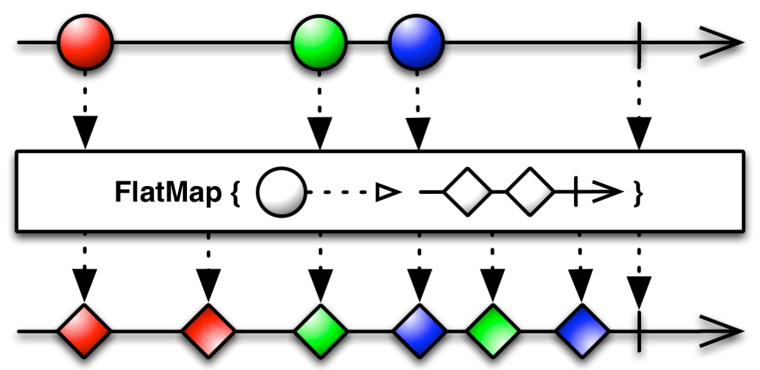
Some operators are not explained well in RxJS documentation, and we recommend you to refer to the general ReaciveX (reactive extensions) documentation for clarification. The flatMap() operator is better explained there, and it states that flatMap() is used to “transform the items emitted by an observable into observables, then flatten the emissions from those into a single observable”. This documentation includes the following marble diagram:

As you see, the flatMap() operator takes an emitted item from the outer observable (the circle) and unwraps its content (the inner observable of diamonds) into the flattened output observable stream. The flatMap() operator merges the emissions of the inner observables so their items may interleave.

The following code listing has an observable that emits drinks, but this time it emits not individual drinks, but palettes. The first palette has beers and the second – soft drinks. Each palette is observable. We want to turn these two palettes into an output observable with individual beverages.

function getDrinks() {

    let beers = Rx.Observable.from([   // 1
        {name: "Stella", country: "Belgium", price: 9.50},
        {name: "Sam Adams", country: "USA", price: 8.50},
        {name: "Bud Light", country: "USA", price: 6.50}
    ], Rx.Scheduler.async);

    let softDrinks = Rx.Observable.from([    // 2
        {name: "Coca Cola", country: "USA", price: 1.50},
        {name: "Fanta", country: "USA", price: 1.50},
        {name: "Lemonade", country: "France", price: 2.50}
    ], Rx.Scheduler.async);

    return Rx.Observable.create( observer => {
            observer.next(beers);     // 3
            observer.next(softDrinks);   // 4
            observer.complete();
        }
    );
}

// We want to "unload" each palette and print each drink info

getDrinks()
  .flatMap(drinks => drinks)    // 5   
  .subscribe(  // 6
      drink => console.log("Subscriber got " + drink.name + ": " + drink.price ),
      error => console.err(error),
      () => console.log("The stream of drinks is over")
  );

1. Creating an async observable from beers
2. Creating an async observable from soft drinks
3. Emitting the beers observable with next()
4. Emitting the soft drinks observable with next()
5. Unloading drinks from pallets into a merged observable
6. Subscribing to the merged observable

This script will produce the output that may look as follows (note that the drinks interleave):

Subscriber got Stella: 9.5
Subscriber got Coca Cola: 1.5
Subscriber got Sam Adams: 8.5
Subscriber got Fanta: 1.5
Subscriber got Bud Light: 6.5
Subscriber got Lemonade: 2.5
The stream of observables is over

To see it in CodePen visit this link.

Are there any other uses of the flatMap() operator besides unloading palettes of drinks? Another scenario where you’d want to use flatMap() is when you need to execute more than one HTTP request, where the result of the first request should be given to the second one. In Angular, HTTP requests return observables and without flatMap() this could be done (it a bad style) with nested subscribe() calls:

this.httpClient.get('/customers/123')
  .subscribe(customer => {
              this.httpClient.get(customer.orderUrl)
              .subscribe(response => this.order = response)
  })

The method httpClient.get() returns an observable, and the better way to write the above code is by using the flatMap() operator, which auto-subscribes and unwraps the content of the first observable and makes another HTTP request:

httpClient.get('./customers/123')
          .flatMap(customer => this.httpClient.get(customer.orderURL))
          .subscribe(response => this.order = response);

Since a flatMap() is a special case of map(), you can specify a transforming function while flattening the observables into a common stream. In the above example, we transform the value customer into a function call httpClient.get().

TIP: In RxJS, flatMap() is an alias of mergeMap() so these two operators have the same functionality.

Let’s consider one more example of using flatMap(). This example will be a modified version of the traders-orders example used in the article “Using RxJS Subject“. This example is written in TypeScript and it uses two Subject instances:

* traders – this Subject keeps track of traders
* orders – this Subject is declared inside the class Trader and keeps track of each order placed by a particular trader.

You’re the manager who wants to monitor all orders placed by all traders. Without flatMap(), you’d need to subscribe to traders (the outer observable) and create a nested subscription for orders (the inner observable) that each subject has. Using flatMap() allows you to write just one subscribe() call, which will be receiving the inner observables from each trader in one stream.

import {Subject} from 'rxjs/Subject';
import 'rxjs/add/operator/mergeMap';

enum Action{
    Buy = 'BUY',
    Sell = 'SELL'
}

class Order{
    constructor(public orderId: number, public traderId: number, public stock: string, public shares: number, public action:Action){}
}

let traders = new Subject<Trader>();  // 1

class Trader {

    orders = new Subject<Order>();   // 2

    constructor(private traderId:number, public traderName:string){}
}

let tradersSubscriber = traders.subscribe(trader => console.log(`Trader ${trader.traderName} arrived`))

let ordersSubscriber = traders        // 3
  .flatMap(trader => trader.orders)   // 4
  .subscribe(ord =>      // 5
       console.log(`Got order from trader ${ord.traderId} to ${ord.action} ${ord.shares} shares of ${ord.stock}`));

let firstTrader = new Trader(1, 'Joe');
let secondTrader = new Trader(2, 'Mary');

traders.next(firstTrader);
traders.next(secondTrader);

let order1 = new Order(1, 1,'IBM',100,Action.Buy);
let order2 = new Order(2, 1,'AAPL',200,Action.Sell);
let order3 = new Order(3, 2,'MSFT',500,Action.Buy);

// Traders place orders
firstTrader.orders.next( order1);
firstTrader.orders.next( order2);
secondTrader.orders.next( order3);

1. Declare the Subject for traders
2. Each trader has its own Subject for orders
3. Starting with the outer observable traders
4. Extracting the inner observable from each Trader instance
5. The function subscribe() receives a stream of orders

In this version of the program, the class Trader doesn’t have a method placeOrder(). We just have the trader’s observable orders push the order to its observer by using the method next(). Remember, a Subject has both observable and observer.

The output of this program is shown next.

Trader Joe arrived
Trader Mary arrived
Got order from trader 1 to BUY 100 shares of IBM
Got order from trader 1 to SELL 200 shares of AAPL
Got order from trader 2 to BUY 500 shares of MSFT

In our example, the subscriber just prints the orders on the console, but in a real world app it could invoke another function that would be placing orders with the stock exchange for execution.

To see it in CodePen, follow this link. In the next article you’ll learn about a very useful operator switchMap().

If you have an account at O’Reilly’s safaribooksonline.com, you can watch my video course “RxJS Essentials” there.

RxJS essentials. Part 4: Using Subject

In this article I’ll introduce an RxJS Subject. The previous articles in this series include:

1. Basic Terms
2. Operators map, filter, and reduce
3. Using Observable.create()

A RxJS Subject is an object that contains the observable and observer(s). This means that you can push the data to its observer(s) using next() as well as subscribe to it. A Subject can have multiple observers, which makes it useful when you need to implement for multi-casting – emit a value to multiple subscribers.

Say, you have an instance of a Subject and two subscribers. If you push a value to the subject, each subscriber will receive it.

const mySubject = new Subject();

const subscription1 = mySubject.subscribe(...);

const subscription2 = mySubject.subscribe(...);

...

mySubject.next(123); // each subscriber gets 123

The following example has one Subject with two subscribers. The first value is emitted to both subscribers, and then one of them unsubscribes. The second value is emitted to one active subscriber.

const mySubject = new Subject();

const subscriber1 = mySubject
    .subscribe( x => console.log(`Subscriber 1 got ${x}`) ); // <1>

const subscriber2 = mySubject
    .subscribe( x => console.log(`Subscriber 2 got ${x}`) ); // <2>

mySubject.next(123);  // <3>

subscriber2.unsubscribe();  // <4>

mySubject.next(567);  // <5>

1. Create the first subscriber
2. Create the second subscriber
3. Push the value of 123 to subscribers (we have two of them)
4. Unsubscribe the second subscriber
5. Push the value of 567 to subscribers (we have just one now)

Running this script produces the following output on the console:

Subscriber 1 got 123
Subscriber 2 got 123
Subscriber 1 got 567

To see it in CodePen, visit the following link: https://codepen.io/yfain/pen/JyxvyK?editors=1011

Now let’s consider a more practical example. A financial firm has traders who can place orders to buy or sell stocks. Whenever the trader places an order, it has to be given to two scripts (subscribers):

1. The script that knows how to place orders with a stock exchange.
2. The script that knows how to report each order to a trade commission that keeps track of all trading activities.

The following code sample shows how to ensure that both of the above subscribers can receive the orders as soon as a trader places them. We create an instance of the Subject called orders, and whenever we invoke next() on it, both subscribers will receive the order. I’ll write this code sample in TypeScript because using types make the code easier to read/write (at least for me), but if you want to see its JavaScript version, copy/paste the code to the TypeScript playground at http://www.typescriptlang.org/play and you’ll see the ES5 version on the right.

import {Subject} from 'rxjs/Subject';

enum Action{      // <1>
    Buy = 'BUY',
    Sell = 'SELL'
}

class Order{   // <2>
    constructor(public orderId: number, public traderId: number, public stock: string, public shares: number, public action:Action){}
}

let orders = new Subject<Order>();  // <3>

class Trader {   // <4>

    constructor(private traderId:number, private traderName:string){}

    placeOrder(order: Order){
        orders.next(order);   // <5>
    }
}

let stockExchange = orders.subscribe(   // <6>
    ord => console.log(`Sending to stock exchange the order to ${ord.action} ${ord.shares} shares of ${ord.stock}`)); 
let tradeCommission = orders.subscribe(  // <7>
    ord => console.log(`Reporting to trade commission the order to ${ord.action} ${ord.shares} shares of ${ord.stock}`));

let trader = new Trader(1, 'Joe'); 
let order1 = new Order(1, 1,'IBM',100,Action.Buy);
let order2 = new Order(2, 1,'AAPL',100,Action.Sell);

trader.placeOrder( order1);   // <8>
trader.placeOrder( order2);   // <9>

1. Use enums to declare which actions are allowed for orders
2. A class representing an order
3. A subject instance that works only with the Order objects
4. A class representing a trader
5. When an order is placed, we push it to subscribers
6. A stock exchange subscriber
7. A trade commission subscriber
8. Placing the first order
9. Placing the second order

Running the above script produces the following output:

Sending to stock exchange the order to BUY 100 shares of IBM
Reporting to trade commission the order to BUY 100 shares of IBM
Sending to stock exchange the order to SELL 100 shares of AAPL
Reporting to trade commission the order to SELL 100 shares of AAPL

To see it in CodePen follow this link: https://codepen.io/yfain/pen/wqNOeg?editors=1011

In this example, we use TypeScript enums that allow defining a limited number of constants. Placing the actions to buy or sell inside an enum provides additional type checking to ensure that our script uses only the allowed actions. If we’d just use the string constants like “SELL” or “BUY”, the developer could misspell a word (e.g. “BYE”) while creating an order. By declaring enum Action we restrict possible actions to Action.Buy or Action.Sell. Trying to use Action.Bye results in a compilation error. BTW, did you know that RxJS 5 was written in TypeScript?
In the next article of this series, we’ll get familiar with the flatMap() operator.

If you have an account at O’Reilly’s safaribooksonline.com, you can watch my video course “RxJS Essentials” there.

My books

Books that I authored or co-authored

0. TypeScript Quickly, Manning Publications, 2019
1. Angular Development with TypeScript, Second Edition, Manning Publications, 2018
2. Angular 2 Development with TypeScript, Manning Publications, 2016
3. Java Programming, 24-Hour Training, 2nd edition, Wiley, 2015
4. Java Programming for Kids, Self-Published e-book, 2015, Free Download
5. Enterprise Web Development: From Desktop to Mobile“, O’Reilly, 2014.
6. Java Programming. 24-Hour Training, 1st edition, Wiley, 2011
7. Enterprise Development with Flex, O’Reilly, 2010
8. Enterprise Development Without the BS, Self-Published, 2008, Free Download”
9. Rich Internet Applications with Flex and Java, Sys-Con Books, 2007
10. Java 2. Enterprise Edition 1.4 Bible, Wiley, 2003
11. Java Tutorial for the Real World Self-Published, 2002

Back to blog

RxJS Essentials. Part 3: using Observable.create()

In this article I’ll show you how to create an Observable using the method create() and how an observable can send messages to the observer using its API. The previous articles in this series include:

1. Basic Terms
2. Operators map, filter, and reduce

An observer is an object that implements one or more of these functions: next(), error(), and complete(). Let’s use an object literal to illustrate an observer, but later in this section, we’ll use a simplified syntax with arrow functions:

const beerObserver = {
  next: function(beer) { console.log("Subscriber got " + 
                       beer.name)},
  error: function(err) { console.err(error)},
  complete: function() {console.log("The stream is over")}
}

You can create an observable with the method create() passing an argument that will represent an observer. When observable gets created, it doesn’t know yet which concrete object will be provided. It’ll be known later, at the time of the subscription.

beerObservable = Rx.Observable.create( 
                 observer => observer.next(beer));

This particular observable thinks, “When someone will subscribe to my beers, they will provide me a concrete beer consumer, and I’ll just push one beer object to this guy”.

At the time of subscription, we’ll provide a concrete observer to our observable.

beerObservable.subscribe(beerObserver); 

The observer will get the beer and will print on the console something like this:

Subscriber got Stella

The next listing has a complete script that illustrates the creation of the observer, observable and the subscription. The function getObservableBeer() creates and returns the observable that will iterate through the array of beers and will push each beer to the observer by invoking next(). After that, our observable will invoke complete() on the observer indicating that there won’t be any more beers.

function getObservableBeer(){
        
    return Rx.Observable.create( observer => { // 1

      const beers = [
        {name: "Stella", country: "Belgium", price: 9.50},
        {name: "Sam Adams", country: "USA", price: 8.50},
        {name: "Bud Light", country: "USA", price: 6.50},
        {name: "Brooklyn Lager", country: "USA", price: 8.00},
        {name: "Sapporo", country: "Japan", price: 7.50}
      ];

       beers.forEach( beer => observer.next(beer)); // 2

           observer.complete(); // 3
       }
    );
}

getObservableBeer()
     .subscribe(  // 4
         beer => console.log("Subscriber got " + beer.name),
         error => console.err(error),
            () => console.log("The stream is over")
);

1 Create and return the observable object
2 Push each beer to the observer
3 Push the end of stream message to the observer
4 Subscribe to the observable providing the observer object in the form of three fat arrow functions.

The output of this script is shown next:

Subscriber got Stella
Subscriber got Sam Adams
Subscriber got Bud Light
Subscriber got Brooklyn Lager
Subscriber got Sapporo
The stream is over

The RxJS 5 version of this code sample is here. The RxJS 6 version is here.

In our code sample we were invoking next() and complete() on the observer. But keep in mind, that there an observable is just a data pusher, and there is always a data producer (an array of beers in our case) that may generate an error. In this case, we’d invoke observer.error() and the stream completes. There is a way to intercept an error on the subscriber’s side to keep the streaming alive and will discuss it in one of the future articles of this series.

It’s important to note, that our data producer (the array of beers) is created inside the observable getObservableBeer(), which makes it a cold observable. A WebSocket could be another example of the producer. Imagine you have a database of beers on the server, and you can request them over a WebSocket connection (could use HTTP or any other protocol here):

Rx.Observable.create((observer) => {
  const socket = new WebSocket('ws://beers');
  socket.addEventListener('message', (beer) => observer.next(beer));
  return () => socket.close(); // is invoked on unsubscribe()
});

With cold observables each subscriber will get the same beers regardless of the time of the subscription provided that the query criteria (in our case show all beers) are the same.

Many RxJS tutorials explain concepts just using observables that emit numbers, which sometimes complicates the understanding of the concept. Things are different when we use examples from the real life. Everyone understands what the beer is for so the concepts become clear, right? In the next article, you’ll get familiar with the RxJS Subject.

If you have an account at O’Reilly’s safaribooksonline.com, you can watch my video course “RxJS Essentials” there.