How I migrated a dozen of projects to Angular 6 and then 7

In this article, I’ll share with you my experience of upgrading more than a dozen of Anguar 5 projects to Angular 6. These projects were small to medium in size, but they used lots of various Angular features because these are the projects from the second edition of our Angular book. Many of these projects had multiple apps configured in the file .angular-cli.json, and they were automatically migrated into the new project structure as defined in the new configuration file angular.json.

First of all, there’s the site https://update.angular.io that gives you an idea of how to do the upgrade from version X to version Y, and you certainly need to read the instructions there first. But the devil is in the detail, right?

Theoretically, the upgrade should be a 1-2-3 process that consists of the following three steps:

1. npm install @angular/cli@latest –save-dev
Run this command in your project’s dir, to upgrade (and install) the latest Angular CLI version in the devDependencies section of package.json. This command shouldn’t need @latest, but it does.

2. ng update @angular/cli
Run this command to convert the project configuration file .angular-cli.json into angular.json introduced by Angular 6.It also will update testing and tslint config files.

3. ng update @angular/core
Run this command to upgrade all Angular dependencies in the package.json file (except Angular Material and Angular Flex Layout, if used).

What else is needed

On my computer, I had Angular CLI 6 install globally, and my typical project had the line “typescript”: “~2.4.2” in devDependency section of package.json.

Before running and upgrade steps, bump up the TypeScript compiler version in your project or you’ll get an error “@angular/compiler-cli” has an incompatible peer dependency to “typescript” during the step 3. Start any project upgrade with manually changing this dependency to “typescript”: “~2.7.2”. If you still see that error, delete the node_module directory and re-run step 3.

If you use the Angular Material library, run ng update @angular/material to update its dependencies in package.json.

If you use the Flex Layout library, modify its version to 6.0.0-beta15 or later prior to running ng update @angular/core.

Your project’s .angular-cli.json might include the file favicon.ico in the asset’s property that’s not used in your app. Angular 5 would still launch your app even if this file was missing. In Angular 6, you need to explicitly remove all occurrences of favicon.ico in the newly generated angular.json.

After migration, I noticed some strange behavior in the UI rendering, which seems like a bug. In some of my apps, I had the following HTML in the component templates:

<a [routerLink]="['/']">Home</a> 
<a [routerLink]="['/product']">Product</a> 

In Angular 5, it rendered just fine, but after migration to Angular 6, the browser rendered both links without the space between them: HomeProduct. Adding &nbsp; after the first anchor tag helped. I thought it might be related to the Angular compiler’s option preserveWhitespaces, but it didn’t.

Starting from TypeScript 2.7, you may need to take care of the error TS2564: Property ‘SoAndSo’ has no initializer and is not definitely assigned in the constructor. For example, the following class variable declaration won’t compile:

product: Product[];

Either set the TypeScript compiler’s option strictPropertyInitialization to false or explicitly initialize class variables, e.g.

product: Product[] = [];

Upgrading your app to RxJS 6

During the upgrade, I spent the most time updating the code related to breaking changes in RxJS 6.

Your updated package.json will include the dependency “rxjs-compat”: “^6.0.0-rc.0” after step 3. At the time of this writing, the current version of rxjs-compat is 6.1.0, so if you decide to keep rxjs-compat, update its version in package.json and reinstall dependencies. Theoretically, having the rxjs-compat package should allow you to run your app without making any changes in the app code that uses RxJS API. In practice, this may not be the case and the app may fail either during the build- or runtime.

So I decided to remove the rxjs-compat dependency and modify my code to conform to RxJS 6 structure. Remove rxjs-compat from your package.json file to avoid unnecessary increase of your app bundle size. Then run ng serve and fix the RxJS errors (if any) one by one. Then load your app in the browser and keep the browser console wide open so you won’t miss the RxJS-related runtime errors, if any.

The internal structure of RxJS 6 has changed, and you need to change the import statements to get the classes and operators from the proper places. You may start with reading this upgrade guide. Disclaimer: I didn’t follow my own advice and started learning by doing.

In the past, the golden rule was “Don’t import Observable from rxjs, import it from rxjs/observable otherwise the entire RxJS library will be included in your app bundle”. No more. The new golden rule is import { Observable } from “rxjs”; The same applies to Subject, Subscription, interval(), of(), and many other RxJS thingies.

You need to stop using the dot-chainable operators (they simply won’t work without rxjs-compat package). Now you have to use the RxJS pipeable operators, and your imports should look like this:
import { debounceTime, map } from ‘rxjs/operators’;

The ng update command added the rxjs-compat package to your project, and if you’re lucky, your app might run as before without changing the code. But some of my apps gave me build errors, while others crashed at runtime.

For example, in one of my apps, I had this:

import { Observable } from "rxjs";
...
const myObservable$ = Observable.fromEvent(...)

Got the TypeScript error “error TS2339: Property ‘fromEvent’ does not exist on type ‘typeof Observable’.” Here’s the fix:

import { fromEvent } from "rxjs";
...
const myObservable$ = fromEvent(...)

In another app, I had this:

import {Observable} from 'rxjs';
...
return Observable.empty();

It also gave me the error TS2339. This time the fix included replacing the deprecated function empty() with the constant EMPTY:

import {EMPTY} from 'rxjs';
...
return EMPTY;

Another app had this:

numbers$ = Observable.interval(1000)...

This code sneaked through the build phase, but crashed my app during runtime. Here’s the fix:

import {interval} from "rxjs";
numbers$ = interval(1000)...

Don’t bet too heavily on rxjs-compat. This package may help you to quickly get your app running in Angular 6, but until you remove rxjs-compat from your project, don’t report to your boss that migration is done. Find the time and fix the code in your Angular 5 app to conform to RxJS 6. After this is done, migrate your app to Angular 6.

The next one is for those two people who also use RxJS WebSocketSubject. The API has changed in RxJS 6. In the past, you’d do this:

import { WebSocketSubject } from 'rxjs/observable/dom/WebSocketSubject';
...
let myWebSocket = WebSocketSubject.create(wsUrl);
...
myWebSocket.next(JSON.stringify(objectToSend));

To make it work in RxJS 6, I’ve changed it to the following:

import { WebSocketSubject } from 'rxjs/websocket';
...
let myWebSocket = new WebSocketSubject(wsUrl);
...
myWebSocket.next(objectToSend);

And one more thing. If you use Angular Material library, you may run into some breaking changes in the UI components. But overall, conversion of a project to Angular 6 is not a time-consuming process.

P.S. If you use NGRX, don’t forget to upgrade all ngrx packages to version 6 (at the time of this writing, it’s 6.0.0-beta.3).

Update. Yesterday, I’ve upgraded all these projects to Angular 7. In each project I ran just one command that updated dependencies in package.json:

ng update –all

This was easy.
Starting a new book on TypeScript

It’s Saturday morning and it’s raining in New York City. There is not much you can do. Why not start writing a new book? The agreement with the publisher is signed, and my colleague Anton Moiseev kindly agreed to be my co-author again. The book will have a title TypeScript Quickly, and its first chapters have to be released in October 2018.

In this blog, I’ll show you the first two pages that I just wrote as well as a table of contents (subject to change). Besides introducing the code samples illustrating the syntax of the language, we’ll be developing a blockchain app using TypeScript in different environments: in Node.js, in the browser without frameworks, with Angular, with React… Meanwhile, the first two pages are ready.

Unit 1. Getting started with TypeScript

This unit starts by presenting the benefits of programming in TypeScript over JavaScript. Then we’ll install the TypeScript compiler and the IDE, and you’ll learn about the process of transforming a TypeScript program into its JavaScript equivalent that can be run in any JavaScript engine. After that, you’ll see how various TypeScript types can be used in a program. In the hands-on section, we’ll introduce you to the blockchain project and will develop a library that will be used in subsequent units.

We’d like to make a clear distinction between the syntax introduced in ECMAScript specification, and the syntax that’s unique to TypeScript. That’s why we recommend you to read the Appendix A first, so you know where ECMAScript ends and TypeScript begins.

Why program in TypeScript

TypeScript is a compile-to-JavaScript language. It’s also a superset JavaScript, which means that you can take any JavaScript file, e.g. myProgram.js, change its name extension from .js to .ts, and the file myProgram.ts becomes a valid TypeScript program without changing a single line of code.

The word superset means that it contains something additional compared to the set. The main addition to the JavaScript is static types. You can declare a variable of a certain type, and any attempt to assign a value of a different type to it results in a compilation error. This is not the case in JavaScript, where you can change the type of a variable anytime you want during runtime.

But web browsers don’t support TypeScript and this won’t change in the foreseeable future. The program written in TypeScript has to be transpiled into JavaScript first, and then it can be executed in the browser or a standalone JavaScript engine.

The difference between transpiling and compiling is that the latter turns the source code of a program into a bytecode or machine code, whereas the former converts the program from one language to another, e.g. from TypeScript to JavaScript.

Then why go through a hassle of writing a program in TypeScript and then transpiling it into JavaScript, if you could write this program in JavaScript in the first place?

In essence, TypeScript is JavaScript with static types. For example, if you declare a variable as a string, trying to assign a numeric value to it will result in the compile-time error.

let customerId: string
customerId = 123;  // compile-time error

In JavaSript, you can’t explicitly assign the type to a variable, and you could write

let customerId = "A15BN";
customerId = 123;  // no errors 

Let’s write a JavaScript function that applies the provided discount to a price. It has two arguments and both must be numbers.

function getFinalPrice(price, discount) {
  return price - price/discount;
}

How do you know that the arguments must be numbers? First of all, you wrote this function and having an exceptional memory, you may just remember all types of all functions arguments. Secondly, you use descriptive names of the arguments that hint their types. Thirdly, you could guess the types by reading the function code.

This is a pretty simple function, which is not always the case. But let’s say someone (not you) would invoke this function by providing a discount as a string, this function would print NaN during the runtime.

console.log(getFinalPrice( 100, 10));    // prints 90
console.log(getFinalPrice( 100, "10%")); // prints NaN

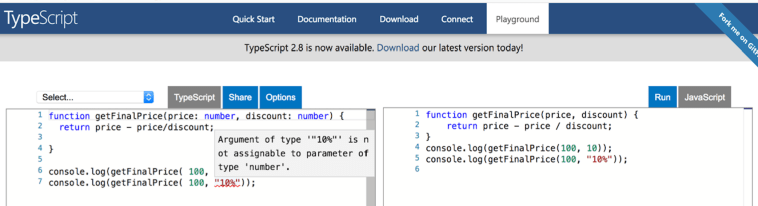
In TypeScript, you could provide the types for the function arguments, so if someone would try to invoke the function with a wrong type of an argument, this error would be caught as you were typing. Let’s see it in action.

The official TypeScript web page is located here. It offers the language documentation and a playground, where you could enter the code snippets in TypeScript, which would be immediately transpiled into JavaScript.

Follow this link https://bit.ly/2IyVNlj, and you’ll see our code snippet in the TypeScript playground, with the squiggly red line under “10%”. If you hover the mouse over the erroneous code, you’ll see a prompt explaining the error as shown below.

This error was caught by the TypeScript static code analyzer as I was typing. Moreover, if you specify the variable types, your IDE would offer the auto-complete feature suggesting you the argument names and types of the getFinalPrice() function.

Isn’t it nice that the errors are caught during the compile time? I think so. The vast majority of the developers with the background in such languages as Java, C++, C# and others take it for granted that the errors are caught during compile time, and they welcome TypeScript.

Having said that, I need to admit that some of the hard-core JavaScript developers say that TypeScript slows them down by requiring to use types, and in JavaScript, they’d be more productive. But the majority of the web developers are not JavaScript ninjas and can appreciate a helping hand offered by TypeScript.

This is all I got so far.

Below is the current version of the Table of Contents.

Unit 1: Getting started with TypeScript
1.1 Why developing in TypeScript
1.2 Installing and using the TypeScript compiler
1.3 Introducing the Visual Studio Code IDE
1.4 Getting familiar with TypeScript syntax
1.4.1 Type annotations and inferred types
1.5. Hands-on: Starting the blockchain project
1.5.1 Introducing the blockchain project
1.5.2 Developing a library that implements a mining algorithm

Unit 2 Classes and interfaces
2.1 Classes
2.1.1 Instance and static methods
2.1.2 Properties and access modifiers public, private, protected
2.1.3 Constructors
2.1.4 Abstract classes
2.2 Interfaces
2.2.1 Declaring custom types with interfaces
2.2.2 Interface as a contract
2.2.3 Declaring types with classes vs interfaces
2.3 Hands-on: Developing a browser-based blockchain node with TypeScript
2.3.1 Working with DOM elements
2.3.2 Making AJAX requests
2.3.3 Implementing the blockchain node for

Unit 3 Generics
3.1 Intro to Generics
3.2 Creating custom generics
3.3 Hands-on: Developing Angular client for the browser-based blockchain node
3.3.1 Brief overview of Angular
3.3.2 Creating a new app with Angular CLI
3.3.3 Generating Angular components and services
3.3.4 Implementing the blockchain node in Angular

Unit 4 Tooling
4.1 Improving code quality with TSLint
4.2 Bundling the TypeScript code with Webpack
4.4 Debugging TypeScript in the browser
4.5 Unit testing TypeScript code
4.7 Hands-on: Developing React client for the browser-based blockchain node
4.7.1 Brief overview of React
4.7.2 Transpiling TypeScript with Babel
4.7.3 Creating a React app for the blockchain node

Unit 5 Advanced types
5.1 Unions, intersections, and the type keyword
5.2 Enums
5.3 Mapped types
5.4 Conditional types
5.5. Hands-on: Developing a server for discovering blockchain nodes in the network

Unit 6 Advanced TypeScript features
6.1 Decorators
6.1.1 Creating custom decorators
6.2 Mixins
6.3 Dynamic imports
6.4 Hands-on: Implementing peer-to-peer blockchain nodes communication
6.4.1 Introducing WebRTC
6.4.2 Implementing nodes communication via WebRTC

Appendix A Modern JavaScript
A.1 The keywords let and const
A.2 Functions
A.2.1 Default and optional function parameters
A.2.2 Fat arrow function expressions
A.3 Classes and inheritance
A.4. Asynchronous programming
A.4.1 From callbacks to promises
A.4.2 async and await
A.5 Destructuring
A.6 The Spread operator
A.6.1 Cloning objects with the Spread operator
A.7 The Rest operator
A.8 Iterating data collections

Appendix B Using TypeScript with JavaScript libraries
B.1 Type declaration files
B.1.1 How to create type declaration files
B.2 Using the JavaScript lodash library in TypeScript code

RxJS Essentials: Part 9: Dealing with breaking changes in RxJS 6

This article is a part of my RxJS series, and the previous post is here.

My plan for this morning was to spend 15 min skimming through my RxJS slides and code samples for the upcoming presentation. I did this presentation multiple times, and my code samples published on CodePen just worked. No more.

RxJS 6 was recently released, and my code samples stopped working. I’m not sure if these particular issues were listed somewhere as breaking changes, but I’d like to share my findings with you. I’ve been using the following CDN to get RxJS 6: https://cdnjs.cloudflare.com/ajax/libs/rxjs/6.0.0/rxjs.umd.js.

In the past, you could use the Rx object as in Rx.Observable. No more.

rxjs is the new Rx

For example, my code sample that had Rx.Observable.create() is broken in RxJS 6 complaining that Rx is not defined. The broken code is here.

Say you need to get a hold of the Observable object in RxJS 6. I did it using the JavaScript destructuring syntax:

const { Observable } = rxjs;

Now you can just write Observable.create(). This fixed my broken code sample for Observable.create(), and the working version is here.

The next broken code sample was related to operators. I remember reading that dot-chainable operators shouldn’t be used in RxJS 6. Using pipeable operators is the way to go.

For backward compatibility of your app, you need to add the package rxjs-compat to be able to use dot-chainable operators. After replacing all dot-chainable with pipeable operators, uninstall rxjs-compat.

Here’s the broken code sample that uses dot-chainable operators map and filter.

To fix this code, I used the destructuring syntax again to get the pipeable version of the map and filter operators like this:

const { filter, map } = rxjs.operators;

Basically, I replaced this:

Rx.Observable.from(beers)  
    .filter(beer => beer.price < 8) 
    .map(beer => beer.name + ": $" + beer.price) 
    .subscribe()

with this:

const { from } = rxjs; 
const { filter, map } = rxjs.operators;

from(beers).pipe(
    filter(beer => beer.price < 8), 
    map(beer => beer.name + ": $" + beer.price) 
    )
    .subscribe()

The working version of the code sample that uses pipeable operators map and filter is here.

Disclaimer. These were quick fixes that I came up with. I wouldn’t be surprised if there was a different way to accomplished the same results. If you find one, please let me know. Gotta share, right?

And one more thing. Importing observables like this is not cool anymore:

import {Observable} from "rxjs/observable";

You need to do it like this:

import {Observable} from "rxjs";

For detailed coverage of how to migrate RxJS-related code see this doc.