Java Programmers-Terrorists

Java has a pretty powerful mechanism of error handling. But sometime programmers ignore it. Recently I’ve seen the following post in one of the production support chat rooms:

Developers, please don’t do this:

 } catch (IOException e) {
     //do nothing, just ignore it
 } finally {

this is better:

 } catch (IOException e) {
      logger.error(e,e);
 } finally {

The poster of this message has demonstrated what being overly polite means. I’m not as polite as the guy who wrote this and want to say that Java developers who quietly ignore exceptions should be tracked down and fired. They can be considered terrorists who plant time bombs into applications.

Handling programming errors is a must. Writing an empty catch clause is the worst thing that could be done. It’s like a time bomb that will definitely blow the program up one day, and finding such bombs is usually a time consuming process. Some people want to save a couple of seconds required to log the error, which eventually will cost dearly to the QA and support teams. Don’t cut corners, exception handling should be taken very seriously if you consider yourself a professional software developer.

Java is short for JavaScript. Not!

Here’s  is a quote from the About page  of the Web site ehow.com: “eHow is your one-stop online resource for life’s challenges. Professionals in every field come together to offer expert advice, backed by the additional support of a can-do eHow community.

Experts are also human beings and sometimes they make mistakes too. But when I’ve read the following article I was stunned:

javaisjavas

Guys and girls, I’m not an eHow-grade expert, but I’ve been doing both Java and JavaScript for while. Trust me, the above description is absolutely wrong! Please ignore. Also, if you know any of the 35 people who found this helpful, get in touch with them and tell them the truth!

There is well known statement that “Java is to JavaScript as ham is to hamster”. So I’m looking forward to a new article at eHow that will be a creative interpretation of the Wikipedia definition:

“Hamster, aslo known as ham for short, is processed pork foodstuff, which undergoes preservation through curing, smoking, or salting. Hamsters are traditionally made only from the hind leg of swine, and referred to that specific cut of pork.”

GlassFish, Open MQ, and the Ear-Eye Problem

Yesterday I’ve been updating code examples for the messaging chapter for the 2nd edition of my Java book. While doing this, I ran into an issue, then fixed it, but the cause and the solution illustrate the situation that we call “Ear-Eye”, which comes from and old joke popular in the USSR, where TV propaganda was stating that everything is great while people had hard time finding food in store. Here’s the joke:

An old lady comes to a medical center saying that she needs to see an Ear-Eye specialist. The receptionist replied, “There is no such specialization in medicine. Why would you need such a doctor?” The old lady answered, “What I hear on the radio, I don’t see in the real life.”

In programming, we have similar situations quite often – you look at the code everything looks perfect, but it doesn’t work no matter how long you look at it. In such cases you should call a colleague simply saying “I got an Ear-Eye problem”. An extra pair of eyes usually helps. After looking at the monitor for half an hour, I realized that I got an Ear-Eye situation, but it was not a one piece of code, but required a two server setup so it was not a quick thing for explain to a colleague. Eventually, I fixed it myself and am happy to share my story with you.

I’ve been using Java GlassFish 4.1 as an application server, and Open MQ 5.1 as a JMS provider. You can use Open MQ separately, but it’s conveniently bundled with GlassFish. While most of the JMS code samples show how to send/receive messages from Java EE clients using JNDI, it may give novice Java developers a false feeling that this is the only way to do messaging.

So I updated my old code samples to illustrate how to use JMS 2.0 goodies in standalone clients talking directly to Open MQ server. Started Open MQ from the command line with the imqbrokerd script, configured the queue, tested the sender and receiver and all worked as the doctor ordered (no, not that doctor). For those, who are not in the know, Open MQ runs on port 7676 by default. Here’s my standalone JMS sender:

public class DirectMessageSender{
 public static void main(String[] args){

   ConnectionFactory factory;
	 
   factory = new com.sun.messaging.ConnectionFactory();  

	try( JMSContext context = factory.createContext("admin","admin")){

		factory.setProperty(ConnectionConfiguration.imqAddressList,
                                        "mq://127.0.0.1:7676,mq://127.0.0.1:7676");
		      Destination ordersQueue = context.createQueue("TradingOrdersQueue");	  
	          JMSProducer producer = context.createProducer();
	      
	          // Send msg to buy 200 shares of IBM at market price	      
	          producer.send(ordersQueue,"IBM 200 Mkt");
	          
	          System.out.println("Placed an order to TradingOrdersQueue");
	                    
	 } catch (JMSException e){
	           System.out.println("Error: " + e.getMessage());
	 } 
 }		
}

And this is the standalone receiver:

public class DirectObjectMessageReceiver implements MessageListener{

	ConnectionFactory factory = new com.sun.messaging.ConnectionFactory();  
	JMSConsumer consumer;
	
	DirectObjectMessageReceiver(){
		try( JMSContext context = factory.createContext("admin","admin")){
			factory.setProperty(ConnectionConfiguration.imqAddressList(
                               "mq://127.0.0.1:7676,mq://127.0.0.1:7676");
		    
			Destination ordersQueue = context.createQueue("TradingOrdersQueue");	  	        
			consumer = context.createConsumer(ordersQueue);
		    
			consumer.setMessageListener(this);
		      
		      System.out.println("Listening to the TradingOrdersQueue...");
		      
		      // Keep the program running - wait for messages
		      Thread.sleep(100000);
		    
		   } catch (InterruptedException e){
	           System.out.println("Error: " + e.getMessage());
	       }
		    catch (JMSException e){
		           System.out.println("Error: " + e.getMessage());
		    } 
	}

    public void onMessage(Message msg){
    	
      try{
       System.out.println("Got the message from TradingOrdersQueue: " +
                          msg.getBody(Order.class));
       
       System.out.println("\n === Here's what toString() on the message prints \n" + msg);
       
      } catch (JMSException e){
    	  System.err.println("JMSException: " + e.toString());
      }
    }

 public static void main(String[] args){
	  new DirectObjectMessageReceiver();
 }	 
}

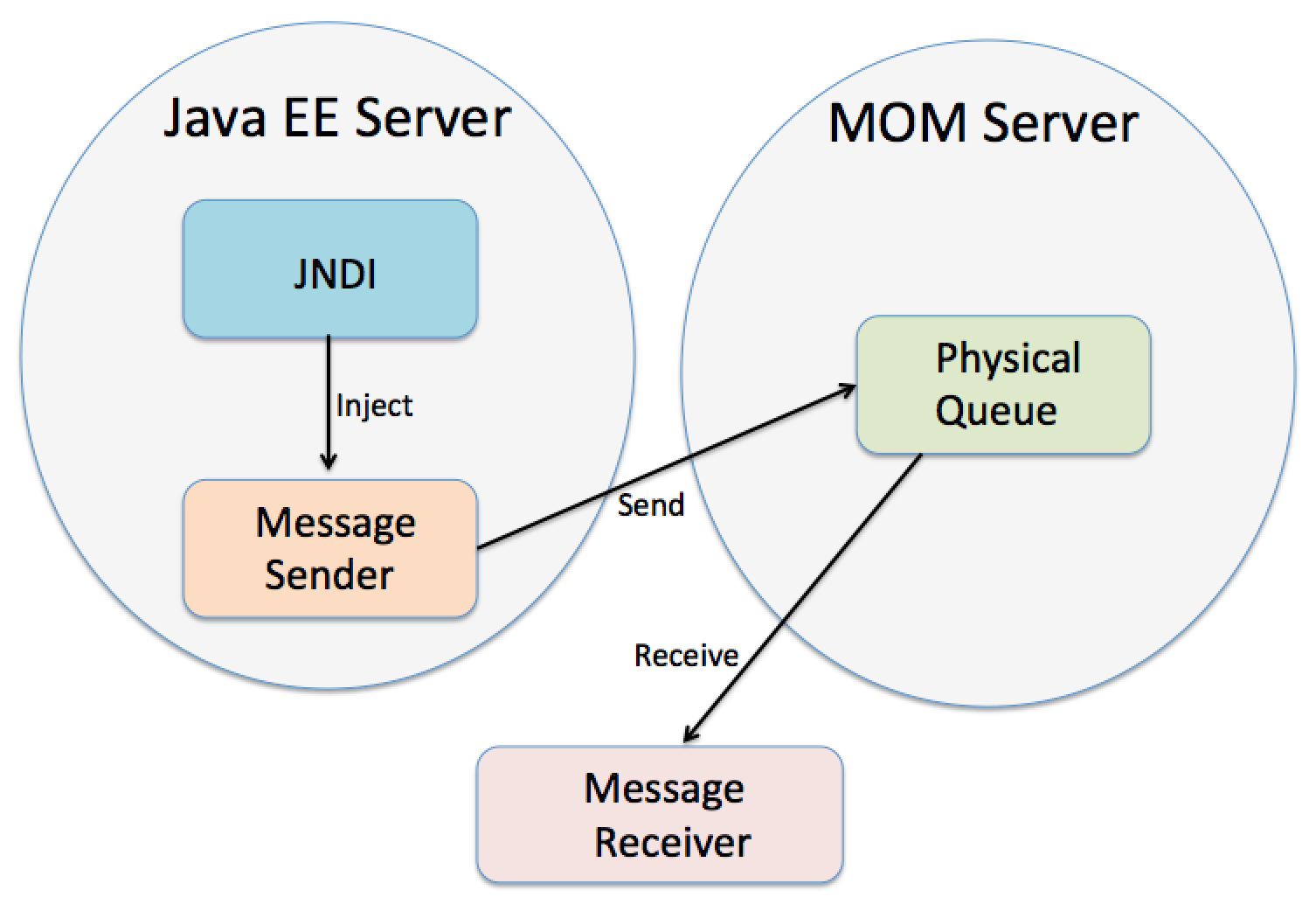
As you see, the code is has several lines specific to Open MQ implementation, which is not great, but gives me a segway to explain the benefits of JNDI and resource injection. Then I explained how to map GlassFish JNDI queue name to a physical queue in the Open MQ server. So here’s the servlet that serves as a JMS sender, and the JNDI name OutgoingTradeOrders is mapped to a physical queue named TradingOrdersQueue.

@WebServlet("/MessageSenderServlet")
public class MessageSenderServlet extends HttpServlet {
	
	  @Resource(lookup ="java:comp/DefaultJMSConnectionFactory")  // JNDI name
	  ConnectionFactory factory;
	  
	  @Resource(lookup = "OutgoingTradeOrders")  // JNDI name
	  Destination ordersQueue;

	  
	protected void doGet(HttpServletRequest request, HttpServletResponse response) 
			  throws ServletException, IOException{	
		
		try( JMSContext context = factory.createContext("admin","admin")){
  
		   JMSProducer producer = context.createProducer();
		      
		   // Send msg to buy 200 shares of IBM at market price	      
		   producer.send(ordersQueue,"IBM 200 Mkt");
		          
		   System.out.println("Placed an order to OutgoingTradeOrders");
	  }
	}
}

Got my Open MQ server running, then deployed the servlet and started GlassFish. The servlet obediently sent a message to the queue OutgoingTradeOrders. Basically, I wanted to implement the following workflow:

figure_30-10

The rest seemed to be easy – I wanted to run my standalone message receiver against the Open MQ server to prove that it’s getting messages from TradingOrdersQueue. Started the receiver, it printed “Listening to the TradingOrdersQueue…” and nothing else. Where is the message that the servlet sent? Is there something wrong with the queue names mapping? Started the Open MQ admin console – looks good, the TradingOrdersQueue is there. Started GlassFish Admin Tool – the OutgoingTradeOrders is properly mapped to TradingOrdersQueue.

Then I decided run the servlet again to send a second message to the queue. Maybe the first message got stuck somewhere and the second one would push it out? Nope, no miracles. Tested again the standalone sender and the receiver – work fine. But where are the servlet’s messages?

What would you do in this situation? Correct, it’s time to take a peek into the queue from the servlet’s code to see if is anybody there. Added QueueBrowser to the servlet, which properly showed me the messages sent by the servlet – they were sitting nicely next to each other in the OutgoingTradeOrders queue. Man!

Added the QueueBrowser to the standalone message receiver – the TradingOrdersQueue is empty. What next? I knew this was an Ear-Eye case, but still it would be nice if I could have blamed someone, wouldn’t it? Should I open a ticket at the GlassFish JIRA? Or is it an issue of Open MQ?

Later. I decided to walk my doggy (his name is Sammy) out. During the walk I was thinking about that case when two group of workers started building a tunnel from both sides of the river hoping to meet in the middle, but built two tunnels instead. When I came back, I decided to see if there is something fishy with the port numbers.

I have the only distribution of GlassFish which has the only subdirectory called mq, where the Open MQ software resides. So in both cases (imqbrokerd and GlassFish) I’d be starting the same instance of the Open MQ server, right? Wrong! While imqbrokerd starts it on port 7676, GlassFish start the embedded OpenMQ on port 27676, which is not written in their admin guides. If found a system variable JMS_PROVIDER_PORT deep inside in the GlassFish file glassfish/domains/domain1/config/domain.xml!

This was a situation with tho tunnels! The standalone clients were sending messages to the server running on port 7676, while the servlet was pumping messages to the Open MQ instance running on the port 27676! After changing the port from 277676 to 7676 everything started working!

I would have caught this bug a lot faster, but the GlassFish Admin console was showing me the physical queue TradingOrderQueue that I configured on the server running on port 7676! That’s why I was sure that I was working with the only instance of Open MQ. This is clearly a design flow in the GlassFish Admin Console – instead of showing the physical queues by actually connecting to the Open MQ server, they just read if from the config file.

Anyway, the Ear-Eye issue is resolved. That’s all folks.

What’s the difference between abstract classes and interfaces?

Probably the most popular question during Java technical interviews is “What’s the difference between abstract classes and interfaces”.  In my own three year old book I’ve offered the following answer:

“An abstract class may contain code in method bodies, which is not allowed in an interface.With abstract classes you have to inherit your class from the abstract one because Java does not allow multiple inheritance. On the other hand, you can implement multiple interfaces in your class.”

But starting from Java 8 this answer is wrong. This is how I’d answered it now:

1. The short answer: “Abstract classes can implement state in member variables, but interfaces can’t.  You can extend from one abstract class, but implement multiple interfaces.”

2. The long one: “Both abstract classes  and interfaces allow you to implement common static methods while leaving the implementation of some methods to other classes. Abstract classes can also have instance-specific methods and they enforce vertical inheritance hierarchy.  Interfaces can’t have instance methods, but they don’t enforce any class hierarchy, so your class can extend any other class while implementing multiple interfaces.

So abstract classes and interfaces have subtle differences now, which are good to recognize anyway. You can find more details on this subject in the draft of Chapter 5 of my upcoming Java for Kids book.

JavaFX Event handling and Property Binding

Some time ago I blogged that Java Swing should be deprecated and replaced with JavaFX. In this blog I’ll show a piece of JavaFX namely event handlers and binding. I’ve created a simple Sign In window with a GridPane layout (it’s JavaFX equivalent of Swing’s GridBagLayout). I’m not going to spend much time on the GridPane itself, but will show you a basic event handling and a binding.

In JavaFX an event object is represented by the instance of the class javafx.event.Event. There are different ways of handling events. Depending on how you structured your application you can handle events either in Java or in FXML. In this blog I’ll do everything in Java, where you can process events using one of the following techniques:

1. Create an instance of an anonymous class overriding its handle() callback method. Pass it to the the event handler for a specific event.

2. Use lambda expressions.

3. Use Java method references introduced in Java 8.

The Sign In window, will have the buttons Sign In, Cancel, and the hyperlink Forgot password. Each of these controls will use different way of handling click event. The Sign In window will look as follows:

f1807

The event handler for the button Sign In will be implemented using an anonymous inner class. The event handler for the Cancel button will be implemented using a lambda expression. I’ll implement the click handler for the hyperlink Forgot password using a method reference. The code of the class GridPaneSampleEvents is shown next (see the section marked as event handlers).

public class GridPaneSampleEvents extends Application {

    public void start(Stage primaryStage) {
        
        Label userIdLbl = new Label("User ID:");
        TextField userIdTxt = new TextField();
        Label userPwdLbl = new Label("Password:");
        PasswordField userPwdTxt = new PasswordField();
        Button signInBtn = new Button ("Sign In");
        Button cancelBtn = new Button ("Cancel");
        Hyperlink forgotPwdLink = new Hyperlink("Forgot password");

        GridPane root = new GridPane();
        root.setVgap(20);
        root.setPadding(new Insets(10));
        root.setAlignment(Pos.CENTER);
        
        // Using static methods for setting node constraints 
        GridPane.setConstraints(userIdLbl, 0, 0);
        GridPane.setConstraints(userIdTxt, 1, 0);
        GridPane.setConstraints(userPwdLbl, 0, 1);
        GridPane.setConstraints(userPwdTxt, 1, 1);
        GridPane.setConstraints(signInBtn, 0, 2);
        //Cancel button: span 1, right aligned
        GridPane.setConstraints(cancelBtn, 1,2, 1, 1, HPos.RIGHT,
                                                      VPos.CENTER);
        GridPane.setConstraints(forgotPwdLink, 0, 3,2,1);

        root.getChildren().addAll(userIdLbl, userIdTxt, userPwdLbl, 
                     userPwdTxt,signInBtn, cancelBtn, forgotPwdLink);
            
        // event handlers
        //1. Anonymous class 
        signInBtn.setOnAction(new EventHandler(){
            public void handle(ActionEvent evt){
              System.out.println(
                      "Anonymous class handler. Sign in clicked.");   
            }
        });
        
        // lambda expression
        cancelBtn.setOnAction(evt -> 
            System.out.println("Lambda handler. Cancel clicked.")
        );
        
        // method reference
        forgotPwdLink.setOnAction(this::forgotPwdHandler);
        
        // Show the window
        Scene scene = new Scene(root,250,200);
        primaryStage.setScene(scene);
        primaryStage.show();

    }
    
    private void forgotPwdHandler(ActionEvent evt){
        System.out.println(
              "Method reference handler. Forgot password clicked");
    }

    public static void main(String[] args) {
        launch(args);
    }
}

If you run this program, and click on Sign In, Cancel, and Forgot password, the console output will show the following:

Anonymous class handler. Sign in clicked.
Lambda handler. Cancel clicked.
Method reference handler. Forgot password clicked

While each of the event handlers works the same, I prefer the lambda expression version as it’s concise and is easy to read. Each of the JavaFX GUI controls has a set of setOnXXX() methods (e.g. setOnAction(), setOnMouseMoved() et al) that should be called for the events you’re interested in handling.

Properties and Binding

While Java developers casually use the words properties referring to class attributes, JavaFX properties are more than just class attributes. JavaFX defines an interface javafx.beans.property.Property, which has a very useful functionality allowing to bind the GUI components (the view) with properties of the Java classes (the model) and automate notifications of the GUI components when the value in the model change or visa versa.

Imagine that you’re developing a financial application that receives notification from the server about the stock price changes. When a Java object receives the new price, you need to modify the content of the corresponding GUI component. With JavaFX you can simply bind a property price of a Java class to the property of, say Label component. No more coding required. As soon as the price value changes, the Label will be automatically updated. JavaFX properties greatly simplify the process of synchronization of the data and the GUI.

Existing implementations of the Property interface serve as wrappers to Java attributes adding the change notification functionality. The interface Property declares the following methods: bind(), unbind(), bindBidirectional() , unbindBidirctional(), and isBound(). Can you bind any value to a JavaFX property? No – the value has to be of an ObservableValue type.

JavaFx property classes are located in the package javafx.beans.property. For each property type there are two classes: read-only and read-write ones. For example, if you need a String property, use either SimpleStringProperty or ReadOnlyStringWrapper. Both of these implement StringProperty interface. Similarly named classes exist for other data types and some collections too.

Let’s modify the GridPaneSampleEvents class. I will place an additional Label components at the bottom of the Sign In window. It’ll display the messages about the events as the user clicks on the buttons and the hyperlink. Initially this label will not have any text:

Label messageLbl = new Label();

JavaFX properties are observables. Hence we can add a listener (observer) to the property to be notified when the property value changes. But it’s much easier to simply use property in a binding expressions. I’ll bind this label to the string property, and as soon as the value of this property changes, the label component messageLbl will display this value.

private StringProperty message = new SimpleStringProperty();
messageLbl.textProperty().bind(message);

The class GridePaneSampleEvents was just printing messages on the system console when the user clicked on the buttons or the hyperlink. The new class GridPaneSampleBinding will modify our property message instead, for example:

cancelBtn.setOnAction(evt -> message.set(“Cancel clicked.”));

The click on the cancelBtn changes the value of the the message property, which was bound to the label’s text – the GUI will change automatically! This is how our Sign In window will look like after pressing the Cancel button.

f1808

The complete code of the GridPaneSampleBinding class is shown next.

public class GridPaneSampleBinding extends Application {

    //Declaring a JavaFX property
    private StringProperty message = new SimpleStringProperty();
    
    public void start(Stage primaryStage) {
        
        Label userIdLbl = new Label("User ID:");
        TextField userIdTxt = new TextField();
        Label userPwdLbl = new Label("Password:");
        PasswordField userPwdTxt = new PasswordField();
        Button signInBtn = new Button ("Sign In");
        Button cancelBtn = new Button ("Cancel");
        Hyperlink forgotPwdLink = new Hyperlink("Forgot password");
        
        // A label to display messages using binding
        Label messageLbl = new Label();
        // binding the StringProperty to a GUI component
        messageLbl.textProperty().bind(message);
        
        GridPane root = new GridPane();
        root.setVgap(20);
        root.setPadding(new Insets(10));
        root.setAlignment(Pos.CENTER);
        
        // Using static methods for setting node constraints 
        GridPane.setConstraints(userIdLbl, 0, 0);
        GridPane.setConstraints(userIdTxt, 1, 0);
        GridPane.setConstraints(userPwdLbl, 0, 1);
        GridPane.setConstraints(userPwdTxt, 1, 1);
        GridPane.setConstraints(signInBtn, 0, 2);
        
        //Cancel button: span 1, right aligned
        GridPane.setConstraints(cancelBtn, 1,2, 1, 1, 
                                      HPos.RIGHT, VPos.CENTER);
        GridPane.setConstraints(forgotPwdLink, 0, 3,2,1);
        
        // Message label: span 2
        GridPane.setConstraints(messageLbl, 0,4,2,1);

        root.getChildren().addAll(userIdLbl, userIdTxt, userPwdLbl,
          userPwdTxt,signInBtn, cancelBtn, forgotPwdLink, messageLbl);
        
        // event handlers
        //1. Anonymous class 
        signInBtn.setOnAction(new EventHandler(){
            public void handle(ActionEvent evt){
                  message.set("Sign in clicked.");   
            }
        });
        
        // lambda expression
        cancelBtn.setOnAction(evt -> 
           message.set("Cancel clicked.")
        );
        
        // method reference
        forgotPwdLink.setOnAction(this::forgotPwdHandler);
        
        // Show the window
        Scene scene = new Scene(root,250,220);
        primaryStage.setScene(scene);
        primaryStage.show();
    }
    
    private void forgotPwdHandler(ActionEvent evt){
        message.set("Forgot password clicked");
    }

    public static void main(String[] args) {
        launch(args);
    }
}

The binding can be bidirectional. If the value of the GUI component changes it can change the value of the underlying model (remember MVC?), and if the value of the model changes the GUI is updated too. If you want to stop binding at any time, use the method unbind().

That’s all folks for now.

Why Java Applets should be banned

During my training classes on Web development with Java I used to ask students this question, “Do you think it would be a smart move if Amazon.com would create their online store using Java Applets?” The right answer is “Yes, if their goal is to go out of business.”

While back in 1995 Java was introduced to the world with the help of Applets (remember that dancing Duke?) this technology was buried by Microsoft (remember that law suit between Sun and Microsoft back in 1998)?

Web applications written with Java Applets would require the user to have the Web browser supporting specific JRE required by the applet. If in the past I was joking that a truck driver from Alabama would not be able to install the proper JRE on his computer, now I have to admit that I ran into a serious issues with this as well. Here’s my story.

I need to run a Webinar for O’Reilly on Tuesday. This will be a second one. The first one was three months ago. When I was testing the software for presenters, I was told not to use Chrome browser, cause they use Web conference software from on24.com, which doesn’t support Chrome. Why? Because they use Java for the Web client. Fine. I started the Firefox, installed the Java plugin and was able to run the Webinar. Disclaimer: three months ago I was using Java 7 under MAC OS X.

Today I use Java 8. I decided to practice with On24 software for the upcoming seminar and got Java errors. Sent a stack trace to O’Reilly, they contacted On24, and I got an answer: uninstall Java 8 from your computer and install Java 7. On24 Webinar platform doesn’t support Java 8, which was released six months ago. WAT?

But I don’t want to uninstall/reinstall Java just to run a Web conference. It’s 2014 for crying out loud! As a matter of fact I have both Java 7 and 8 installed on my MAC OS 1.9.4. Can I just configure my MAC OS to use Java 7? In the past, MAC System Preferences would allow to select the Java version – not anymore. Found a script to run during the boot of my Macbook to make it use Java 1.7. Great, it worked, but only for applications – typing java -version in the Terminal window properly reported Java 7. Unfortunately Firefox uses its own Java plugin that still sees my Java 8, and the On24 applet still crashes. Firefox on MAC doesn’t offer installing older versions of the Java plugins for security reasons. Actually, replacing Java 8 JavaAppletPlugin.plugin from the Internet Plugins folder with the one from Java 7 will make Firefox happy, but the applet from On24 still doesn’t work properly.

I’m not a truck driver from Alabama, but I’m about to give up and will uninstall Java 8 just to run this Webinar. Hope this will help.

Amazon is not stupid. They would never develop a Web front end with Java applets. But On24.com should seriously consider modernizing their Web conferencing platform unless their goal is to go out of business.

Closures in Java With Lambdas

While working on the second edition for my Java 24-hour Trainer book I’m re-writing some of the code samples to use lambda expressions. Today I was re-writing an example for wait/notify for the chapter on multi-threading. Beside illustrating the wait/notify, I used a closure in this example. Since Java closures are not well presented in the blogosphere, I decided to write a quick blog on the subject.

My goal was to write a program that starts a thread and waits for the notification from that thread until its execution is completed. When the main thread receives the notification from the second thread it continues processing.

In the traditional object oriented programming you’d create a class that implements Runnable with a constructor receiving an object to send notification to, for example:

class MarketNews implements Runnable throws InterruptedException{
    Object parent;
    
    MarketNews(Object whoToNotify){
        parent=whoToNotify;
    }

    public void run(){
       // Do something
       synchronized(parent){
           parent.notify();
       }
    }
}

Turning Runnable into a lambda expression and creating a thread is simple:

  Runnable mNews = () -> {
	// Do something
        // But who to notify????
  }; 
   
  Thread marketNews = new Thread(mNews, "Market News");
  marketNews.start();

But how to let the mNews know who to notify when this “Do something is done?” How to pass the reference to that parent thread? It’s not overly difficult if you understand the concept of closures and know that a method can return lambda expression.

In functional languages like JavaScript a closure is a nested function that knows the context where it was declared (I know, it’s fuzzy, just bear with me). In Java there is not nested function but you can return a lambda expression from a method:

private Runnable getMktNewsRunnable(){
   return () -> {//Do something};
}

Runnable mktNewsRunnable = getMktNewsRunnable();

After running the above code the variable mktNewsRunnable will store the text of the lambda expression that can be used for creating a thread:

new Thread(mktNewsRunnable, “Market News”).start();

But this version of lambda expression still doesn’t know who to notify. Let’s fix it:

private Runnable getMktNewsRunnable(Object whoToNotify){
   return () -> {
      // Do something
      // whoToNotify.notify();
   };
}

Runnable mktNewsRunnable = getMktNewsRunnable(this);

I’m using the fact that when the closure was created by the above return statement, it knew about the existence of the variable whoToNotify in the neighborhood! The rest is easy – just put the call to notify() into the synchronized block to make the Java compiler happy. Here’s the complete working example.

public class TestLambdaWaitNotify {

  private static Runnable getMktNewsRunnable(Object whoToNotify){
      
	return  () -> {
		 try{
	      for (int i=0; i<10;i++){
	       Thread.sleep (1000);  // sleep for 1 second
	       System.out.println( "The market is improving " + i);
	      } 
	      
	      synchronized(whoToNotify){
	          whoToNotify.notify(); // send notification to the calling thread	   
	       }
	    }catch(InterruptedException e ){
	       System.out.println(Thread.currentThread().getName() 
	                                        + e.toString());
	    }  
	};    
  }
	
	
  public static void main(String args[]){
    	
	 TestLambdaWaitNotify thisInstance = new TestLambdaWaitNotify();
	 
	 Runnable mktNewsRunnable = getMktNewsRunnable(thisInstance);
	 Thread marketNews = new Thread(mktNewsRunnable,"");
	 marketNews.start();
   
     
     synchronized (thisInstance) {
    	   try{
    		   thisInstance.wait(20000);  // wait for up to 20 sec
    	   } catch (InterruptedException e){ 
    		   e.printStackTrace();
    	   }
    	 }
     
        System.out.println( "The main method of TestLambdaWaitNotify is finished");
  }
}

The main thread will print the message “The main method of TestLambdaWaitNotify is finished” only after receiving the notification from Runnable or when 20 sec expires. Easy?

If you want to see how to write closures in JavaScript, I’ll be running a JavaScript Webinar for O’Reilly on Aug 5th.

Working on the second edition of Java Tutorial

In 2011 Wiley (Wrox) published my book “Java Programming. 24-Hour Trainer“. To be honest, I don’t like the title because it misleads people as if this book promises that the reader can learn Java within 24 hours. But creators of this series (many titles were published under this umbrella) meant to say that this book was like your personal instructor; 24 hours a day. Whatever. It’s not my call.

But earlier this year I got a call from the publisher stating that they’re happy with the book sale numbers and want me to update the book and release the second edition reflecting the latest changes in the Java Language.

I agreed because with the latest release Java became more interested than ever. The magnitude of changes to the Java 8 language and APIs can be compared with Java 5 that was released back in 2004. It’s exciting to program in Java again.

In the second edition I’m replacing Java applets chapters with JavaFX . The Java EE part will reflect the latest Java EE edition. Of course, I’m adding the coverage of lambdas and Stream API. Re-writing and simplifying all examples and testing them in the freshly released Eclipse Luna IDE. GlassFish 4 is my server of choice for all Java EE 7 examples.

Those of you who used the first edition of my book or watched my Intro To Java video lessons may start using the fresh version of code examples, which I started publishing on Github. So far I’ve I’ve uploaded examples for lessons 1-10 and 13-17. If you haven’t worked with git, watch this video to get up to speed. I’d really appreciate your feedback on these code samples. The Table of Contents of the second edition is shown below.

1. Introducing Java
2. Integrated Development Environment
3. Object-Oriented Programming with Java
4. Class Methods and Constructors
5. Java Syntax: Bits and Pieces
6. Packages, Interfaces, and Encapsulation
7. Programming with Abstract Classes and Interfaces
8. GUI Basics with Swing
9. Event Handling in Swing GUI
10. Error Handling
11. GUI Basics with JavaFX
12. Developing a game with JavaFX
13. Collections
14. Generics
15. Lambda Expressions and Functional Programming
16. Working with I/O Streams
17.Java Serialization
18. Network Programming Basics
19. Introduction to Concurrency
20. The Stream API
21. Working with Databases Using JDBC
22. Rendering Table Data to GUI
23. Annotations and Reflection
24. Remote Method Invocation
25. Java EE 7 Overview
26. Programming with Servlets
27. JavaServer Pages
28. Web Applications with WebSockets
29. Java Messaging Service
30. Java Naming and Directory Interface
31. Enterprise JavaBeans
32. Java Persistence API
33. RESTful Web Services With JAX-RS
34. Introduction to Spring MVC Framework
35. Introduction to Spring Security
36.Build Automation with Gradle
37. Java Technical Interviews

Losing Polymorphism with Java Lambda Expressions

Yesterday, I decided to re-write with lambdas one of the example I use while explaining polymorphism during my Java trainings. I realize that lambdas promote functional style of programming and implementing inheritance via composition over polymorphism, which is one of the crucial object-oriented features. Still, I decided to try mixing traditional OOP and functional styles to see what happens.

The Task

The class Person has two descendants: Employee and Contractor. Also, there is an interface Payable that’s used to increase pay for workers.

public interface Payable {
   int INCREASE_CAP = 20;
   boolean increasePay(int percent);
}

Both Employee and Contract implement Payable, but the implementation of the increasePay() should be different. you can increase pay to the Employee by any percent, but the Contractor’s pay increase should stay under INCREASE_CAP.

The OOP version

Here’s the class Person:

public class Person {
	private String name;
	
	public Person(String name){
		this.name=name;
	}

	public String getName(){
		return "Person's name is " + name; 
	}
}

Here’s the Employee:

public class Employee extends Person  implements Payable{

   public Employee(String name){
     super(name);
    }
    public boolean increasePay(int percent) {
    System.out.println("Increasing salary by " + percent + "%. "+ getName()); 
    return true;
  }
}

Here’s the Contractor:

 public class Contractor extends Person implements Payable {
	
   public Contractor(String name){
 	super(name);
    }
   public boolean increasePay(int percent) {
	if(percent < Payable.INCREASE_CAP){
	  System.out.println("Increasing hourly rate by " + percent + 
                                      "%. "+ getName()); 
	  return true;
	} else {
	   System.out.println("Sorry, can't increase hourly rate by more than " + 
                       Payable.INCREASE_CAP + "%. "+ getName());
	   return false;
	}
  }
}

Here’s the code that will perform pay increase in a polymorphic way:

public class TestPayInceasePoly {

  public static void main(String[] args) {

     Payable workers[] = new Payable[3];
	workers[0] = new Employee("John");
	workers[1] = new Contractor("Mary");
	workers[2] = new Employee("Steve");		
	
        for (Payable p: workers){
	    p.increasePay(30);
	 }
  }
}

The output of this program looks like this:

Increasing salary by 30%. Person’s name is John
Sorry, can’t increase hourly rate by more than 20%. Person’s name is Mary
Increasing salary by 30%. Person’s name is Steve

Introducing Lambdas

Now I decided to experiment with lambdas. Namely, I wanted to pass a function as an argument to a method. I wanted to extract the increase pay logic from Employee and Contractor into lambda expressions and pass them to workers as argument to their methods.

I left the code of the Payable interface without any changes.

Here’s the new Person class that includes the method validatePayIncrease, which will take a lambda expression as a first argument (passing a function to a method):

public class Person {
	
	private String name;

	public Person (String name){
		this.name = name;
	}
	
	public String getName(){
		return name;
	}
	
	public boolean validatePayIncrease(Payable increaseFunction, int percent) {
			 
         boolean isIncreaseValid= increaseFunction.increasePay(percent); 
         	 
         System.out.println( " Increasing pay for " + name + " is " + 
        	              (isIncreaseValid? "valid.": "not valid."));
		 return isIncreaseValid;
	}
}

The new version of Employee doesn’t implements Payable:

public class Employee extends Person{

  // some other code specific to Employee goes here

  public Employee(String name){
	  super(name);
  } 
}

The new version of Contractor doesn’t implements Payable either:

	  
public class Contractor extends Person{
    

  // some other code specific to Contractor goes here

    public Contractor(String name){
       super(name);
    }
}

Finally, the program that will increase the pay to all workers passing different lambda expressions to employees and contractors.

public class TestPayIncreaseLambda {
	
  public static void main(String[] args) {

        Person workers[] = new Person[3];
		workers[0] = new Employee("John");
		workers[1] = new Contractor("Mary");
		workers[2] = new Employee("Steve");		

	  // Lambda expression for increasing Employee's pay
	   Payable increaseRulesEmployee = (int percent) -> {
				return true;
	   };
	   
		// Lambda expression for increasing Contractor's pay	   
	    Payable increaseRulesContractor = (int percent) -> {
	    	if(percent > Payable.INCREASE_CAP){
	    		System.out.print(" Sorry, can't increase hourly rate by more than " + 
	    	             Payable.INCREASE_CAP + "%. "); 
				return false;
			} else {	
				return true;
			}
	   };	
	   
	   for (Person p: workers){
		   if (p instanceof Employee){
			   // Validate 30% increase for every worker
			   p.validatePayIncrease(increaseRulesEmployee, 30); 
		   } else if (p instanceof Contractor){
			   p.validatePayIncrease(increaseRulesContractor, 30);
		   }
	   }
  }

}

As you see, I’m passing one or the other lambda expression to the method validatePayIncrease. Running this program produces the following output:

Increasing pay for John is valid.
Sorry, can’t increase hourly rate by more than 20%.  Increasing pay for Mary is not valid.
Increasing pay for Steve is valid.

It works, but so far I like my OOP version better than the lambda’s one:

1. In the OOP version I’ve enforced a contract – both Employee and Contractor must implement Payable. In the lambda’s version it’s gone on the class level. On the plus side, the strong typing still exists in the lambda’s version –  the type of the valiastePayIncrease first argument is Payable.

2. In the OOP version I didn’t use type checking, but in the lambda’s version this ugly instanceof creeped in.

While it’s cool that I can pass the function to the object and execute it there, the price seems to be high. Let’s see if this code can be further improved.

Getting rid of the class hierarchy

Currently the code in Employee and Contractor is the same. If the only difference in their code is implementation of the validatePayIncrease method, we can remove the inheritance hierarchy and just add the property boolean workerStatus to the class Person to distinguish employees from contractors.

Let’s get rid of the classes Employee and Contractor and modify the Person. I’ll add the second argument to the constructor workerStatus.

public class Person {
	
	private String name;
	private char workerStatus;  // 'E' or 'C'

	public Person (String name, char workerStatus){
		this.name = name;
		this.workerStatus=workerStatus;
	}
	
	public String getName(){
		return name;
	}
	
	public char getWorkerStatus(){
		return workerStatus;
	}
	
	public boolean validatePayIncrease(Payable increaseFunction, int percent) {
			 
         boolean isIncreaseValid= increaseFunction.increasePay(percent); 
         	 
         System.out.println( " Increasing pay for " + name + " is " + 
        	              (isIncreaseValid? "valid.": "not valid."));
		 return isIncreaseValid;
	}
}

The code of the TestPayIncreaseLambda will become simpler now. We don’t need to store objects of different types in the array workers and can get rid of the instanceof:

public class TestPayIncreaseLambda {
	
  public static void main(String[] args) {

        Person workers[] = new Person[3];
		workers[0] = new Person("John", 'E');
		workers[1] = new Person("Mary", 'C');
		workers[2] = new Person("Steve", 'E');		

	  // Lambda expression for increasing Employee's pay
	   Payable increaseRulesEmployee = (int percent) -> {
				return true;
	   };
	   
		// Lambda expression for increasing Contractor's pay	   
	    Payable increaseRulesContractor = (int percent) -> {
	    	if(percent > Payable.INCREASE_CAP){
	    		System.out.print(" Sorry, can't increase hourly rate by more than " + 
	    	             Payable.INCREASE_CAP + "%. "); 
				return false;
			} else {	
				return true;
			}
	   };	
	   
	   for (Person p: workers){
		   if ('E'==p.getWorkerStatus()){
			   // Validate 30% increase for every worker
			   p.validatePayIncrease(increaseRulesEmployee, 30); 
		   } else if ('C'==p.getWorkerStatus()){
			   p.validatePayIncrease(increaseRulesContractor, 30);
		   }
	   }
  }
}

If a new type of a worker will be introduced (e.g. foreign workers), we’ll just need to add another lambda expression to the class TestPayIncreaseLambda that implements business rules for foreign workers.

The purists may not like the fact that I’m using hardcoded ‘E’ and ‘C’.You can add a couple of final variables EMPLOYEE and CONTRACTOR at the top of this class.

So what’s the verdict? Losing polymorphism may not be a bad thing. The code became simpler, we’ve removed two classes, but didn’t lose the type enforcement (the Payable interface). Software developers that use functional programming languages live without polymorphism and don’t miss it.

P.S. As a matter of fact you can lose the Payable interface too. This would require a different implementation of our lambda expressions with the help of the interfaces from the new package java.util.function. But this should be a topic of a separate blog. OK, here’s a hint: I did it using the BiFunction interface.

Swing rendering seems to be broken in Java 8

Here’s a simple Java program that I wrote to test Swing GUI in Java 8 (I use JDK 1.8.0_05-b13):


import javax.swing.JFrame;
import javax.swing.JButton;

public class HelloWorld extends JFrame {

public static void main(String[] args) {
JFrame myWindow = new HelloWorld();

// Creating and adding a button the the container
JButton myButton = new JButton (“Click me”);
myWindow.add(myButton);

myWindow.setSize(200,300);
myWindow.setTitle(“Hello World”);
myWindow.setVisible(true);
}
}

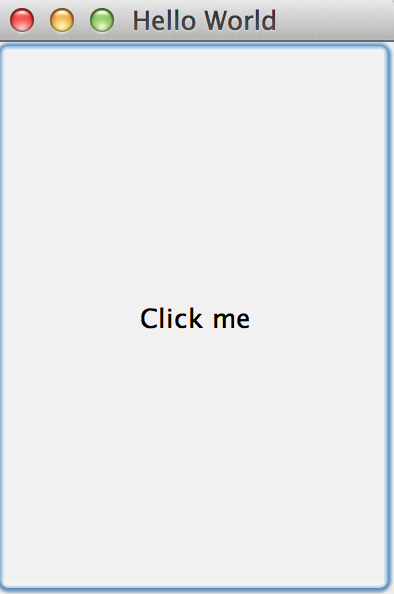
The program renders fine on MAC OS:
HelloWorld_java8_MAC

But this is what I get on Windows 7 Ultimate with JDK 1.8.0_05-b13:
HelloWorld_java8_Windows

In JDK 1.7 under Windows it works fine:

HelloWorld_java7_Windows

I’ve asked some people to try the same code with the same version of Java and they don’t see this issue.

I’ve submitted a bug report to Oracle (it’s in review for two weeks), but if you use Java Swing, test your code before migrating to Java 8.

Update.Running this app with the following command-line parameters helped fixing the situation with bad rendering on Windows:
java -Dsun.java2d.opengl=True HelloWorld
java -Dsun.java2d.d3d=false HelloWorld

So the Swing rendering is broken as it should not depend on the external to JVM software.