ECMAScript 6, block-level functions, and the strict mode

I was preparing code samples for my ECMAScript 6 (ES6) workshop. ES6 has tons of new language features and programming in the next version of JavaScript is a lot of fun. In particular, ES6 supports block-level functions, so the following code should produce the error “doSomething is not defined”.

 
  {
    function doSomething(){
      console.log("In doSomething");
    }
  }

  doSomething();

And it does if you test it in ES6 Fiddle:

es6fiddle

But the best part about ES6 is that you can use it today in your real world projects. Just run it through one of the transpilers, which will convert ES6 to ES5 code ready for deployment in all existing Web browsers. Let’s see how the Babel handles my block-level function:

babel

As you can see, Babel renamed my function to _doSomething, so doSomething is not defined, which is correct.

The Traceur transpiler did pretty much the same trick, and doSomething is not defined:

traceur

Now let’s run the same code in the console of the developer’s edition of FireFox, which doesn’t support block-level functions. It behaves differently. Because of the hoisting, the declaration of the function doSomething has been moved to the top of the script and it is defined and works.

FF

Google Chrome (allegedly supports block-level functions) also applies hoisting and invokes doSomething (stable and experimental JavaScript features were enabled). Something is broken here. After quick search I found this ES5 recommendation that in strict mode programmers shouldn’t declare functions in a statement context (ny statement they meant block). Let’s use strict mode and try it again in FireFox:

ff2

In strict mode this code gives a syntax error in FireFox. Chrome, Babel, and Traceur still produce “doSomething is undefined” in strict mode. It’s not the end of the world, but get prepared for inconsistent results.

New Java books and videos

The second edition of my Java tutorial went on sale.
While this is not my first book, it’s special, because it’s a second edition. When you see a second edition of any book, it means that the first one was successful (i.e. was profitable for the publisher). I don’t remember the exact figures, but I made around $40K in the form of royalties for the first edition.

java24cover
In the second edition I’ve re-written a half of the book from scratch. The release of Java 8 was THE major release of this 20 year-old super popular programming language, and I had to cover the new syntax and APIs of the language.

I’ve replaced the chapters covering Swing with showing a modern way of developing GUI with JavaFX 8. The chapters about Spring, Hibernate, and JSF are out. The chapters about WebSockets and Logging and Gradle are in.

This book comes with more than 7 hours of professional-grade video screencasts produced by Chad Darby. You can watch several of these videos here.

My special thanks to the technical editors Martijn Verberg and Rajesuwer Singaravelu for providing valuable input about the book content.

Finally, I’d like to thank Wiley editors for their professionalism, and O’Reilly Media that provided a great publishing platform Atlas, which spared me from using MS Word.

Cover
In parallel, I was writing a book “Java For Kids”, and the drafts of this book are available at this Web site. At this point I have no official publisher for this book, and the content is available for free (subject to change). I also plan to create a training manual based on this book and start running workshops teaching kids Java programming. These manuals will be available for free for anyone who wants to teach Java.

I hope you’ll enjoy the reading as much as I enjoyed writing these books!

Partying with IntelliJ IDEA Dart, Java, WebSocket and Glassfish

Recently I wrote a blog showing how to use the WebSocket protocol to push the data from a Java server to a JavaScript client. This time I’ll keep the same code on the server, but the client will be written in Dart. For this example I was using GlassFish 4.1 server, and IntelliJ IDEA 14.1 with installed Dart plugin. I also have Dart 1.9.1 SDK. My goal was to create one Web application deployable module that would contain both Java and Dart code.

I’ll be brief assuming the the reader has some familiarity with IntelliJ IDEA IDE and the structure of Dart projects. Repeating the same exercise in Eclipse IDE should be a trivial task too.

By the time I was creating this app, I already had an IntelliJ IDEA project with multiple Dart modules. So I wanted to add a new Java module with Dart support to the same project. If you prefer creating a new IDEA project from scratch, instead of creating a new module create a new project. Here’s how I did it:

1. Create a new GlassFish configuration (IDEA menu Run | Edit Configurations) pointing at the existing GlassFish installation.

2. Create a new module of type Java Enterprise selecting GlassFish as an application server Web Application and WebSocket as additional libraries. IDEA will create a project with directories src and web (the latter will contain the WEB-INF dir). I called my module GlassfishWebsocketDart. IDEA will also generate index.jsp, which you can delete.
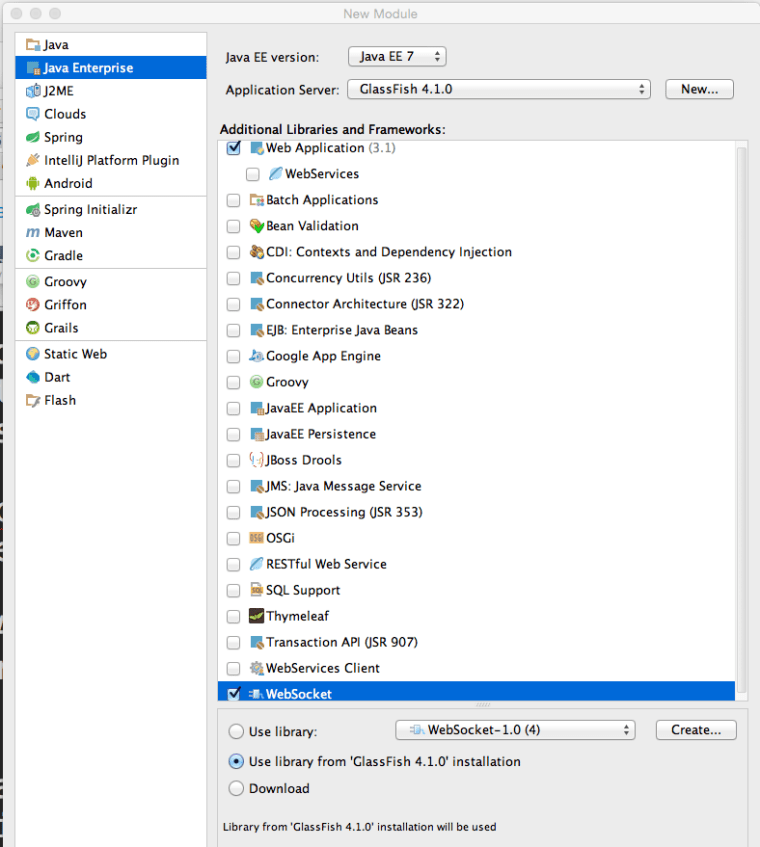
GlassFish_Idea

3. Go to the Project Structure (Cmd ; ) and add GlassFish, GlassFIsh WebSocket, and Dart SDK as dependencies to the module GlassfishWebsocketDart.

4. Create (or copy from an existing Dart module) the files pubspec.yaml and pubspeck.lock into the root dir of your module.

5. Create index.html and main.dart in the web dir. The file index.html can look like this:

 
<!DOCTYPE html>
<html><head>
    <meta charset="utf-8">
    <meta http-equiv="X-UA-Compatible" content="IE=edge">
    <meta name="viewport" content="width=device-width, initial-scale=1.0">
    <meta name="scaffolded-by" content="https://github.com/google/stagehand">
    <title>hello</title>

</head>

<body>

  <div id="output">dart uber</div>

  <script type="application/dart" src="main.dart"></script>
  <script data-pub-inline src="packages/browser/dart.js"></script>
</body></html>

My file main.dart looks as follows:

import 'dart:html';

main() {

  var output = querySelector('#output');

  WebSocket ws = new WebSocket('ws://localhost:8080/GlassfishWebsocketDart_war_exploded/clock');

  ws.onOpen.listen((event){
    output.text = &amp;amp;quot;Connected&amp;amp;quot;;
  });

  ws.onMessage.listen((event){
    output.text = event.data;
  });
}

6. Open main.dart in the editor and IDEA will show the option Enable Dart support – click on it.

7. Right-click on the pubspec.yaml and run pub build (select the debug mode). It’ll create the folder build with files and dart packages required for deployment.
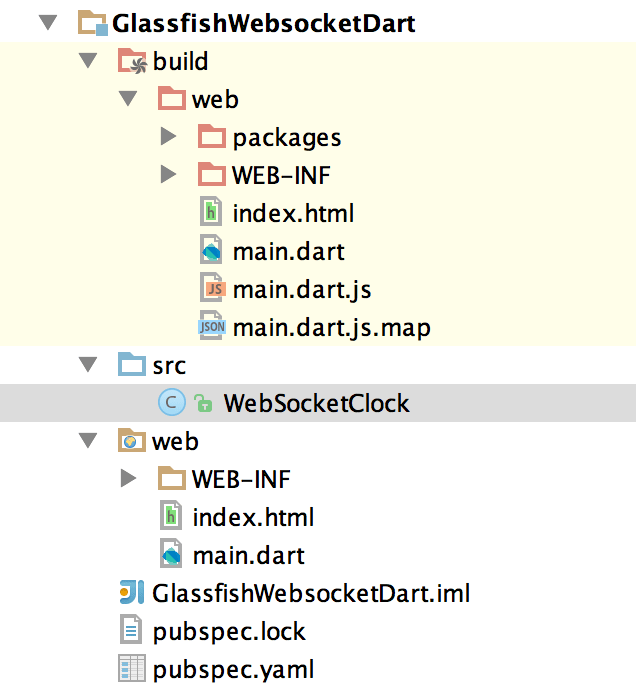
build

8. Copy all the files from the build/web dir into the web dir located in the root of your module.

9. In the src directory create the following file WebSocketClock.java

import javax.websocket.OnOpen;
import javax.websocket.Session;
import javax.websocket.server.ServerEndpoint;
import java.io.IOException;
import java.time.LocalTime;
import java.time.format.DateTimeFormatter;
import java.util.Set;
import java.util.concurrent.Executors;
import java.util.concurrent.ScheduledExecutorService;
import java.util.concurrent.TimeUnit;

@ServerEndpoint("/clock")
public class WebSocketClock {

    static ScheduledExecutorService timer =
            Executors.newSingleThreadScheduledExecutor();

    private static Set<Session> allSessions;

    DateTimeFormatter timeFormatter =
            DateTimeFormatter.ofPattern("HH:mm:ss");
    @OnOpen
    public void showTime(Session session){
        allSessions = session.getOpenSessions();

        // start the scheduler on the very first connection
        // to call sendTimeToAll every second
        if (allSessions.size()==1){
            timer.scheduleAtFixedRate(
                    () -> sendTimeToAll(session),0,1,TimeUnit.SECONDS);
        }
    }

    private void sendTimeToAll(Session session){
        allSessions = session.getOpenSessions();
        for (Session sess: allSessions){
            try{
                sess.getBasicRemote().sendText("Local time: " +
                        LocalTime.now().format(timeFormatter));
            } catch (IOException ioe) {
                System.out.println(ioe.getMessage());
            }
        }
    }
}

10. IDEA can deploy Java web apps in the exploded mode (default) or as an WAR archive. Open the GlassFish configuration (menu Run | Edit), and it should look like this:
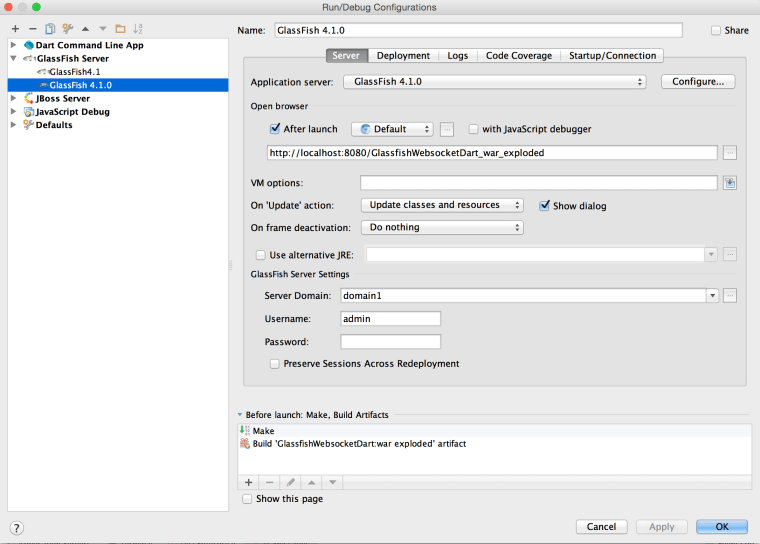
gf_exploded

11. Run your GlassFish and you should see the server pushing the local time every second. The Chromium browser runs the client’s code in its Dart VM, which properly runs WebSocket client communicating with the Java server.
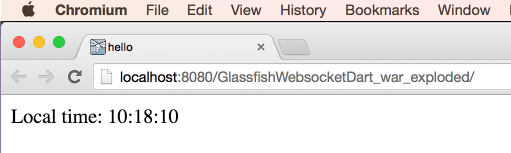
chromium

You may ask, “Will this app work in other browsers that don’t have (and will never have) Dart VM?”. Good question. Theoretically the last two lines in our index.html file should check the presence of Dart VM and replace the references to main.dart with a reference to the JavaScript main.dart.js that was generated by the pub build process.

  <script type="application/dart" src="main.dart"></script>
  <script data-pub-inline src="packages/browser/dart.js"></script>

In practice this may not happen, and you’d get a 404 on “missing” dart.js. Now you have two choices:

a) Manually replace the above two lines with this one:

 <script src="main.dart.js"></script>

b) Add a dependency to your project to use the transformer dart_to_js_script_rewriter to do this replacement automatically. Your modified pubspec.yaml should look like this:

name: 'glassfish_websocket_dart'
version: 0.0.1
description: >
  A web app that illustrates dart, websocket, and glassfish.
environment:
  sdk: '>=1.0.0 <2.0.0'
dependencies:
  browser: any
  dart_to_js_script_rewriter: any
transformers:
  - dart_to_js_script_rewriter

Now run the pub get and pub build and only the JavaScript version will be used. This should be done only if you decide to deploy my useful application in production.

The other improvement that can be done are to create a deployment artifact that builds a WAR file that will include the content from the Dart build folder as well as compiled Java classes. And those who already cut the IDE umbilical cord should automate build and deployment with gradle and gulp.

In April, I’ll be making the presentation “Dart for Java developers” twice. On April 14 I’ll do it online at the New York Dart Users Group, and on April 23 I’ll do a live presentation for the New York Java SIG.

Update for MAC OS users: After upgrading to 10.10.3 GlassFish doesn’t start unless you change the startup line to
/Users/yfain11/glassfish4/glassfish/bin/asadmin start-domain –verbose

How to create a signup screen to minimize the number of users who will sign up

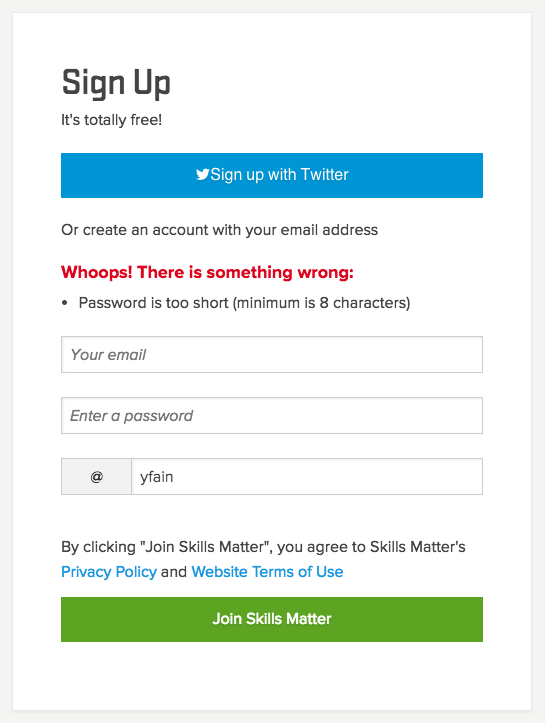
I’m wondering if these developers do this on purpose or they are just random people in our profession? I was trying to sign up at this Web site. Had to enter my email and pick a password, which I did. Nobody warned me that the password had to be 8 characters until I pressed the submit button. Then the new window popped up:

login

Just take a look and try to recreate the line of thinking of the developer of this piece of art:

“I need to let the user enter the password that’s at least 8 characters long. So I’ll hide in the bushes and will quietly wait till the user will make a mistake and enter a shorter password. Then I’ll chuckle: one more fell into my trap. Then I’ll add a cool Whoops message. The instructor in our vocational evening classes told us that the error messages should be shown in red. Makes sense. Let me google how to display the text in red. Got it. There is a Font tag with an attribute color. It was easy. Done.  It would be nice to add a counter to know how many people will enter a short password.  I hope it’ll be covered in the Advanced Programming class that I’m planning to take next year”.

Why some developers hate users so much? The prompt in the password field reads “Enter a password”. Why not add the helpful text prompting to enter at least 8 characters?

Maybe this developer was a rookie? And the QA engineer didn’t notice? And the manager never tried to sign up? And the site owner didn’t care?

It’s all about caring. If you care about your users, you’ll find a way to do it right.

And the biggest irony is that the name of this Web site is Skills Matter. Indeed. That’s why I’m not going to sign up for their services.

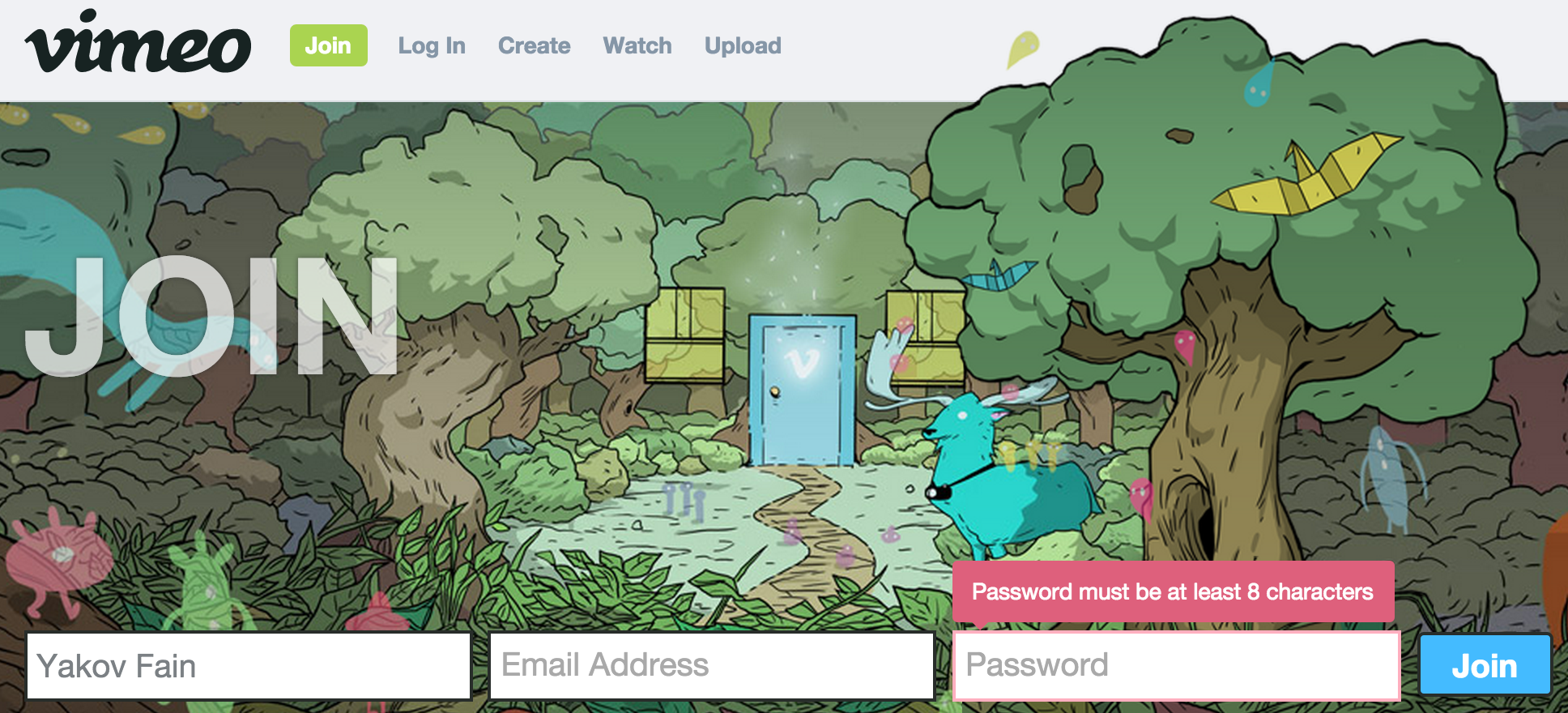
Update. Two days after writing this blog I decided to registered at the Vimeo video site. They were also hiding in the bushes with the same password length error. Is is something wrong with me? Am I being too picky?

vimeo

Am I still a Java Developer?

This morning I got the following email from a Java developer: “It seems you are doing less Java and more web development every year.” This got me thinking, and I decided to write this blog.

Am I still a Java developer after 17 years of using this language? I certainly am. But in today’s world using just one programming language is almost impossible unless you’re willing to limit yourself to the server-side development. I’m not saying this is bad – it’s a huge field for never ending self-education and research. Even from the career perspective becoming an expert in a specific Java field can put bread and butter on your table for years to come. For example, Java experts specializing in performance tuning can charge several times more than a typical Java developer. Some people become experts in security or concurrent programming, which allows them to eat an omelet with truffles for breakfast daily.

But 95% of Java developers are doing more or less routine work, and learning other languages and tools can bring some excitement in their lives and make them more competitive in the job market.

While Java is the server-side king, HTML/JavaScript/CSS (a.k.a. HTML5) rule on the client. You can use HTML5 for creating a cross-platform UI for desktop and mobile applications. People use a variety of languages and frameworks to develop Web applications that we use daily. If you already know Java, why not come out of the closet and explore the huge and ever growing HTML5 world?

Traditionally many Java developers look down on JavaScript developers with a false assumption that real development is happening only in Java. I can reveal a secret: this is wrong. JavaScript is as close to the Web what as C language is to the hardware. Just look at this long list of compilers from different languages that generate JavaScript. In our company we use Google Dart as a way to produce JavaScript. Next year we’re planning to switch to programming in the new version of JavaScript (EcmaScript 6 spec will be finalized this summer).

Lots of popular IDEs offer great support for developing and debugging JavaScript. Every Web browser comes with a developer tool allows you to debug JavaScript and monitor everything that goes over the wire during the runtime. The tooling of a modern JavaScript developer has everything that Java developers are accustomed too:

node.js – JS framework plus a runtime for all development tools listed below
npm – node package manager used for installing and managing development tools
bower – package manager for the application dependencies
grunt – a build automation tool
yeoman – a scaffolding tool for generating the initial structure of an application for various frameworks

I teach JavaScript classes for Java developers several times a year. A typical feedback is “I thought JavaScript is a toy, but it’s a serious programming ecosystem worth learning and mastering”. And this is what I do while remaining a Java developer.

Why I Rejected a LinkedIn-Originated Offer of 10 Million Euros

LinkedIn is a popular social network for connecting professionals, and I have an account there. Every day I get an invite to connect with someone. Typically I ignore these invites unless I know the person. But I’ve never received invites to connect from a chair of board of directors of a bank. Till yesterday.  So I’ve accepted the invite.

Then I’ve received an LinkedIn email from this woman stating that she had a business proposition for me, and if I was interested, she was ready to explain. She also provided her email that ended in outlook.com. I checked her LinkedIn profile again. Looked legit. She even had a Twitter account with recent tweets in two languages.

I responded that I was ready to hear about this business proposition. Next day I’ve received a long email from her explaining how she had a private client named Lewis Fain who initially deposited €19M  in their bank and she helped him to grow the wealth to €22M, but unfortunately he died in a car crash. She’s ready to wire transfer me the money, in one condition: we’d split the amount in half so she could improve the wellbeing  of her family. She also asked me not to ruin her career in the bank if I was not interested.

At this point it was clear that it was a new type of a scam that involved creating  fake LinkedIn accounts and impersonating themselves as someone else. Still I decided to continue my treasure hunt and responded to my fake banker asking her to send me any email from her bank email account. She responded again, stating that she understood my concern, but couldn’t use her bank email for such a delicate matter. But to establish trust, she attached a photo of her bank ID.

At this time I had enough of materials for this blog and responded wishing her good luck in finding another heir of poor Lewis Fain. Then I decided to report this scam to LinkedIn. To my surprise this banker was not in my connections list any longer. I searched by her name in LinkedIn, and found the account of that banker, the profile looked different and she didn’t have any connections.So either someone else reported this as a stolen account, or the con artists have removed it programmatically. I’ve reported this account to LinedIn anyway.So beware of LinkedIn initiated scams.

One more warning. Even if this banker would have sent me an email from the account that ended with the bank name, this would not be enough. Being a programmer, I can easily write a program that would send an email with any address in the “Reply To” field. Here’s how a fragment of the Java code to wannabe con artists:

Message emailMessage = new MimeMessage(session);

emailMessage.setFrom(new InternetAddress("MaryLou@thefakebank.com")); 
emailMessage.setRecipients(Message.RecipientType.TO, 
                                 InternetAddress.parse(emailRecipient, false));
emailMessage.setSubject(emailSubject); 
emailMessage.setSentDate(new Date()); 
emailMessage.setText(emailText);  

So if you want to confirm someone’s identity, you need to send an email to the provided email address and receive a response back. Hope this helps.

JavaFX 8: The keyboard events are not being processed if a scene has only shapes

I ran into an interesting problems with JavaFX. When the GUI is done in FXML it seems that if a scene has only shapes (e.g. Rectangle, Circle, etc.) the handler method doesn’t receive keyboard events. And the problem seems to be that there is no way (at least I don’t see it) to give a focus to such a scene. I found a workaround, but I’d appreciate if someone could offer a cleaner solution or confirm that this is a JavaFX bug.

Here’s a code sample that illustrates the problem and the solution:

1. Here is the main application:

package sample;

import javafx.application.Application;
import javafx.fxml.FXMLLoader;
import javafx.scene.Parent;
import javafx.scene.Scene;
import javafx.stage.Stage;

public class Main extends Application {

@Override
  public void start(Stage primaryStage) throws Exception{
   Parent root = FXMLLoader.load(getClass().getResource(&quot;sample.fxml&quot;));

   primaryStage.setScene(new Scene(root, 300, 300));
   primaryStage.show();
  }

  public static void main(String[] args) {
     launch(args);
  }
}

2. Here’s the sample.fxml that works, except I don’t need a Button there:

&lt;?xml version=&quot;1.0&quot; encoding=&quot;UTF-8&quot;?&gt;

&lt;?import javafx.scene.control.*?&gt;
&lt;?import java.lang.*?&gt;
&lt;?import javafx.scene.*?&gt;
&lt;?import javafx.scene.shape.*?&gt;
&lt;?import javafx.scene.control.Button?&gt;
&lt;?import javafx.scene.Group?&gt;

&lt;Group fx:id=&quot;theGroup&quot; onKeyPressed=&quot;#keyHandler&quot; focusTraversable=&quot;true&quot;
       xmlns=&quot;http://javafx.com/javafx/8&quot; xmlns:fx=&quot;http://javafx.com/fxml/1&quot;
       fx:controller=&quot;sample.Controller&quot;&gt;
   &lt;children&gt;
       &lt;Button /&gt;
       &lt;Rectangle fill=&quot;BLUE&quot; height=&quot;300.0&quot;  stroke=&quot;BLACK&quot;
                              strokeType=&quot;INSIDE&quot; width=&quot;300.0&quot; /&gt;

   &lt;/children&gt;
&lt;/Group&gt;

3. Here’s the Controller.java:

package sample;

import javafx.fxml.FXML;
import javafx.scene.Group;
import javafx.scene.input.KeyEvent;

public class Controller {

  @FXML Group theGroup;

  public void initialize(){
     theGroup.setFocusTraversable(true); // doesn't have any effect
     theGroup.requestFocus(); // doesn't have any effect
  }

  public void keyHandler(KeyEvent event){
    System.out.println(&quot;A Key was pressed&quot;);
  }
}

This application works and prints the message “A Key was pressed” as long as I keep the <Button> tag in FXML (it’s not visible on GUI because the Rectangle covers it). This is my workaround to make sure that event handler works and prints the message.  Remove the <Button> tag from FXML, and the application won’t process the keyboard events. The problem seems to be that if the FXML has only shapes, it can’t get the focus. The code in the initialize() method doesn’t help to set the focus on a Group container.If anyone could find an explanation of why this code  doesn’t work without a <Button>, please let me know.

Update: The user jewelsea on Stack Overflow suggested to set the focus after  calling  primaryStage.show(); http://stackoverflow.com/questions/28506855/javafx-8-the-keyboard-events-are-not-being-processed-if-a-scene-has-only-shapes.

This gave me an idea how to do it. I’ve added one line root.requestFocus(); at the end of the start() method. No <Button> is needed in FXML and no initialize() method is needed in the Controller.


Introducing AngularJS to Java Developers

If you want to develop Web applications, you’ll need to learn JavaScript. But writing code in JavaScript (at least in its ECMAScript 5 incarnation) is non-productive. You need to pick up a one of the JavaScript frameworks, because:

  • they make you more productive
  • will deal with cross-browser compatibility and make the application more structured
  • may include reusable components
  • lower the amount of manually written code.

JavaScript market offers multiple frameworks and libraries. While frameworks expect you to programs using well defined ruleswithin a certain code structure, libraries just offer reusable components a la cart.

In turn, frameworks can be categorized as feature complete (rigid app structure, intrusive, rich GUI components, tooling) and lightweight (MVC + Binding + Routing)
.

Ext JS, YUI, and Dojo represent feature-complete frameworks. AngularJS, Backbone.js, and Ember are examples of lightweight frameworks. After years of experimenting with different frameworks and libraries we decided to stick with hugely popular AngularJS by Google.

I work in a Java shop, and one of my responsibilities is to create an conduct trainings (both internal and external). Several years ago I started to work with our engineers on the curriculum introducing AngularJS to an enterprise Java developer.

The learning curve of AngularJS is not too steep for Java developers, who understand the concept of containers, dependency injections, callbacks. They must become proficient with JavaScript with its functions, closures and other good stuff.

But equally important is to be familiar with todays tooling of a productive Web developer. Here’s a short list of tools that JavaScript developers use today:

  • npm – node package manager used for installing and managing development tools
  • yeoman – a scaffolding tool used to generate the initial structure of an application
  • bower – package manager for application dependencies
  • grunt – a build automation tool
  • A JavaScript testing framework

The next decision to make is how to communicate with the Java backend. Forget about JSP, servlets, and JSFs. Preparing HTML in your Java code is out of fashion. A Java server exchanges the JSON-formatted data with a single-page HTML/JavaScript front end, which use either AJAX techniques (old) or WebSocket protocol (new).

On the Java side we like to use such tried and true technologies as RESTful Web service and Java Messaging API.

When we hire a AngularJS/Java developer, we expect him to be familiar with at least 90% of all the above buzzwords. Finding such skilled software engineers may be difficult, so we’ve created a training program to prepare such a person.

By now, we’ve taught and fine-tuned this training class multiple times. The latest online version of this class consists of seven weekly training sessions (3.5 hours each) and seven consultations (from 30 to 60 min each). Programmers learn and gradually apply all of the above tools and techniques while working on the Online Auction application that has the following architecture:

javaauction-1

We have a great feedback from people who have completed this training. But everyone says it’s challenging. And it should be. Back in the nineties a person who knew one of the programming languages plus SQL could relatively easy get a well paid job. Not anymore.

JavaScript for Java/C#/C++ Developers

This year I’m planning to run a one day workshop at a couple of software development conferences and privately for IT shops. The goal is to introduce JavaScript and related technologies to developers that are accustomed to developing in classical object-oriented languages like Java, C++ or C#. Below is the outline of this workshop.

Part 1. JavaScript Building blocks

* Functions, Objects, Prototypal Inheritance,Closures
* Using Chrome Developer Tools
* JavaScript in the Web Browser, DOM, CSS.
* New JavaScript: an overview of selected ECMAScript 6 features.

Part 2. Designing Single-Page Web Applications

* Web app prototyping. Designing a Product page of an online auction using Pure JavaScript and CSS.
* Responsive Web Design. CSS Media Queries. Redesigning the Product page for smart phones and tablets by adding CSS Media Queries. Our Product page will look like this.
* Single-Page Applications. AJAX.
* The Bootstrap framework. Responsive GUI components. Fluid grids. Yet another redesign of the Product page by using responsive Bootstrap components.

Part 3. Productive JavaScript development with Google Dart

* Getting familiar with the Google Dart language. Classes, top-level functions.
* Dart Tooling. Dartium VM. Dart Editor IDE. Dart to JavaScript Compiler. Package manager pub.
* Re-creating the Product page in Dart + Bootstrap. JavaScript generation and deployment.

Why You Should Start Developing With Google Dart

In the summer of 2013 I wrote a blog “How Serious is Google About Dart“. It’s January of 2015, and I’d like to give you an update from the trenches. Our team has developed and deployed in prod a beta version of the application that helps consumers with finding and rating insurance agents and getting quotes online. The front end of EasyInsure is written in Dart language.

Before introducing the Dart ecosystem, I’d like to give you a little background about our prior experience in developing Web applications (I work for Farata Systems).

On the server side we always use Java and have no plans to switch to any other technology. After spending many years developing the front end with Adobe Flex framework and ActionScript programming language we got spoiled by this super-productive environment. After the mankind led by Apple killed Flash Player, we started to look for an alternative.

Back in 2005 we’ve abandoned JavaScript, but decided to give it another chance. Things were a little better this time. JavaScript has better IDEs and browser-based tools for developers. The number of JavaScript frameworks and libraries went down from two hundred to a couple of dozens, which is a good thing.

Still, the productivity of our developers dropped substantially in JavaScript comparing to what we’ve seen with Flex. I can’t give you exact numbers, but it looks like developing in Flex is at least three times faster than with any JavaScript framework we tried (ExtJS,AngularJS, and lots of small libraries). When I say JavaScript, I mean its version based on the ECMAScript 5 specification.

In 2013 we got familiar with the Google Dart language. The syntax of the language was pretty appealing and easy to understand. It felt like Java, but a little more modern. Dart is optionally-typed language. You can run the compiled Dart code in DartVM, but no browser except Dartium support it, and it’ll remain this way. Generating JavaScript from the Dart code is a realistic way of delivering Dart applications for any browser today.

But any language without the proper tooling is doomed, and this is what makes Dart stand out. Here’s the list of tools available for Dart Developers:

1. The IDEs: Dart Editor from Google and WebStorm from JetBrains. We use Dart Editor because it’s smarter than WebStorm today.
2. dart2js is a Dart-to-JavaScript compiler and a tree-shaker, which removes the unused code from the third-party libraries used in the application.
3. pub is a dependency management, development server and build tool.
4. gulp is a task manager. It’s an analog of Grunt or Gradle. We use gulp to prepare optimized ready-to-deploy application from the code produced by the pub build. In particular, we do the gzip compression there.
5. Dartium is a Web Browser for developers. Google Chrome is based on the open source project called Chromium, and Dartium is Chromium with built-in DartVM. We use it for launching and debugging applications.
6. Dump-Info Visualizer – allows to inspect the generated JavaScript. It gives a very convenient breakdown by the application’s JavaScript code so we can analyze file sizes and identify the scripts to be optimized.
7. Observatory is Dart profiler (we haven’t used it yet).
8. AngularDart framework. It’s a port of a popular JavaScript framework AngularJS.

The above list is pretty impressive, isn’t it? As Google Dart evangelists say, “Batteries included”.

Developing JavaScript applications in Dart is definitely more productive. I do recommend you to start learning Dart and develop the front end of your Web applications in this developer-friendly environment. Having said that, I’d like to warn you that there are no jobs on dice.com that require programmers with Dart skills. Oops… Moreover, three years from now your Dart skills may be in even lesser demand in the enterprise world. Oops…

After these two oopses half of the readers may lose interest to Dart, because it doesn’t meet their career objectives. For those of you who continue reading I’ll explain why IMHO you still should learn and use Dart today. Because the final release of ECMAScript 6 (ES6) is around the corner. Because this spec already gave birth to JavaScript 6 (it’s a boy)!

By the way, do you know why there is no enterprise jobs that require Dart skills? Because enterprise architects will fight hard against any language that runs in a browser unless it’s called JavaScript. Back in 2007 Adobe sales force did a great job by pushing Flex framework into enterprises. Enterprise architects were fighting hard against Flex then, and they will do the same with Dart. But Google is not Adobe. They won’t fight for Dart in enterprises.

But promoting Dart in your organization can be easy. Just explain your enterprise architects that programming in Dart is just a smart way of preparing the enterprise to embrace the bright JavaScript 6 future with classes,modules, promise, fast image rendering, et al. The code that you’ll be writing in Dart during the next 12-18 months will need to be converted into EcmaScript 6 as soon as several major Web browsers will start supporting it.

The syntax of Dart and ES6 are literally the same. Google invested time and resources in creation of IDE for Dart, and now they’re working on the IDE for ES6. Even manual refactoring of the code from Dart to ES6 shouldn’t be a major project, but I’m sure this process will be automated soon.

As a matter of fact, some browsers already started supporting ES6. See for yourself:

dartblog

I’d like to draw your attention to the greenest column on the right side. Yes, it’s the successor of the today’s funniest browser known as IE! Microsoft calls it Spartan, and promises that Spartan will be a lightweight browser that feels like Chrome or Firefox. You just can’t go wrong with such a name.

Spartan already supports ES6. Courageous early adopters can start developing code in ES6 now, than compile the code down to ES5 with Traceur compiler and deploy it in any today’s browser. But if you want to work in a tools-rich environment just develop your single-page applications in Dart and AngularDart. Give the ES6 some time to mature. The work on ES7 is being done too, and it looks very interesting and promising.

I’ve created a New York City Dart Meetup with a hope to get some Manhattan-based firm to host our meetings in the future. Meanwhile we’ll run our meetings online so you’re welcome to join no matter where you are located. Go Dart if you need to deliver today!