A Toolbox of the Angular 2 Developer

Say you need to hire a Web developer experienced with Angular. What would you expect the developer to know? Well, he or she needs to know how to create Angular components, what’s data binding, dependency injection, routing et al. But this is just the tip of the iceberg. Below is a list of languages and tools that professional Angular developers use.

* JavaScript is a de-facto standard programming language for the front-end of Web applications. ECMAScript 6 (ES6) is the latest standardized specification for scripting languages and JavaScript is the most popular implementation of this spec.

* TypesScript is a superset of JavaScript that makes developers more productive. TypeScript 1.5 (currently in Beta) supports most of the features of ES6 and adds optional types, interfaces, meta-data annotations and more. The Angular 2 framework itself is written in TypeScript.

* DefinitelyTyped is a vast collections of files describing the API of 500+ libraries and frameworks. Using DefinitelyTyped allows the TypeScript compiler and IDEs know the types expected by the APIs of these libraries.

* Angular 2. It’s a complete re-write of a popular Angular 1.x. It’s currently in Alpha.

* Transpilers. Since most of the Web browsers support only the ECMAScript 5 syntax, you need to transpile (convert, compile one source code to another) the code written in TypeScript or ES6 to its ES5 version for deployment. Angular developers use Babel, Traceur, and the TypeScript compiler.

* SystemJS is a universal module loader, which load modules created in ES6, AMD or CommonJS standards.

* Node.js is a platform built on Chrome’s JavaScript engine. Node includes both a framework and a runtime environment to run JavaScript code outside of the browser. We don’t use the framework, but you can’t avoid using the Node runtime to install required tools for developing Angular applications.

* npm is a package manager that allows to download tools and reusable JavaScript modules. Npm has a repository of thousands modules, but we’ll mostly use it for installing developer’s tools, e.g. the TypeScript compiler, the task runner Gulp and more.

* Bower used to be a popular package manager for resolving application dependencies (e.g Angular 2, jQuery at al.). We don’t use Bower any longer as everything we need can be downloaded using npm.

* jspm is yet another package manager. Why do we need another package manager if npm and bower can take care of all dependencies? Modern Web applications consist of loadable modules and jspm integrates SystemJS, which makes loading modules a breeze.

* Grunt is a task runner. Lots of steps need to be performed between developing and deploying the code. All these steps must be automated. You may need to transpile the code written in TypeScript or ES6 into widely supported ES5 syntax. The code, images, and CSS files need to be minimized. You may want to include the tasks that will check the code quality and unit-test your application. With Grunt you configure all the tasks and their dependencies in a JSON file so the process is 100% automated.

* Gulp is a newer than Grunt task runner. It can automate all the tasks just as Grunt does, but instead of configuring the process in JSON you simply program it in JavaScript. This allows you to debug it if need be.

* jslint and eslint are code analyzers that looks for problematic patterns in a JavaScript program or JSON-formatted documents. These are code quality tools. Running a JavaScript program trough jslint or eslint results in a number of warning messages suggesting how to improve the code quality of this program.

* tslint is is a code quality tool for TypeScript. It has an collection of rules (can be extended) to enforce the recommended coding style and patterns.

* Minifiers make files smaller. For example, in JavaScript they remove comments, line breaks, and make variable names shorter. Minification can also be applied to HTML, CSS, and image files.

* Bundlers combine multiple files and their dependencies in a single file.

* Testing frameworks. Since JavaScript syntax is very forgiving, the application code requires testing. We use the Jasmine framework and the test runner called Karma.

* IDE. Both JavaScript and TypeScript are well supported by modern IDEs and text editors such as WebStorm, Visual Studio, Visual Studio Code, Sublime Text, Atom et al.

* Browser as a development environment. All major Web browser comes with developer tools that allow to debug your programs right inside the browser. We use Chrome Developer Tools.

* Web Components. This is the future of Web development. The goal is to develop reusable widgets for the Web application. We already started using the Polymer library of Web components in a pilot project and like it a lot.

This list may look intimidating, but it can be mastered one step at a time. Programming in Angular 2 is easier than in Angular 1.x, but the initial environment setup should be done right so you can really enjoy the development process.

The private in TypeScript is kinda private

TypeScript includes the keywords public, protected, and private to control access to the members of a class such as properties or methods. Public class members are visible from within and outside the class, protected are visible form the class and its descendants, and private are visible from within the class only. But being a superset of JavaScript, which doesn’t support the private keyword, using private members in TypeScript is not what you may expect.

Let’s look at the example of the class Person, which has three public and one private property.

class Person {
    public firstName: string;
    public lastName: string;
    public age: number;
    private ssn: string;

    constructor(firstName:string, lastName: string, age: number, ssn: string) {
        this.firstName = firstName;
        this.lastName = lastName;
        this.age = age;
        this.ssn = ssn;
    }
}

var p = new Person("John", "Smith", 29, "123-90-4567");

console.log("Last name: " + p.lastName + " SSN: " + p.ssn);

The TypeScript compiler properly reports an error at the last line where I tried to access the private variable ssn. Here’s the error:

“Error:(17, 53) TS2341: Property ‘ssn’ is private and only accessible within class ‘Person’.”

But this should have been marked as a warning, because the TypeScript compiler generates the JavaScript code anyway, which looks like this:

var Person = (function () {
    function Person(firstName, lastName, age, ssn) {
        this.firstName = firstName;
        this.lastName;
        this.age = age;
        this.ssn = ssn;
    }
    return Person;
})();

var p = new Person("John", "Smith", 29, "123-90-4567");
console.log("Last name: " + p.lastName + " SSN: " + p.ssn);

To see the code generation in action, visit the TypeScript Playground at http://bit.ly/1GKUeV0. As you see all traces of privacy have been removed, the property ssn has been exposed to the outside world as every other Property on the Person object.

Moreover, there is an easy workaround for accessing the “private” ssn even in TypeScript by casting this property to the type any:

console.log("Last name: " + p.lastName + " SSN: " + (p as any).ssn);

There must be some reason why creators of the TypeScript compiler didn’t turn the class Person into the JavaScript closure that would actually make ssn private, for example:

var Person = (function () {
    var _ssn;
    
    function Person(firstName, lastName, age, ssn) {
      
        this.firstName = firstName;
        this.lastName;
        this.age = age;
        _ssn = ssn;
    }
    return Person;
})();

But it is what it is. So when you use the private keyword in TypeScript, keep in mind that it just suggests you to be nice and not access it directly, but write public getter and setter methods instead.

Let’s extend the class Person like this:

class Employee extends Person{
    ssn: number;
}

TypeScript’s compiler will give you an error:

Error:(17, 53) TS2341: Property ‘ssn’ is private and only accessible within class ‘Person’.

But it’ll still generate the JavaScript code unless you add a compiler option –noEmitOnError to not generate JavaScript until all TypeScript syntax errors are fixed.

Having said that, I still like TypeScript. Developing in TypeScript is clearly more productive than in JavaScript. For more TypeScript articles go here.

P.S. IMO, protected variables are useless in any object–oriented language.

ECMAScript 6, block-level functions, and the strict mode

I was preparing code samples for my ECMAScript 6 (ES6) workshop. ES6 has tons of new language features and programming in the next version of JavaScript is a lot of fun. In particular, ES6 supports block-level functions, so the following code should produce the error “doSomething is not defined”.

 
  {
    function doSomething(){
      console.log("In doSomething");
    }
  }

  doSomething();

And it does if you test it in ES6 Fiddle:

es6fiddle

But the best part about ES6 is that you can use it today in your real world projects. Just run it through one of the transpilers, which will convert ES6 to ES5 code ready for deployment in all existing Web browsers. Let’s see how the Babel handles my block-level function:

babel

As you can see, Babel renamed my function to _doSomething, so doSomething is not defined, which is correct.

The Traceur transpiler did pretty much the same trick, and doSomething is not defined:

traceur

Now let’s run the same code in the console of the developer’s edition of FireFox, which doesn’t support block-level functions. It behaves differently. Because of the hoisting, the declaration of the function doSomething has been moved to the top of the script and it is defined and works.

FF

Google Chrome (allegedly supports block-level functions) also applies hoisting and invokes doSomething (stable and experimental JavaScript features were enabled). Something is broken here. After quick search I found this ES5 recommendation that in strict mode programmers shouldn’t declare functions in a statement context (ny statement they meant block). Let’s use strict mode and try it again in FireFox:

ff2

In strict mode this code gives a syntax error in FireFox. Chrome, Babel, and Traceur still produce “doSomething is undefined” in strict mode. It’s not the end of the world, but get prepared for inconsistent results.

Am I still a Java Developer?

This morning I got the following email from a Java developer: “It seems you are doing less Java and more web development every year.” This got me thinking, and I decided to write this blog.

Am I still a Java developer after 17 years of using this language? I certainly am. But in today’s world using just one programming language is almost impossible unless you’re willing to limit yourself to the server-side development. I’m not saying this is bad – it’s a huge field for never ending self-education and research. Even from the career perspective becoming an expert in a specific Java field can put bread and butter on your table for years to come. For example, Java experts specializing in performance tuning can charge several times more than a typical Java developer. Some people become experts in security or concurrent programming, which allows them to eat an omelet with truffles for breakfast daily.

But 95% of Java developers are doing more or less routine work, and learning other languages and tools can bring some excitement in their lives and make them more competitive in the job market.

While Java is the server-side king, HTML/JavaScript/CSS (a.k.a. HTML5) rule on the client. You can use HTML5 for creating a cross-platform UI for desktop and mobile applications. People use a variety of languages and frameworks to develop Web applications that we use daily. If you already know Java, why not come out of the closet and explore the huge and ever growing HTML5 world?

Traditionally many Java developers look down on JavaScript developers with a false assumption that real development is happening only in Java. I can reveal a secret: this is wrong. JavaScript is as close to the Web what as C language is to the hardware. Just look at this long list of compilers from different languages that generate JavaScript. In our company we use Google Dart as a way to produce JavaScript. Next year we’re planning to switch to programming in the new version of JavaScript (EcmaScript 6 spec will be finalized this summer).

Lots of popular IDEs offer great support for developing and debugging JavaScript. Every Web browser comes with a developer tool allows you to debug JavaScript and monitor everything that goes over the wire during the runtime. The tooling of a modern JavaScript developer has everything that Java developers are accustomed too:

node.js – JS framework plus a runtime for all development tools listed below
npm – node package manager used for installing and managing development tools
bower – package manager for the application dependencies
grunt – a build automation tool
yeoman – a scaffolding tool for generating the initial structure of an application for various frameworks

I teach JavaScript classes for Java developers several times a year. A typical feedback is “I thought JavaScript is a toy, but it’s a serious programming ecosystem worth learning and mastering”. And this is what I do while remaining a Java developer.

Introducing AngularJS to Java Developers

If you want to develop Web applications, you’ll need to learn JavaScript. But writing code in JavaScript (at least in its ECMAScript 5 incarnation) is non-productive. You need to pick up a one of the JavaScript frameworks, because:

  • they make you more productive
  • will deal with cross-browser compatibility and make the application more structured
  • may include reusable components
  • lower the amount of manually written code.

JavaScript market offers multiple frameworks and libraries. While frameworks expect you to programs using well defined ruleswithin a certain code structure, libraries just offer reusable components a la cart.

In turn, frameworks can be categorized as feature complete (rigid app structure, intrusive, rich GUI components, tooling) and lightweight (MVC + Binding + Routing)
.

Ext JS, YUI, and Dojo represent feature-complete frameworks. AngularJS, Backbone.js, and Ember are examples of lightweight frameworks. After years of experimenting with different frameworks and libraries we decided to stick with hugely popular AngularJS by Google.

I work in a Java shop, and one of my responsibilities is to create an conduct trainings (both internal and external). Several years ago I started to work with our engineers on the curriculum introducing AngularJS to an enterprise Java developer.

The learning curve of AngularJS is not too steep for Java developers, who understand the concept of containers, dependency injections, callbacks. They must become proficient with JavaScript with its functions, closures and other good stuff.

But equally important is to be familiar with todays tooling of a productive Web developer. Here’s a short list of tools that JavaScript developers use today:

  • npm – node package manager used for installing and managing development tools
  • yeoman – a scaffolding tool used to generate the initial structure of an application
  • bower – package manager for application dependencies
  • grunt – a build automation tool
  • A JavaScript testing framework

The next decision to make is how to communicate with the Java backend. Forget about JSP, servlets, and JSFs. Preparing HTML in your Java code is out of fashion. A Java server exchanges the JSON-formatted data with a single-page HTML/JavaScript front end, which use either AJAX techniques (old) or WebSocket protocol (new).

On the Java side we like to use such tried and true technologies as RESTful Web service and Java Messaging API.

When we hire a AngularJS/Java developer, we expect him to be familiar with at least 90% of all the above buzzwords. Finding such skilled software engineers may be difficult, so we’ve created a training program to prepare such a person.

By now, we’ve taught and fine-tuned this training class multiple times. The latest online version of this class consists of seven weekly training sessions (3.5 hours each) and seven consultations (from 30 to 60 min each). Programmers learn and gradually apply all of the above tools and techniques while working on the Online Auction application that has the following architecture:

javaauction-1

We have a great feedback from people who have completed this training. But everyone says it’s challenging. And it should be. Back in the nineties a person who knew one of the programming languages plus SQL could relatively easy get a well paid job. Not anymore.

Why You Should Start Developing With Google Dart

In the summer of 2013 I wrote a blog “How Serious is Google About Dart“. It’s January of 2015, and I’d like to give you an update from the trenches. Our team has developed and deployed in prod a beta version of the application that helps consumers with finding and rating insurance agents and getting quotes online. The front end of EasyInsure is written in Dart language.

Before introducing the Dart ecosystem, I’d like to give you a little background about our prior experience in developing Web applications (I work for Farata Systems).

On the server side we always use Java and have no plans to switch to any other technology. After spending many years developing the front end with Adobe Flex framework and ActionScript programming language we got spoiled by this super-productive environment. After the mankind led by Apple killed Flash Player, we started to look for an alternative.

Back in 2005 we’ve abandoned JavaScript, but decided to give it another chance. Things were a little better this time. JavaScript has better IDEs and browser-based tools for developers. The number of JavaScript frameworks and libraries went down from two hundred to a couple of dozens, which is a good thing.

Still, the productivity of our developers dropped substantially in JavaScript comparing to what we’ve seen with Flex. I can’t give you exact numbers, but it looks like developing in Flex is at least three times faster than with any JavaScript framework we tried (ExtJS,AngularJS, and lots of small libraries). When I say JavaScript, I mean its version based on the ECMAScript 5 specification.

In 2013 we got familiar with the Google Dart language. The syntax of the language was pretty appealing and easy to understand. It felt like Java, but a little more modern. Dart is optionally-typed language. You can run the compiled Dart code in DartVM, but no browser except Dartium support it, and it’ll remain this way. Generating JavaScript from the Dart code is a realistic way of delivering Dart applications for any browser today.

But any language without the proper tooling is doomed, and this is what makes Dart stand out. Here’s the list of tools available for Dart Developers:

1. The IDEs: Dart Editor from Google and WebStorm from JetBrains. We use Dart Editor because it’s smarter than WebStorm today.
2. dart2js is a Dart-to-JavaScript compiler and a tree-shaker, which removes the unused code from the third-party libraries used in the application.
3. pub is a dependency management, development server and build tool.
4. gulp is a task manager. It’s an analog of Grunt or Gradle. We use gulp to prepare optimized ready-to-deploy application from the code produced by the pub build. In particular, we do the gzip compression there.
5. Dartium is a Web Browser for developers. Google Chrome is based on the open source project called Chromium, and Dartium is Chromium with built-in DartVM. We use it for launching and debugging applications.
6. Dump-Info Visualizer – allows to inspect the generated JavaScript. It gives a very convenient breakdown by the application’s JavaScript code so we can analyze file sizes and identify the scripts to be optimized.
7. Observatory is Dart profiler (we haven’t used it yet).
8. AngularDart framework. It’s a port of a popular JavaScript framework AngularJS.

The above list is pretty impressive, isn’t it? As Google Dart evangelists say, “Batteries included”.

Developing JavaScript applications in Dart is definitely more productive. I do recommend you to start learning Dart and develop the front end of your Web applications in this developer-friendly environment. Having said that, I’d like to warn you that there are no jobs on dice.com that require programmers with Dart skills. Oops… Moreover, three years from now your Dart skills may be in even lesser demand in the enterprise world. Oops…

After these two oopses half of the readers may lose interest to Dart, because it doesn’t meet their career objectives. For those of you who continue reading I’ll explain why IMHO you still should learn and use Dart today. Because the final release of ECMAScript 6 (ES6) is around the corner. Because this spec already gave birth to JavaScript 6 (it’s a boy)!

By the way, do you know why there is no enterprise jobs that require Dart skills? Because enterprise architects will fight hard against any language that runs in a browser unless it’s called JavaScript. Back in 2007 Adobe sales force did a great job by pushing Flex framework into enterprises. Enterprise architects were fighting hard against Flex then, and they will do the same with Dart. But Google is not Adobe. They won’t fight for Dart in enterprises.

But promoting Dart in your organization can be easy. Just explain your enterprise architects that programming in Dart is just a smart way of preparing the enterprise to embrace the bright JavaScript 6 future with classes,modules, promise, fast image rendering, et al. The code that you’ll be writing in Dart during the next 12-18 months will need to be converted into EcmaScript 6 as soon as several major Web browsers will start supporting it.

The syntax of Dart and ES6 are literally the same. Google invested time and resources in creation of IDE for Dart, and now they’re working on the IDE for ES6. Even manual refactoring of the code from Dart to ES6 shouldn’t be a major project, but I’m sure this process will be automated soon.

As a matter of fact, some browsers already started supporting ES6. See for yourself:

dartblog

I’d like to draw your attention to the greenest column on the right side. Yes, it’s the successor of the today’s funniest browser known as IE! Microsoft calls it Spartan, and promises that Spartan will be a lightweight browser that feels like Chrome or Firefox. You just can’t go wrong with such a name.

Spartan already supports ES6. Courageous early adopters can start developing code in ES6 now, than compile the code down to ES5 with Traceur compiler and deploy it in any today’s browser. But if you want to work in a tools-rich environment just develop your single-page applications in Dart and AngularDart. Give the ES6 some time to mature. The work on ES7 is being done too, and it looks very interesting and promising.

I’ve created a New York City Dart Meetup with a hope to get some Manhattan-based firm to host our meetings in the future. Meanwhile we’ll run our meetings online so you’re welcome to join no matter where you are located. Go Dart if you need to deliver today!

How serious is Google about Dart?

Developing applications in JavaScript is not overly productive. You can use CoffeeScript or TypeScript to write code that will be converted into JavaScript for deployment. We are also closely watching the progress with Google’s new programming language called Dart.

It’s a compiled language with an elegant and terse syntax, which is easy to understand to anyone who knows Java or C#. Although compiled version of the Dart code requires Dartium VM, which is currently available only in the Chromium browser, Google created dart2js compiler that turns your application code into JavaScript in seconds, so it can run in all Web browsers today. Google also offers Dart Editor – an IDE with debugger and autocomplete. You can event debug the Dart code in Dart Editor while running generated JavaScript in the browser.

Dart’s VM can communicate with JavaScript’s VM, so if you have a portion of your application written in JavaScript, it can peacefully coexist with the Dart code. You can literally have two buttons on the Web page: one written in JavaScript and the other in Dart.

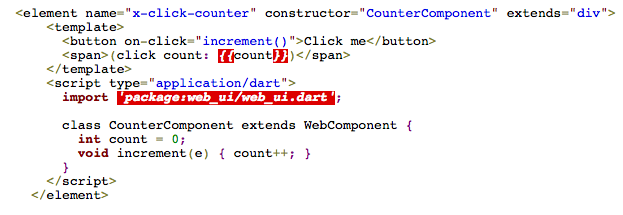
W3C published a document called “Introduction to Web Components”, which among other things defines recommendations on how to create custom HTML components. Existing implementation of Web UI package includes a number of UI components and defining a new custom HTML element can be done in a declarative way. The following code sample I borrowed from the Dart Web site:

html

This code extends the Web UI element `div` and includes a template, which uses binding – the value of the variable count is bound to HTML span, so as soon as counter’s value increases, the Web page immediately reflects its new value. I remember those powerful curly braces from programming with Flex framework. The Web UI package will be replaced soon with the Polymer Stack built on top of Web components. In 2014, the popularity of Dart should increase if Google will remain committed to this project. Will it?

Yesterday, we had a meeting at Farata Systems discussing the possibility of developing new functionality to our insurance stack in Dart. During the meeting one person said that about 15% of our users are still working with older browsers and we don’t want to lose them if Dart-generated JavaScript won’t work in Internet Explorer 7 or 8. I immediately answered that this wouldn’t be an issue, because several years ago Google created a smart way to automatically download Chrome’s JavaScript VM if the application runs inside IE. The name of this smart solution is Google Frame.

The meeting went on, and I decided to see what’s happening with this really useful plugin for IE. A quick googling for Google Frame revealed the page that started with a message “We’re winding down Chrome Frame, and plan to cease support and updates in January 2014”. WAT? Google did it again. Remember Google Reader? Forget it. Millions of people were using it and now it’s discontinued. “All subscription data will be permanently, and irrevocably deleted”. Google became bored with this toy too.

Unless Google will seriously reconsider their policies of decommissioning software, Dart won’t fly in the enterprise world. I hope Google will provide some iron clad guarantees that their Dart project will be around for the next 5 years. If this will happen, I’m all for it, and will prepare a new proposal to O’Reilly Media for a book titled “Enterprise Web Development with Dart”, where Farata’s engineers will share their experience in developing enterprise-grade applications with this promising language.

Which language is better: Java or JavaScript?

In one of my blogs a person asked me, “Can you teach a person to be a programmer within 6 months?”  I answered, “I can make a programmer out of any person within two weeks, but there is a chance that he’ll be asking questions like this: http://m.hotpot.hk/story.php?id=15689”.

I shared the above link with our software developers in the Skype chat. Some people laughed. One person responded with a popular link to a presentation that makes fun of JavaScript:

https://www.youtube.com/watch?feature=player_detailpage&v=THERgYM8gBM#t=88s .

Another guy responded with this question:

var a=0.1
a=a+a+a
(a - 0.3== 0)  // false or true ?

 
After years on Wall Street, this was an easy one, “Of course, false!” Floating numbers precision makes the results unpredictable. We use BigDecimal. I’ve created a little fiddle for you. Just follow this link and press Run to see for yourself: http://jsfiddle.net/4nwdv/

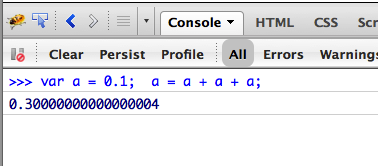
For those who after running this fiddle say “WTF!”, here are the some details – I ran the same code in JavaScript console in Chrome Developers Tool:

addition

So Google Chrome’s Java Script engine truly believes that
0.1 + 0.1 + 0.1 = 0.30000000000000004

Maybe if you’ll run it in Firefox, the result will be different? Nope, I ran it in Firebug’s JavaScript console, which confirmed, that 0.1 + 0.1 + 0.1 = 0.30000000000000004.

addingff

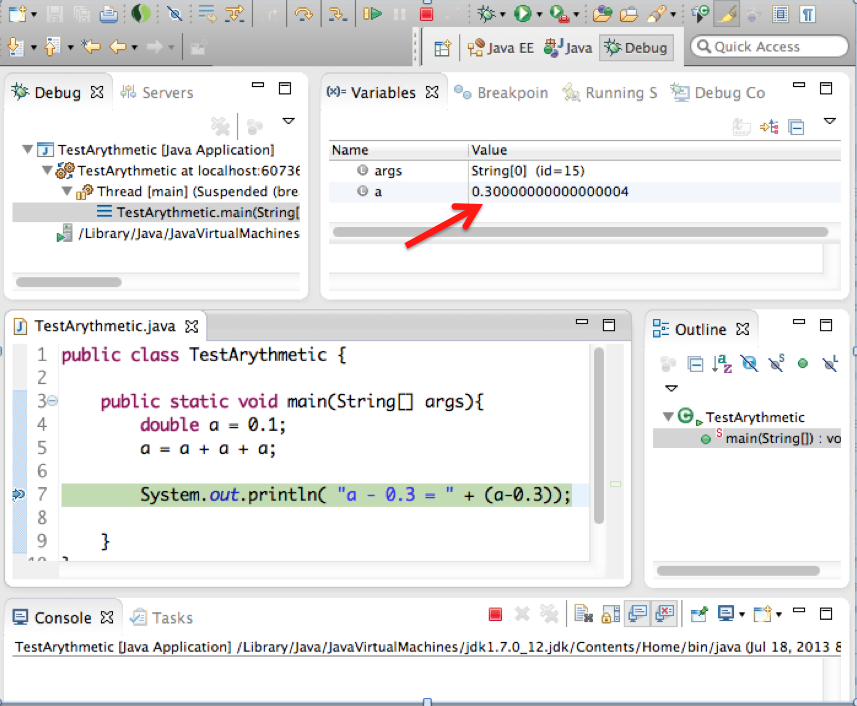
By now, only the person who forgot to take his morning pill wouldn’t agree that this is a language problem and JavaScript is bad. What’s good then? This is another easy question: “Java and only Java!” Most of the Wall Street applications are written in Java and do the number crunching real well! Let’s see what will be the result of the same arithmetics in Java. I wrote this little program, ran it in the debugger and put a breakpoint right after the variable got the new value. Man, the result is the same as in JavaScript!

addingjava1_1

Just to complete the program I pressed the green button Resume to see the result of a-0.3 on the console. Well, it’s not exactly what I was expected to see, but pretty damn close, isn’t it?

addingjava2_3

This little experiment shows that the demand in software developers will only be increasing, because while regular Joe believes that (0.1 + 0.1 + 0.1) – 0.3 = 0, the savvy software developer would not be so sure cause it depends…

I’d appreciate if you’d run the same tests in other programming languages and share your findings. Together we can make the world a better (or at least more definitive) place!

Starting XAMPP Apache from Aptana IDE

In the first five chapters of the upcoming book on Web development we use Aptana IDE. It’s free, easy to use, has a simple internal Web server, and is Eclipse based. All this makes it a perfect IDE for teaching Web development with HTML and JavaScript. While working on a jQuery.ajax() code sample for the upcoming book, I wanted to show how to make an AJAX POST request to the server side script with the manual form serialization. Since knowledge of Java is not a requirement for reading this book, I found myself in an unfamiliar territory of using PHP.

Disclamer: I’m not a PHP developer, and have no intention to become one.

I just needed a simple script that would echo the data it received. Writing such a script is not a rocket science, but now I need a Web server that would support PHP, which means pretty much any server other than the toy one that comes with Aptana.

xampp_UI

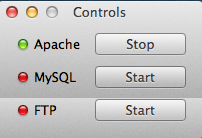
OK, I’ve installed the XAMPP package that includes Apache Web Server and supports PHP. It comes with a nice little UI with the buttons to start stuff. It’s shown on the right and can turn on/off Apache, MySQL, and FTP with a click of a button, which is perfect solution for everyone, but me. Remember, I want to do it from Aptana, and not from and external UI panel. But first things first, let me check that my PHP script even works under Apache.

This part went through fine. I created an Aptana project right under the document root of Apache, which is the htdocs folder, put there helloworld.php, html, JavaScript – he whole shebang. Then I opened the Web browser, paster the URL there, and it worked like a charm – I’m da man!

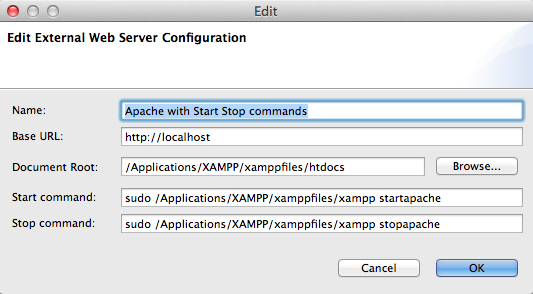
But the fact that I had to leave Aptana bothered me and I decided to configure an external Web server in this IDE. I did similar thing in Eclipse and Apache Tomcat a million times, but this is different – I needed to start a prepackaged Apache Web server from XAMPP.

First, I learned how to do this from a command line in the Terminal Window (I use MAC OS):

To start apache do this: sudo /Applications/XAMPP/xamppfiles/xampp startapache

To stop apache do that: sudo /Applications/XAMPP/xamppfiles/xampp stopapache

But I knew it wouldn’t be that easy to do from the IDE, casu when I do stuff as a sudo user, I get a command line prompt to enter the admin’s password. OK, let’s try and see what happens. Right-click on the Aptana’s project, then Run Configurations, then the link Configure next to the “Use selected server”. Then I’ve entered everything about my Apache Web server:

ApacheServer_Aptana

Aptana has created the Servers view with this server entry, but when I tried to start the server by clicking on the green play button it gave me this error: “no tty present and no askpass program specified”. I knew it! Aptana doesn’t know where to ask for the sudo’s password!

How can I turn this stupid password off? Google helped – there is a system file /etc/sudoers that has to be edited to allow certain users to sudo without being bothered with the password. Can’t edit it – not enough permissions. That’s an easy one. The unix command chmod works fie on Mac. Being a lazy person I did sudo chmod 777 sudoers. It did the job, but it was a mistake – stay tuned. Opened the file, figured out that I need to uncomment one line and specify my ID with the NOPASSWD option.

OK, but the warning in this file reads “# This file MUST be edited with the ‘visudo’ command as root. Failure to use ‘visudo’ may result in syntax or file permission errors that prevent sudo from running.” Uuuh, getting dangerous, nice! I still remember a couple of vi commands – did the editing in the Terminal window, saved the file… and got the error message that the “/etc/sudoers is mode 0777, should be 0440 “. Man, that was my laziness with chmod 777. Let me change it to 440. Not that easy now! It doesn’t allo me to change the permissions back. Am I screwed or what? Did a backup to my external disk last week – shouldn’t be difficult to recover the original file sudoers.

But let me google first – it helped again – was there a life before Google? Some kind soul suggested to run Disk Utility, which has a button “Repair Disk Permissions”. It repaired a bunch of files including this one keeping my corrections intact.

Voila! Now I can start my Apache Web Server without leaving Aptana IDE by clicking on the Play button in the Servers view! Great! But how to stop it? Eclipse IDE has a red little square next to Play? The right-click menu doesn’t exist in the Servers view in Aptana Studio 3 IDE – I guess their developers are as lazy as I am. I’m not going to continue my research though. Nough! If anyone knows how to stop the server started from Aptana IDE – please do let me know.

Java is Better Than JavaScript

Tоday I was participating in a discussion on one Java forum – the question was if Java is easy or difficult programming language to learn. IMO, Java is not difficult to lear, to teach, and to use. It’s a strongly-typed compiled language with tools that help you out to identify most of the error before you even run the program.

While participating in this discussion I was writing code in a different programming language called JavaScript, which gave me a chance to illustrate that lots of things Java developer take for granted, while there are people who work in a more hostile environment called JavaScript.

I had a working program, and decided to add JavaScript handler function to illustrate HTML form submission with jQuery for our upcoming book. I’ve been writing this code in Eclipse-based IDE called Aptana. I’ve added this handler for the submit event to a Donation form:

$('#donate-form-container').submit(function(){
  var formData = $(this).serialize();
  console.log("The Donation form is serialized: " + formData);
  returm false;  
});

Ran the program – it rendered the Web page, HTML looks fins, but nothing worked. IDE didn’t give any errors. Started a browser debugger – Firebug. Now I’ll going to put a breakpoint in this newly added function and find the problem. How hard could it be? I’ve added just this little fragment to a working program. Easy Peasy.

Oops. Where is my main.js? Nowhere to be found. Only jQuery script is available.

s1

Was my main.js even downloaded? Let’s check the Network tab. Yes, it’s here:

s2

After applying deductive reasoning (as in Sherlock Holmes stories) I figured out that the script has arrived to the browser, which instead of adding it to the DOM, showed a middle finger without explaining why. As any normal person, I started to to find who someone else to blame. May be this Firebug is buggy and just doesn’t want to show my nice script? Tried Chrome with Developer Tools – same story. The script arrived, got the finger and I have nothing to debug.

Well, there is no one else to blame. Let me just re-read my own code. Man, I misspelled the word return and wrote “returm false;” instead, which deserves a capital punishment. Changing m to n did the trick, and now both Chrome and Firefox are happy to add my JavaScript code to DOM.

What’s the moral of this story:
1. Java developers should know that they take lots of things for granted and should not complain that their life is difficult!
2. The fact that it takes less code to write Hello World program in JavaScript doesn’t mean that it’s an easy programming language. Don’t trust me? Watch this.