Most of the Java developers I know don’t like JavaScript. Initially. They would give you different reasons why, but the real one is simple: too much to learn to make it work. For many Java developers creating the front end of a Web application in JavaScript is a chore to write and a burden to maintain. Nevertheless JavaScript rules in Web development and the new version of JavaScript (ES6) will make it even more popular.
ES6 offers classes, standardized module definition, arrow expressions (lambdas), predictable “this” and a lot more. Firefox and Chrome already support most of the ES6 syntax, and other browsers are getting there as well.
But there is something better than ES6: the TypeScript language, which has most of what ES6 has to offer plus types, casting, interfaces, generics, and annotations. The TypeScript code analyzer will help you to see syntax errors even before you run the program. Code refactoring works as well. In this blog I stated the main reasons of why TypeScript is the right tool for JavaScript development.
Now let’s take a quick glance at Angular 2, a complete re-write of the popular open-source framework managed by Google. There were two Beta releases of Angular 2, and it’s safe to start using it for your next Web project unless your app has to go to prod in the first half of 2016. Angular 2 is stable enough for serious development, and I know this first hand after surviving a couple of dozens of alpha releases of Angular 2.
Disclaimer. You can write Angular applications in the current JavaScript (ES5), next JavaScript (ES6), Dart, or TypeScript. Based on my experience with all these languages using TypeScript is the best option.
What makes the Angular 2/TypeScript combo so appealing to Java folks?
First of all, the code looks clean and easy to understand. Let’s do an experiment. I’ll give you a two-paragraph intro on how to write an Angular component in TypeScript followed by the sample code. See if you can understand this code.
Any Angular application is a hierarchy of components represented by annotated classes. The annotation @Component contains the property template that declares an HTML fragment to render by the browser. The HTML piece may include the data binding expressions, which can be represented by double curly braces. If a view depends on other components, the @Component annotation has to list them in the property directives. The references to the event handlers are placed in the HTML from the @Component section and are implemented as the class methods.
The annotation @Component also contains a selector declaring the name of the custom tag to be used in HTML document. When Angular sees an HTML element with the name matching a selector, it knows which component implements it. The lesson is over.
Below is a code sample of a SearchComponent, and we can include it in an HTML document as <search-product> because its declaration includes the selector property with the same name.
@Component({
  selector: 'search-product',
  template:
     `<div>
          <input #prod>
          <button (click)="findProduct(prod.value)">Find Product</button>
          Product name: {{product.name}}
        </div>
    `
})
class SearchComponent {

   product: Product; // code of the Product class is omitted

   findProduct(prodName: string){
    // Implementation of the click handler goes here
   }
   // Other code can go here
}
A Java developer can read and understand most of this code right away. OK,ok. I’ll give you more explanations. The annotated class SearchComponent declares a variable product, which may represent an object with multiple properties, one of which (name) is bound to the view ({{product.name}}). The #prod is a local template variable that stores a reference to the input field so you don’t need to query DOM to get the entered value.The (click) notation represents a click event, and the event handler function gets the argument value from the input field.
Note that the HTML template is surrounded with the back tick symbols, which allow you to write the markup in multiple lines in a readable form. If you prefer to store HTML in a separate file instead of template use the templateURL property:
templateUrl: './search.html'
Dependency Injection. Angular architecture will be very familiar to those who use Spring framework or Java EE. Angular comes with the Dependency Injection (DI) module, which instantiates an object using a registered class or a factory and injects it to the application component via constructor’s arguments. The following code will instruct Angular to instantiate the class ProductService and inject it into the ProductComponent:
@Component({
   providers: [ProductService]
})
class ProductComponent {
product: Product;

  constructor(private productService: ProductService) {

     this.product = this.productService.getProduct();
  }
}
Specifying the provider and declaring the constructor with the type is all you need for injecting the object. Application components form a hierarchy, and each component may have its own injector. Injectors are not singletons.
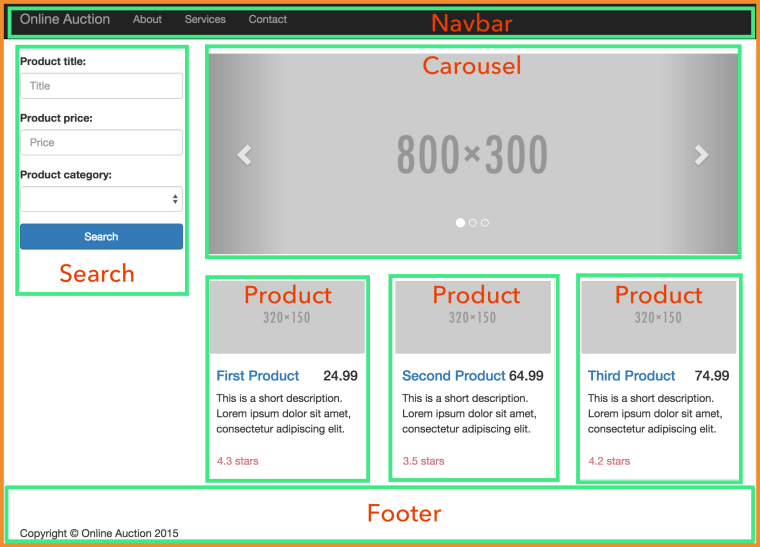
App structure. The following image shows what the main page of a sample application is made up of. The parent component includes child components, which are surrounded with green borders.
Router. Angular shines in development of single-page applications (SPA), where the entire Web page is never reloaded. Angular router allows you to easily configure the page fragments (the views) that should be loaded based on the user’s actions. The code snippet below includes the annotation @RouteConfig that configures two routes Home and ProductDetail, which are mapped to the corresponding components (HomeComponent and ProductDetailComponent). The user navigates the application by clicking on the links with the corresponding routerLink attribute, which will display the requested component in the area marked as <router-outlet>.
@Component({
    selector: 'basic-routing',
    template: `<a [routerLink]="['/Home']">Home</a>
              <a [routerLink]="['/ProductDetail']">Product Details</a>
              <router-outlet></router-outlet>`,
    directives: [ ROUTER_DIRECTIVES]
})

@RouteConfig([
    {path: '/',        component: HomeComponent, as: 'Home'},
    {path: '/product', component: ProductDetailComponent, as: 'ProductDetail'}
])
class RootComponent{
}
Inter-component communication. Each component in Angular is well encapsulated, and you can create it in a losely-coupled manner. To pass the data from the outside world to the component just annotate a class variable(s) with @Input() and bind some value to it from the parent component.
class OrderComponent {

    @Input() stockSymbol: string;
    @Input() quantity: number;
}
To pass the data from the component to the outside world, use the @Output annotation and dispatch events through this variable. Dispatch to whom? Ain’t none of the component’s business. Let’s whoever is interested listen to this event, which can be either a standard or a custom event carrying a payload.
class PriceQuoterComponent {
    @Output() lastPrice: EventEmitter<IPriceQuote>  = new EventEmitter();
 ...
    this.lastPrice.emit(priceQuote)
 }
See something familiar? You got it. That thingy in the angle brackets after EventEmitter denotes a generic type, and IPriceQuote can be an interface. TypeScript supports generic and interfaces.
Casting. TypeScript supports types, classes, and interfaces (class A extends B implements D, E, F). It support type casting as well. As in Java, upcasting doesn’t require special notation. To denote downcasting surround the target type with angle brackets and place it before more general type as shown in the screenshot below.
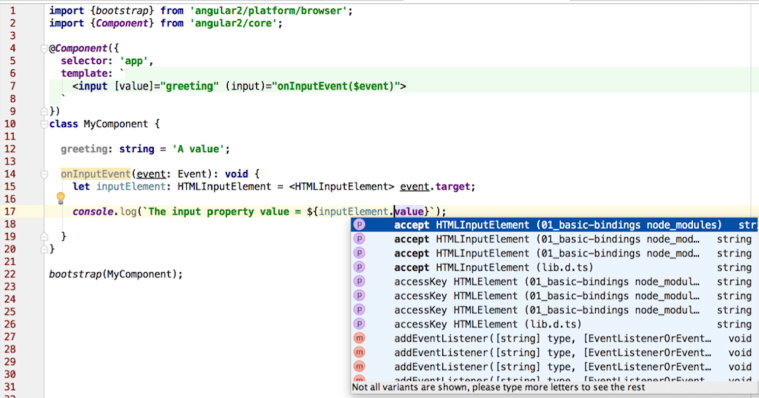
I took this screenshot after placing the cursor before value in line 17. I use WebStorm 12 IDE (a little brother of IntelliJ IDEA), which supports TypeScript quite nicely (including refactoring), and this supports improves with every minor release of WebStorm. If I wouldn’t declare the variable with the type in line 15 and wouldn’t use casting, the code would still work, but the IDE would show value in red and the code completion wouldn’t work in line 17.
Streams and lambdas. These are big in Java 8. Angular 2 incorporates RxJS, the library with react extensions, where streams is a religion. Everything is a stream in RxJS, and Angular 2 promotes using observable streams and subscribers.
Even events are streams, can you believe this? The user types in an HTML input field or is dragging the mouse, which generates a stream that you can subscribe to (think observer/observable or pub/sub).
Make an HTTP request or open a WebSocket and subscribe to the observable stream, which is a Promise on steroids. Handling results is still an asynchronous operation, but as opposed to a Promise it can be cancelled.
In Java 8 you can run a stream through a number of changed intermediate operations (e.g. map()) followed by a terminal one. In Angular 2 you can do the same:
class AppComponent {

  products: Array = [];

  constructor(private http: Http) {

    this.http.get('/products')
        .map(res => res.json())
        .subscribe(
            data => {
              if (Array.isArray(data)){
                this.products=data;
              } else{
                this.products.push(data);
              }
            },
            err =>
              console.log("Can't get products. Error code: %s, URL: %s ",  err.status, err.url),
            () => console.log('Product(s) are retrieved')
        );
  }
}
If the above code requires explanations, then your Java is a little rusty. Seriously.
Module loading. One of the important features that ES6 brings to Web development is standardization of modules. The application code consists of modules (typically one module is one script file). Using the export keyword (e.g. export class Product {...}) you specify which members of the module should be exposed to other scripts. Accordingly, a script can include one or more import statements to have access to other modules.
ES6 includes the syntax for importing/exporting modules, but the standardization of the module loader System is postponed, and we use the polyfill SystemJS that can load modules of all existing formats (including ES6). When the System object will become standard in all browsers that support ES6, you won’t need to change your code (removing the polyfill is all that’s needed).
The main HTML file of he Angular/TypeScript application simply includes the configuration of the loader and transpiler (the running code must be compiled to JavaScript) and import statement of the main application component:
<body>
  <app>Loading...</app>

  <script>
    System.config({
      transpiler: 'typescript',
      typescriptOptions: {emitDecoratorMetadata: true},
      packages: {app: {defaultExtension: 'ts'}}
    });
    System.import('app');
  </script>
</body>
In the above code snippet the System object imports the module from the file app.ts, which is a root component of the application and may have child components represented by custom HTML tags. The System loader reads all import statements in each application component and loads all dependencies accordingly. Lazy loading of the modules is supported as well.
Deployment. Java developers use build tools like Maven or Gradle for deployment. Guess what, Angular developers use them as well. The TypeScript code needs to be transpiled into JavaScript, minimized and obfuscated before deployment to QA or prod servers. Some people use Grunt, some Gulp, but we use Webpack for bundling the code and npm scripts for deployment. The jury is still out on the best build automation tools, and we keep our eyes open.
I hope that after reading this blog thousands (ok, hundreds) of Java developers will want to take a closer look at Angular 2. Start with Angular architecture.
In this blog I showed you just a tip of the iceberg. You’d need to invest some time in learning Angular 2 and TypeScript, but the learning process isn’t too steep for the Java folks. If you want to make this process as pleasant as it can be, get the book that I’m co-authoring or enroll in one of our training classes.
IMHO Angular 2 will make as big of an impact in the JavaScript community as Spring Framework has in the Java world.
One more thing… View rendering is implemented in a separate tier, which means that it doesn’t have to be HTML only. You will be able to implement mobile applications that will use native iOS or Android UI components. The folks from Telerik are working with the Angular team to integrate this framework with NativeScript (read this).

 yakovfain.com