Starting an Angular 2 RC.5 project

This blog is updated on August 9, 2016

The current version of Angular is Release Candidate 5. It has been released an hour ago, and I’ve started learning again. The major breaking change is how the app is loaded. The RC.5 introduced the concept of modules and now the app is not loaded by invoking the bootstrap() method. You have wrap the root component of your app into a module, which is a class decorated with the @NgModule() annotation and declare your component (or several components, services, directives, providers, and pipes) inside this annotation.

If the Angular code is dynamically compiled in the browser (not to be confused with transpiling), this is called just-in-time compilation (JIT). If the code is precompiled, it’s called ahead-of-time (AoT) compilation. In this blog we’ll do the JIT compilation.

To start a new project managed by npm, create a new directory (e.g. angular-seed) and open it in the command window. Then run the command npm init -y, which will create the initial version of the package.json configuration file. Normally npm init asks several questions while creating the file, but the -y flag makes it accept the default values for all options. The following example shows the log of this command running in the empty angular-seed directory.

$ npm init -y

Wrote to /Users/username/angular-seed/package.json:

{
  "name": "angular-seed",
  "version": "1.0.0",
  "description": "",
  "main": "index.js",
  "scripts": {
    "test": "echo \"Error: no test specified\" && exit 1"
  },
  "keywords": [],
  "author": "",
  "license": "ISC"
}

Most of the generated configuration is needed either for publishing the project into the npm registry or while installing the package as a dependency for another project. We’ll use npm only for managing project dependencies and automating development and build processes.

Because we’re not going to publish it into the npm registry, you should remove all of the properties except name, description, and scripts. Also, add a “private”: true property because it’s not created by default. It will prevent the package from being accidentally published to the npm registry. The package.json file should look like this:

{
  "name": "angular-seed",
  "description": "An initial npm-managed project for Chapter 2",
  "private": true,
  "scripts": {
    "test": "echo \"Error: no test specified\" && exit 1"
  }
}

The scripts configuration allows you to specify commands that you can run in the command window. By default, npm init creates the test command, which can be run like this: npm test. Let’s replace it with the start command that we’ll be using for launching the live-server that’s we’ll add to the generated package.json a bit later. Here’s the configuration of the scripts property:

{
  ...
  "scripts": {
    "start": "live-server"
  }
}

You can run any npm command from the scripts section using the syntax npm run mycommand, e.g. npm run start. You can also use the shorthand npm start command instead of npm run start. The shorthand syntax is available only for predefined npm scripts (see the npm documentation at https://docs.npmjs.com/misc/scripts).

Now we want npm to download Angular to this project as a dependency. We want Angular with its dependencies to be downloaded to our project directory. We also want local versions of SystemJS, live-server, and the TypeScript compiler.

npm packages often consist of bundles optimized for production use that don’t include the source code of the libraries. Let’s add the dependencies and devDependencies sections to the package.json file right after the license line:

    "dependencies": {
 "@angular/common": "2.0.0-rc.5",
    "@angular/compiler": "2.0.0-rc.5",
    "@angular/core": "2.0.0-rc.5",
    "@angular/forms": "0.3.0",
    "@angular/http": "2.0.0-rc.5",
    "@angular/platform-browser": "2.0.0-rc.5",
    "@angular/platform-browser-dynamic": "2.0.0-rc.5",
    "@angular/router": "3.0.0-rc.1",
    "systemjs": "0.19.36",
    "core-js": "^2.4.0",
    "reflect-metadata": "^0.1.3",
    "rxjs": "5.0.0-beta.6",
    "zone.js": "^0.6.12",
    "angular2-in-memory-web-api": "0.0.15"
  },
  "devDependencies": {
    "live-server": "1.0.0",
    "typescript": "^2.0.0"
  }

NOTE:This version uses the very latest version of Angular Router, which is currently 3.0.0-rc.1.

Now run the command npm install on the command line from the directory where your package.json is located, and npm will start downloading the preceding packages and their dependencies into the node_modules folder. After this process is complete, you’ll see dozens of subdirectories in node_modules, including @angular, systemjs, live-server, and typescript.

angular-seed
├── index.html
├── package.json
└── app
└── app.ts
├──node_modules
    ├── @angular
    ├── systemjs
    ├── typescript
    ├── live-server
    └── …

In the angular-seed folder, let’s create a slightly modified version of index.html with the following content:

<!DOCTYPE html>
<html>
<head>
  <title>Angular seed project</title>
  <meta charset="UTF-8">
  <meta name="viewport" content="width=device-width, initial-scale=1">

  <script src="node_modules/core-js/client/shim.min.js"></script>
  <script src="node_modules/zone.js/dist/zone.js"></script>
  <script src="node_modules/reflect-metadata/Reflect.js"></script>

  <script src="node_modules/typescript/lib/typescript.js"></script>
  <script src="node_modules/systemjs/dist/system.src.js"></script>
  <!-- script src="node_modules/rxjs/bundles/Rx.js"></script -->
  <script src="systemjs.config.js"></script>
  <script>
    System.import('app').catch(function(err){ console.error(err); });
  </script>
</head>

<body>
<app>Loading...</app>
</body>
</html>

The script tags load the required dependencies of Angular from the local directory node_modules. The Angular modules will be loaded according to the SystemJS configuration file systemjs.config.js. Note the commented out script tag for Rx.js. I’ll show you two ways of configuring SystemJS, and in the first version this line is not needed.

Configuring SystemJS. Take 1.

The SystemJS configuration file systemjs.config.js can look as follows:

System.config({
    transpiler: 'typescript',
    typescriptOptions: {emitDecoratorMetadata: true},
    map: {
        'app' : 'app',
        'rxjs': 'node_modules/rxjs',
        '@angular'                    : 'node_modules/@angular'
      },
      packages: {
        'app'                              : {main: 'main', 
                                              defaultExtension: 'ts'},
        'rxjs'                             : {main: 'index.js'},
        '@angular/core'                    : {main: 'index.js'},
        '@angular/common'                  : {main: 'index.js'},
        '@angular/compiler'                : {main: 'index.js'},
        '@angular/router'                  : {main: 'index.js'},
        '@angular/platform-browser'        : {main: 'index.js'},
        '@angular/platform-browser-dynamic': {main: 'index.js'}
      }
});

NOTE:This version loads all Angular modules as separate files, which causes the browser to make 300+ network requests. No good. We can do better.

The app code will consist of three files:
– app.component.ts – the one and only component of our app
– app.module.ts – The declaration of the module that will include our component
– main.ts – the bootstrap of the module

Let’s create the file app.component.ts with the following content:

----
import {Component} from '@angular/core';

@Component({
    selector: 'app',
    template: `<h1>Hello {{ name }}!</h1>`
})
export class AppComponent {
    name: string;

    constructor() {
        this.name = 'Angular 2';
    }
}

Now you need to create a module that will contain our AppComponent. This code we’ll place inside the app.module.ts file:

import { NgModule }      from '@angular/core';
import { BrowserModule } from '@angular/platform-browser';
import { AppComponent }  from './app.component';

@NgModule({
    imports:      [ BrowserModule ],
    declarations: [ AppComponent ],
    bootstrap:    [ AppComponent ]
})
export class AppModule { }

This file just contains the definition of the Angular module. The class is annotated with @NgModule that includes the BrowserModule that every browser must import. Since our module contains only one class, we need to list it in the declarations property, and list it as the bootstrap class.

In the section packages of the SystemJS config file we mapped the name app to main.ts that will look like this:

import { platformBrowserDynamic } from '@angular/platform-browser-dynamic';
import { AppModule }  from './app.module';
platformBrowserDynamic().bootstrapModule(AppModule);

The last line of the above script actually compiles and loads the module.

Start the application by executing the npm start command from the angular-seed directory, and it’ll open your browser and show the message “Loading…” for a couple of seconds, followed by “Hello Angular 2!”. If you check the Network panel in Chrome Developer tools, it shows more than 300 network requests and more than 5MB of the downloaded code. Not all of this code is Angular though. SystemJS uses the TypeScript compiler in the browser, and it weighs 3Mb.

Configuring SystemJS. Take 2.

To lower the number of network requests and the download size let’s change the systemjs.config.js to use the minimized and bundled versions of Angular packages:

System.config({
    transpiler: 'typescript',
    typescriptOptions: {emitDecoratorMetadata: true},
    map: {
      '@angular': 'node_modules/@angular'
    },
    paths: {
      'node_modules/@angular/*': 'node_modules/@angular/*/bundles'
    },
    meta: {
      '@angular/*': {'format': 'cjs'}
    },
    packages: {
        'app'                              : {main: 'main', 
                                              defaultExtension: 'ts'},
       '@angular/core'            :{main: 'core.umd.min.js'},
       '@angular/common'          :{main: 'common.umd.min.js'},
       '@angular/compiler'        :{main: 'compiler.umd.min.js'},
       '@angular/platform-browser':{main: 'platform-browser.umd.min.js'},
       '@angular/platform-browser-dynamic': 
                            {main:'platform-browser-dynamic.umd.min.js'}
    }
});

If you use forms and http, add the following two lines to the above file:

        '@angular/forms'                   : {main: 'forms.umd.min.js'},
        '@angular/http'                    : {main: 'http.umd.min.js'},

NOTE: I’ve removed the Rx.js configuration from this version of systemjs.config.js, and you’ll need to uncomment the line that loads Rx.js in the index.html shown earlier.

If you run the same application, it’ll make only 16 network requests and the download size is less than 5MB (it’ll take just a half a second). Much better, isn’t it? In chapter 10 of our Angular 2 Development with TypeScript book we explain how to minimize a small Angular app to only 150Kb with Webpack.

Using the AoT compilation will decrease the application footprint even more because the app sent to the browser won’t include the internal Angular compiler. After learning how to perform the AoT compilation I’ll write a sequel to this blog.

You can find the source code of our angular-seed project (yes, the RC.5 version) at https://github.com/Farata/angular2typescript/tree/master/chapter2/angular-seed.

That’s all there is to it for the Hello World type application.

I’d like to thank Anton Moiseev, my coauthor of the Angular 2 book for his contribution to this blog. We often run online Angular 2 trainings, and if you’re interested in learning Angular 2 in depth, join one of our workshops (see the dates of the upcoming trainings at https://yakovfain.com/ ).
Angular 2: Exposing Child Component’s API

In Angular 2 a parent component can pass the data to its child via binding to the child’s input parameter marked with the annotation @Input(). I’ll blog about it later, but you can see how it can be done in my blog on implementing the Mediator design pattern.

In this blog I’ll show you another scenario when the parent component simply needs to use the API exposed by the child. You’ll see how a parent component can use the child’s API from both the template and the TypeScript code.

Let’s create a simple application where a child component has the method greet() that will be invoked by the parent. Our Child component will look like this:

@Component({
    selector: 'child',
    template: `<h3>Child</h3>`

})
class Child {
    greet(name) {
        console.log(`Hello from ${name}.`);
    }
}

To illustrate different techniques of calling the child’s API, the parent will use two instances of the same child component.

<child #child1></child>
<child #child2></child>

Here use local template variables that are used to for getting a reference to DOM object that represents an HTML component in the browser’s window. The names of local template variables must start with the hash sign.

To access the first child component from the TypeScript code, the parent component App will declare a variable of type Child annotated with `@ViewChild`. This annotation is provided by Angular for getting a reference to child components. This code will also invoke the method greet() declared in the Child component:

@ViewChild('child1')
firstChild: Child;
  // invoke the child's API
this.firstChild.greet('Child 1');

The second child will be accessed not from the code, but from the parent’s template as simple as this:

<button (click)="child2.greet('Child 2')">Invoke greet() on child 2</button>

The entire code of the application that uses both techniques is shown below.

import {bootstrap} from 'angular2/platform/browser';
import {Component, ViewChild, AfterViewInit} from 'angular2/core';

@Component({
    selector: 'child',
    template: `<h3>Child</h3>`

})
class Child {
    greet(name) {
        console.log(`Hello from ${name}.`);
    }
}

@Component({
    selector: 'app',
    directives: [Child],
    template: `
    <h1>Parent</h1>
    <child #child1></child>
    <child #child2></child>

    <button (click)="child2.greet('Child 2')">Invoke greet() on child 2</button>
  `
})
class App implements AfterViewInit {
    @ViewChild('child1')
    firstChild: Child;

    ngAfterViewInit() {
        this.firstChild.greet('Child 1');
    }
}

bootstrap(App);

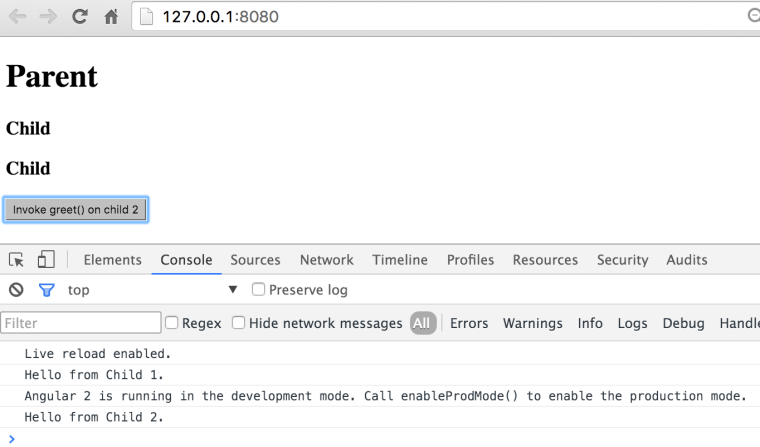
If you’ll run this application in the browser with Developer Panel open, it’ll immediately invoke the method greet() on the first child and will print the greeting on the console. This is an illustration of using of the child’s API from the TypeScript code. If you click on the button, the method greet() will be invoked on the second child, which is an illustration of the using child’s API from the template. The browser’s window will look as follows:

child_api

Note that in the above example I used the parent’s component lifecycle hook ngAfterViewInit() for invoking the API on the first child. The child’s greet() method doesn’t change its UI and simply prints the message on the console. But if you’d try to change the UI from greet() Angular would throw an exception that the UI is changed after ngAfterViewInit() was fired. The reason being that this hook is called in the same event loop for both parent and child components, and Angular by default runs in the development mode which does an additional change detection run to check the bindings, and it wouldn’t like the fact that UI has changed again on the same event.

There are two ways to deal with this issue:
1. either run the application in the production mode – invoke enableProdMode() before the bootstrap() – so Angular won’t do the additional bindings check
2. Use setTimeout() for the code updating UI to run it in the next event loop.

If you’re interesting in learning Angular 2, consider enrolling into one of our training classes. The current schedule is published here.

Implementing the Mediator Design Pattern in Angular 2

In any component-based framework you’ll need to implement component communications. The main principle is that components should be loosely coupled hence reusable hence testable. The mediator design pattern allows you to arrange component communications via “the man in the middle” so a component A never communicates with the component B directly. If a component needs data, someone will provide the data via bindings to the component’s input properties. Who’s this someone?Ain’t no business of the component. If a component needs to provide some data to the external world, it’ll emit events (with the data payload). Emits to whom? Ain’t no business of the component. Let whoever needs the data listen to the events from this component.

The mediator pattern is one of the ways to arrange a loosely coupled communication between components. In the following video I show an example of one of the ways of implementing Mediator in Angular 2. Here the sibling components communicate via their parent, but this could be also arranged via injecting a service into both component that need to “talk” to each other.

This video is an extract from the online training session I ran recently. If you’re interested of learning Angular 2 in a live session, here’s  my speaking/training schedule. If you can’t attend live events, get consider reading our book:  https://manning.com/books/angular-2-development-with-typescript.

What’s Happening in the JavaScript Ecosystem

Lots of things are happening there. As of today it’s the liveliest software ecosystem. The last time I’ve seen such an interesting gathering was 15 years ago in Java.

The Past

Fifteen years ago Java developers were looking down on the JavaScript folks. It was assumed that JavaScript was only good for highlighting menus and making an impression that the Web site is current by displaying a running clock on the page. Mobile phones still had buttons with one digits and three letters. There were no App stores. Java was promising “Write once run everywhere”, but now we can see that JavaScript actually delivered on this promise.

Say, you are developing in the XYZ language and wrote tons of programs in this language over the last 15 years. During this time new versions of the XYZ were released. The hardware advanced and new versions of operational systems came about. And you decided to take your old XYZ program written in the last century and run it on the brand new iPhone 6 or Android. Voila! It works without changing a line of code! I don’t know about the XYZ language, but programs written in JavaScript 15 years ago still work on iPhones.

js

Having said that, writing in JavaScript was never a pleasant experience. Some people made fun of JavaScript. Making fun of Brendan Eich, who created JavaScript in 10 days, was popular.

Other people started creating multiple libraries and frameworks to lower the pain of writing in plain JavaScript and making it work in different browsers. Ten years ago there were a couple of hundred JavaScript libraries and frameworks. People were overwhelmed by the freedom of choice well explained by Barry Schwartz in this video. The ECMAScript was abandoned. HTML5 was not born yet. In short, Web development was not fun.

The Present

In 2016 the situation is drastically different:

— The ECMAScript (ES) standard is actively being worked on, and its new versions will be released annually. Last year the ES6 (aka ES2015) spec was released and ES7 will be released this year. Now the JavaScript language has classes, lambda expressions (a.k.a. arrow functions), predictable “this”, block scope, generator functions, promises, destructuring, spread and rest operators and more. Some hardcore JavaScript developers immediately started WTF-ing classes as being a lot worse than functions, but these discussions are as useful as arguments about where to put curly braces in the if-statements: on the same or on the new line. Classes are just a syntax sugar that doesn’t change the prototypal inheritance, but reading and writing code is much easier now.

— All major browsers support most of the ES6 syntax.

— Transpilers easily generate ES5 program from the ES6 code so you can deploy the ES6 code today in all browsers.

— Dozens of languages emerged allowing you to write code that gets converted int to JavaScript automatically. The best of the breed is TypeScript created by Anders Hejlsberg from Microsoft. In the past he also created C#, Delphi and Turbo Pascal.

— Tons of open-source JavaScript code are published in various repositories. The most popular repo is npmjs.org, which has more than 200K libraries, frameworks and useful utilities. By the way, npm literally killed bower, his former competitor.

— Google created a super-fast JavaScript engine V8. The Node.js framework allows you to write standalone applications that don’t require browsers. Node servers started to compete with the ones written in Java. Despite the single-threaded architecture of I/O, Node’s asynchronous processing allows handling tens of thousands client requests simultaneously.

— There are build automation tools (we use Webpack), which minimize and optimize the JavaScript code with the further bundling separate files together so browsers don’t need to make dozens of requests to the server to download that home page.

— The WebComponents standard prescribes how to develop custom HTML components. The Material Design principles explain how to develop nice-looking Web pages. Google implemented these principles in a library of custom components called Polymer. We already tried it in the real-world projects, and it works!

– HTTP/2, a major revision of HTTP will substantially speed up the client-server communications.

Libraries and Frameworks

The number of JavaScript libraries and frameworks is comparable to the number of presidential candidates in the Republican Party in the USA. Those (mainly enterprise) folks who want to get everything out of the box and are not afraid to sell themselves into slavery still use Ext JS. This is not an easy to master framework, but it has everything you need to develop back-office enterprise applications.

Developers who want a lighter framework that puts a structure on your app with navigation and data binding usually go with AngularJS 1.x or Ember. They would need to integrate third-party libraries for graphical components, grids, and a usual Twitter’s Bootstrap (to make the app usable on mobile phones and tablets), but it’s doable. Some people prefer the React framework from Facebook, but React is mainly about views, and you’d need to use some third-party libraries to build an app.

Those who don’t like prix fixe meals and prefer a la carte menus pick a bunch of small libraries each of which can do one thing well. They are ready to face the issues while trying to make these libraries work together. Such people charge higher rates and project managers keep their fingers crossed hoping that these developers won’t quit.

Fashion Trends

In this season every top model-developer entering a catwalk wears reactive accessories. Not that “reactive” is something completely new (even our grandmas liked messaging, pub-sub, and the observer-observable pattern), but in today’s asynchronous UI world, reactive is a must have. We need to give a credit to Microsoft (do people still hate it by default?) for beautifully designed reactive extensions, which in JavaScript world go by the name RxJS.

In the reactive world every component or service is implemented as a stream. Everything is a stream. You are a stream. I am a stream. A click on a button spits out the event as a next element of a stream. An HTTP request to a server returns a response as an element of a stream (promises had their 15-min of fame and are considered old fashioned these days). A piece of data pushed over a WebSocket connection is an element of a stream you can subscribe to. And there is a nice little twist to it: a subscriber can regulate the stream volume and lower the pressure if need be.

A year ago a team from Google decided to re-write their super-popular (1.1M devs) framework AngularJS. They started with creating a new language AtScript just for the new Anguar 2, but then invited the TypeScript team from Microsoft (can we start liking Microsoft, just a little bit?), and asked them to add some features to the TypeScript language. Microsoft folks kindly agreed, and Google wrote Angular 2 in TypeScript, which also became a recommended language for developing Angular 2 apps. Now the code of Angular 2 apps is easy to read and write even for Java and C# developers (see this). Needless to say that RxJS is embedded inside Angular 2.

Jokes aside, I really like the Angular 2/TypeScript/RxJS/npm/Webpack combo. During the last ten months I’ve been working with my colleague Anton Moiseev on the book “Angular 2 Development with TypeScript“. So far Manning published 300 pages of this book, and the remaining 150 pages are almost ready. The code faindz will lower the price of the eBook by 39%.

If you prefer to learn Angular 2 in a classroom setting, this year I’ll be teaching Angular 2 classes and my training/speaking schedule is published here.

The Bottom Line

My hat off to Brendan Eich for not over-engineering the language. JavaScript is getting a lot of traction and the demand for professional JavaScript developers will grow by leaps and bounds. Be there and stay current.

Why Java Developers Will Embrace Angular 2 and TypeScript

Most of the Java developers I know don’t like JavaScript. Initially. They would give you different reasons why, but the real one is simple: too much to learn to make it work. For many Java developers creating the front end of a Web application in JavaScript is a chore to write and a burden to maintain. Nevertheless JavaScript rules in Web development and the new version of JavaScript (ES6) will make it even more popular.

ES6 offers classes, standardized module definition, arrow expressions (lambdas), predictable “this” and a lot more. Firefox and Chrome already support most of the ES6 syntax, and other browsers are getting there as well.

But there is something better than ES6: the TypeScript language, which has most of what ES6 has to offer plus types, casting, interfaces, generics, and annotations. The TypeScript code analyzer will help you to see syntax errors even before you run the program. Code refactoring works as well. In this blog I stated the main reasons of why TypeScript is the right tool for JavaScript development.

Now let’s take a quick glance at Angular 2, a complete re-write of the popular open-source framework managed by Google. There were two Beta releases of Angular 2, and it’s safe to start using it for your next Web project unless your app has to go to prod in the first half of 2016. Angular 2 is stable enough for serious development, and I know this first hand after surviving a couple of dozens of alpha releases of Angular 2.

Disclaimer. You can write Angular applications in the current JavaScript (ES5), next JavaScript (ES6), Dart, or TypeScript. Based on my experience with all these languages using TypeScript is the best option.

What makes the Angular 2/TypeScript combo so appealing to Java folks?

First of all, the code looks clean and easy to understand. Let’s do an experiment. I’ll give you a two-paragraph intro on how to write an Angular component in TypeScript followed by the sample code. See if you can understand this code.

Any Angular application is a hierarchy of components represented by annotated classes. The annotation @Component contains the property template that declares an HTML fragment to render by the browser. The HTML piece may include the data binding expressions, which can be represented by double curly braces. If a view depends on other components, the @Component annotation has to list them in the property directives. The references to the event handlers are placed in the HTML from the @Component section and are implemented as the class methods.

The annotation @Component also contains a selector declaring the name of the custom tag to be used in HTML document. When Angular sees an HTML element with the name matching a selector, it knows which component implements it. The lesson is over.

Below is a code sample of a SearchComponent, and we can include it in an HTML document as <search-product> because its declaration includes the selector property with the same name.

@Component({
  selector: 'search-product',
  template:
     `<div>
          <input #prod>
          <button (click)="findProduct(prod.value)">Find Product</button>
          Product name: {{product.name}}
        </div>
    `
})
class SearchComponent {
 
   product: Product; // code of the Product class is omitted

   findProduct(prodName: string){
    // Implementation of the click handler goes here
   }
   // Other code can go here
}

A Java developer can read and understand most of this code right away. OK,ok. I’ll give you more explanations. The annotated class SearchComponent declares a variable product, which may represent an object with multiple properties, one of which (name) is bound to the view ({{product.name}}). The #prod is a local template variable that stores a reference to the input field so you don’t need to query DOM to get the entered value.The (click) notation represents a click event, and the event handler function gets the argument value from the input field.

Note that the HTML template is surrounded with the back tick symbols, which allow you to write the markup in multiple lines in a readable form. If you prefer to store HTML in a separate file instead of template use the templateURL property:

templateUrl: './search.html' 

Dependency Injection. Angular architecture will be very familiar to those who use Spring framework or Java EE. Angular comes with the Dependency Injection (DI) module, which instantiates an object using a registered class or a factory and injects it to the application component via constructor’s arguments. The following code will instruct Angular to instantiate the class ProductService and inject it into the ProductComponent:

@Component({
   providers: [ProductService]
})
class ProductComponent {
product: Product;
 
  constructor(private productService: ProductService) {
 
     this.product = this.productService.getProduct();
  }
}

Specifying the provider and declaring the constructor with the type is all you need for injecting the object. Application components form a hierarchy, and each component may have its own injector. Injectors are not singletons.

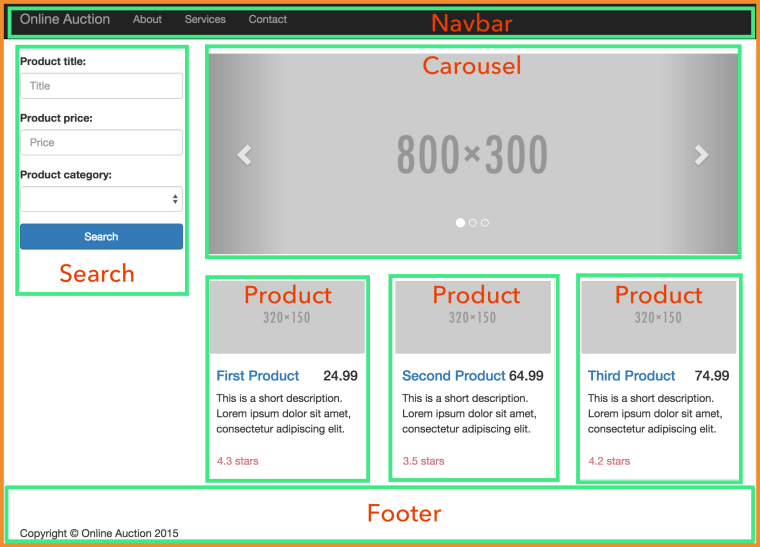
App structure. The following image shows what the main page of a sample application is made up of. The parent component includes child components, which are surrounded with green borders.

ch2_auction_home_page_components

Router. Angular shines in development of single-page applications (SPA), where the entire Web page is never reloaded. Angular router allows you to easily configure the page fragments (the views) that should be loaded based on the user’s actions. The code snippet below includes the annotation @RouteConfig that configures two routes Home and ProductDetail, which are mapped to the corresponding components (HomeComponent and ProductDetailComponent). The user navigates the application by clicking on the links with the corresponding routerLink attribute, which will display the requested component in the area marked as <router-outlet>.

@Component({
    selector: 'basic-routing',
    template: `<a [routerLink]="['/Home']">Home</a>
              <a [routerLink]="['/ProductDetail']">Product Details</a>
              <router-outlet></router-outlet>`,
    directives: [ ROUTER_DIRECTIVES]
})

@RouteConfig([
    {path: '/',        component: HomeComponent, as: 'Home'},
    {path: '/product', component: ProductDetailComponent, as: 'ProductDetail'}
])
class RootComponent{
}

Inter-component communication. Each component in Angular is well encapsulated, and you can create it in a losely-coupled manner. To pass the data from the outside world to the component just annotate a class variable(s) with @Input() and bind some value to it from the parent component.

class OrderComponent {

    @Input() stockSymbol: string; 
    @Input() quantity: number; 
}

To pass the data from the component to the outside world, use the @Output annotation and dispatch events through this variable. Dispatch to whom? Ain’t none of the component’s business. Let’s whoever is interested listen to this event, which can be either a standard or a custom event carrying a payload.

class PriceQuoterComponent {
    @Output() lastPrice: EventEmitter<IPriceQuote>  = new EventEmitter(); 
 ...
    this.lastPrice.emit(priceQuote)
 }   

See something familiar? You got it. That thingy in the angle brackets after EventEmitter denotes a generic type, and IPriceQuote can be an interface. TypeScript supports generic and interfaces.

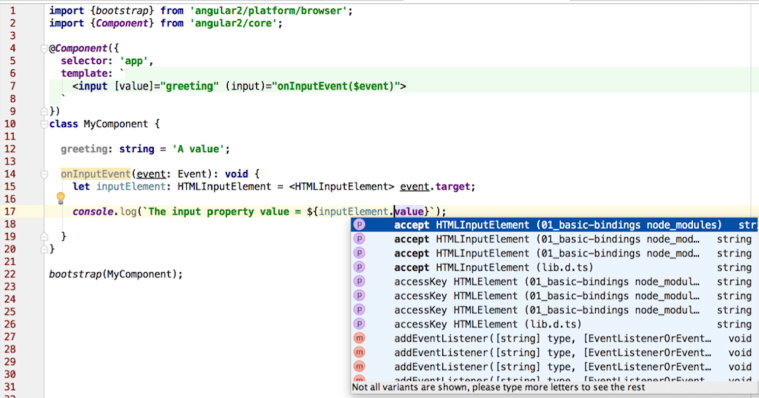
Casting. TypeScript supports types, classes, and interfaces (class A extends B implements D, E, F). It support type casting as well. As in Java, upcasting doesn’t require special notation. To denote downcasting surround the target type with angle brackets and place it before more general type as shown in the screenshot below.

casting

I took this screenshot after placing the cursor before value in line 17. I use WebStorm 12 IDE (a little brother of IntelliJ IDEA), which supports TypeScript quite nicely (including refactoring), and this supports improves with every minor release of WebStorm. If I wouldn’t declare the variable with the type in line 15 and wouldn’t use casting, the code would still work, but the IDE would show value in red and the code completion wouldn’t work in line 17.

Streams and lambdas. These are big in Java 8. Angular 2 incorporates RxJS, the library with react extensions, where streams is a religion. Everything is a stream in RxJS, and Angular 2 promotes using observable streams and subscribers.
Even events are streams, can you believe this? The user types in an HTML input field or is dragging the mouse, which generates a stream that you can subscribe to (think observer/observable or pub/sub).

Make an HTTP request or open a WebSocket and subscribe to the observable stream, which is a Promise on steroids. Handling results is still an asynchronous operation, but as opposed to a Promise it can be cancelled.

In Java 8 you can run a stream through a number of changed intermediate operations (e.g. map()) followed by a terminal one. In Angular 2 you can do the same:

class AppComponent {

  products: Array = [];

  constructor(private http: Http) { 

    this.http.get('/products') 
        .map(res => res.json()) 
        .subscribe(
            data => {
              if (Array.isArray(data)){
                this.products=data; 
              } else{
                this.products.push(data);
              }
            },
            err =>
              console.log("Can't get products. Error code: %s, URL: %s ",  err.status, err.url), 
            () => console.log('Product(s) are retrieved') 
        );
  }
}

If the above code requires explanations, then your Java is a little rusty. Seriously.

Module loading. One of the important features that ES6 brings to Web development is standardization of modules. The application code consists of modules (typically one module is one script file). Using the export keyword (e.g. export class Product {...}) you specify which members of the module should be exposed to other scripts. Accordingly, a script can include one or more import statements to have access to other modules.

ES6 includes the syntax for importing/exporting modules, but the standardization of the module loader System is postponed, and we use the polyfill SystemJS that can load modules of all existing formats (including ES6). When the System object will become standard in all browsers that support ES6, you won’t need to change your code (removing the polyfill is all that’s needed).

The main HTML file of he Angular/TypeScript application simply includes the configuration of the loader and transpiler (the running code must be compiled to JavaScript) and import statement of the main application component:

<body>
  <app>Loading...</app>

  <script>
    System.config({
      transpiler: 'typescript',
      typescriptOptions: {emitDecoratorMetadata: true},
      packages: {app: {defaultExtension: 'ts'}}
    });
    System.import('app');
  </script>
</body>

In the above code snippet the System object imports the module from the file app.ts, which is a root component of the application and may have child components represented by custom HTML tags. The System loader reads all import statements in each application component and loads all dependencies accordingly. Lazy loading of the modules is supported as well.

Deployment. Java developers use build tools like Maven or Gradle for deployment. Guess what, Angular developers use them as well. The TypeScript code needs to be transpiled into JavaScript, minimized and obfuscated before deployment to QA or prod servers. Some people use Grunt, some Gulp, but we use Webpack for bundling the code and npm scripts for deployment. The jury is still out on the best build automation tools, and we keep our eyes open.

I hope that after reading this blog thousands (ok, hundreds) of Java developers will want to take a closer look at Angular 2. Start with Angular architecture.

In this blog I showed you just a tip of the iceberg. You’d need to invest some time in learning Angular 2 and TypeScript, but the learning process isn’t too steep for the Java folks. If you want to make this process as pleasant as it can be, get the book that I’m co-authoring or enroll in one of our training classes.

IMHO Angular 2 will make as big of an impact in the JavaScript community as Spring Framework has in the Java world.

One more thing… View rendering is implemented in a separate tier, which means that it doesn’t have to be HTML only. You will be able to implement mobile applications that will use native iOS or Android UI components. The folks from Telerik are working with the Angular team to integrate this framework with NativeScript (read this).

Two-way Data Binding in Angular 2

By default Angular 2 doesn’t use a two-way data binding. It uses a unidirectional binding but if offers you a simple syntax for a two-way data binding if need be. In this blog I’ll show you an example of such syntax.

One-way binding from the UI an Angular component is arranged by surrounding an event name with parentheses:

<button (click)="onClick()">Get Products</button>

<input placeholder= "Product name" (input)="onInput()">

The one-way binding in the opposite direction is denoted by surrounding an HTML attribute with square brackets. The greeting is a property of an Angular component in this line:

<input [value]="greeting" >

There is also a template binding that allows to add/remove HTML elements to the DOM tree. The following line will add the only if a boolean flag is true, for example:

<span *ngIf="flag">Flag is true</span>

In limited cases you may want to use two-way binding, and you can specify it by adding the ngModel directive as an HTML attribute surrounded with both parentheses and square brackets, for example:

<input [(ngModel)] = "myComponentProperty">

In other frameworks two-way binding is popular with forms where you often needed to synchronize values of the form fields with the underlying model. While Angular also allows you to map each form field to the corresponding property of the model object there is a better way to handle forms and I’ll write about it in a separate blog. Still, there are some cases when using ngModel may be handy, so let’s get familiar with the syntax.

Say the landing page of a financial application allows the user to check the latest prices of the stock by entering its symbol in an input field. Often the user enters the same stock that he owns or follows, e.g. AAPL for Apple. You could save the last entered symbol as a cookie or using the HTML5 local storage, and next time the user opens this page the program reads it from there and populates the input field. The user still should be able to type in this field and the entered value should be synchronized with a variable lastStockSymbol, which plays the role of the model (as in MVC). The code sample below implements this functionality.

import {bootstrap} from 'angular2/platform/browser';
import {Component} from 'angular2/core';

@Component({
    selector: 'stock-search',
    template: `<input type='text' 
        placeholder= "Enter stock symbol" [(ngModel)] = "lastStockSymbol"> // 1
               <br>The value of lastStockSymbol is {{lastStockSymbol}}`
})
class StockComponent {

    lastStockSymbol: string; // 2

    constructor() {
        setTimeout(() => { // 3            
            this.lastStockSymbol="AAPL"; 
        }, 1000);
    }
}
@Component({
    selector: 'app',
    directives: [StockComponent],
    template:`<stock-search></stock-search>`

})
class AppComponent {}
bootstrap(AppComponent);

1. Requesting the two-way binding to synchronize the changes in the input field with lastStockSymbol

2. The lastStockSymbol is our model and it can be modified either by user typing in the input field or programatically.

3. To emulate a scenario of reading the last stock symbol we simply arranged a one second delay after which the value of the variable lastStockSymbol will be changed to AAPL and the <input>> field will show it.

The variable lastStockSymbol and the value of the <input> field will be always in sync, and you can see this in action by trying it online on Plunker at http://bit.ly/1MDExS2. A little bit fancier version of this sample is located at http://plnkr.co/edit/bOOkz96iIjFu9ydHKNNy

In AngularJS 1.x the two-way binding was a default mode of operations, which seems like a simple and elegant solution for synchronization of a view and a model. But on a complex UI containing dozens of controls, where changing the value in one place could cause a chain of bindings updates performance could suffer.

Debugging could also be more difficult as there could be many reasons of why a particular value was changed. Was it because of the user’s input or it’s a result of modified value in seemingly unrelated variable in the program? With two-way binding implementing the change detection inside the framework was not trivial either. With the unidirectional data flow you always know where a change to a particular UI element or a component property came from. We’ll discuss Angular’s change detection mechanism in on of the future blogs.

My other Angular-related blogs are here. Manning is publishing the drafts of the book “Angular 2 Development with TypeScript“ that I write with Anton Moiseev. Starting on February 28, we’ll also teach an online class on Angular 2.

Injecting a Service in Angular 2

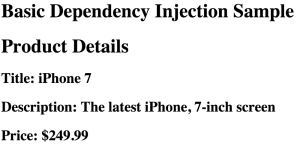
This is a sequel to my blog “Getting Familiar with Angular 2 DI“. This time we’ll create a simple application that will use a ProductComponent to render product details and ProductService to supply the data about the product. In this blog I use Angular 2 Beta.0. The working application is deployed as a plunk and it’ll produce the page shown below.

ch4_running_di_sample

The ProductComponent can request the injection of the ProductService object by declaring the constructor argument with a type:

constructor(productService: ProductService)

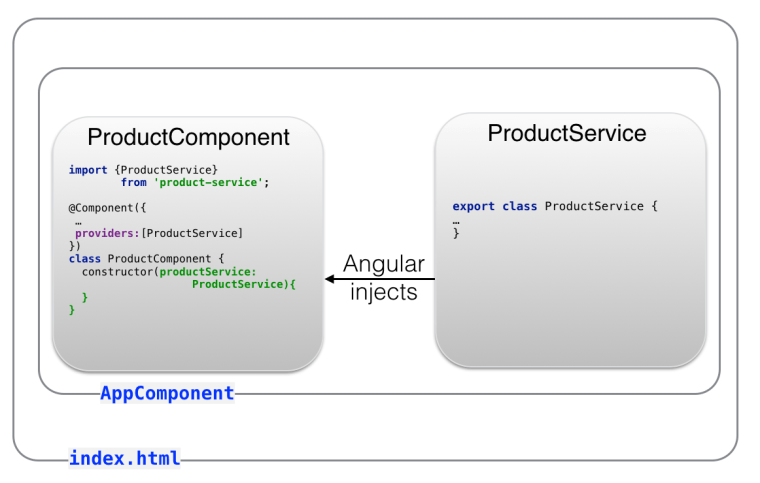
The following image will give you a better idea how these component and service are related.

ch4_di_product2

The file index.html will host a root component of your app’s main page, which in turn will include ProductComponent that’s dependent on ProductService.

Note the import and export statements. The class definition of the ProductService starts with the export statement to enable other components to access its content. Accordingly, the ProductComponent includes the import statement providing the name of the class (ProductService) and the module being imported (located in the file product-service.ts).

The providers statement instructs Angular to provide an instance of the class ProductService when requested.

The ProductService may communicate with some server requesting details for the product selected on the Web page, but we’ll skip this part for now and will concentrate on how this service can be injected into ProductComponent.

Our app will consist of the following files:

* The file index.html that loads the code of the app.ts that renders root component, which uses ProductComponent
* The ProductComponent will be implemented in the file product.ts.
* The ProductService will be implemented in a file product-service.ts.

The file index.html performs three functions:

* Loads Angular and its dependencies
* Hosts a root component represented by the tag .
* Configures SystemJS and uses it to load the application component from app.ts.

<!DOCTYPE html>
<html lang="en">
<head>
  <meta charset="utf-8">
  <title>Angular DI Sample</title>
  
  <script src="https://npmcdn.com/angular2@2.0.0-beta.0/bundles/angular2-polyfills.js"></script>
  <script src="https://npmcdn.com/typescript@1.7.5/lib/typescript.js"></script>
  <script src="https://npmcdn.com/systemjs@0.19.8/dist/system.src.js"></script>
  <script src="https://npmcdn.com/rxjs@5.0.0-beta.0/bundles/Rx.js"></script>
  <script src="https://npmcdn.com/angular2@2.0.0-beta.0/bundles/angular2.dev.js"></script>
  
  <script>
    System.config({
      transpiler: 'typescript',
      typescriptOptions: {emitDecoratorMetadata: true},
      packages: {app: {defaultExtension: 'ts'}}
    });
  </script>
</head>
<body>
  <disample-root>Loading...</disample-root>
  <script>System.import('app/app');</script>
</body>
</html>

The AppComponent is shown next. It hosts the ProductComponent, hence it needs to import and declare it in the property directives. Note that the name of the selector of the AppComponent is disample-root, and we used it in index.html above:

import {bootstrap} from 'angular2/platform/browser';
import {Component} from 'angular2/core';
import ProductComponent from './components/product';

@Component({selector: 'disample-root',
  template: `<h1> Basic Dependency Injection Sample</h1>
             <di-product-page></di-product-page>`,
  directives: [ProductComponent]
})
class AppComponent {}

bootstrap(AppComponent);

Based on the tag it’s easy to guess that there is a child component with the selector having this value. This selector is declared in ProductComponent, which will get its dependency (ProductService) injected via the constructor:

import {Component, bind} from 'angular2/core';
import {ProductService, Product} from "../services/product-service";

@Component({
  selector: 'di-product-page',
  template: `<div>
  <h1>Product Details</h1>
  <h2>Title: {{product.title}}</h2>
  <h2>Description: {{product.description}}</h2>
  <h2>Price: \${{product.price}}</h2>
</div>`,
  providers:[ProductService] // 1
})

export default class ProductComponent {
  product: Product;

  constructor( productService: ProductService) { // 2

    this.product = productService.getProduct();
  }
}

1. The providers property maps a token that we’ll use in the code to the name of the class that will represent this token. In this example the name of the token is the same as the name of the class: ProductService, so we use a short notation without invoking the function provide() with useClass.

2. Injection of the ProductService will be done here, and Angular will instantiate this object.

We separate the type ProductService from the actual implementation of this service being that a class ProductService, OtherProductService or something else. Replacing one implementation with another comes down to changing the providers line.

The constructor of ProductComponent invokes getProduct() on the service and places a reference to the returned Product object into the class variable product, which is used in the HTML template.

Using double curly braces the above markup allows us to bind the properties title, description, and price of the class Product. The file product-service.ts includes the declaration of two classes: Product and ProductService.

export class Product {  // 1
  constructor(
    public id: number,
    public title: string,
    public price: number,
    public description: string) {
  }
}

export class ProductService { 

  getProduct(): Product { // 2
    return new Product(0, "iPhone 7", 249.99, "The latest iPhone, 7-inch screen");
  }
}

1. The class Product represents a product (a.k.a. Value Object). This type will be used outside of this script so we export it.

2. For simplicity the method getProduct() always returns the same product with hard-coded values. In the real-world applications you’d need to get it from some external data source, e.g. by making an HTTP request to a remote server.

To see this example in action open this plunk and press the button Run.

The instance of ProductService was injected into ProductComponent, and the product component rendered product details provided by the server.

In the next section you’ll see a ProductService decorated with the @Injectable annotation, which is used for generating DI metadata in cases when the service itself uses DI as shown in the next section. It’s not needed here because this service doesn’t get any other service injected into it.

Injecting an Http Service

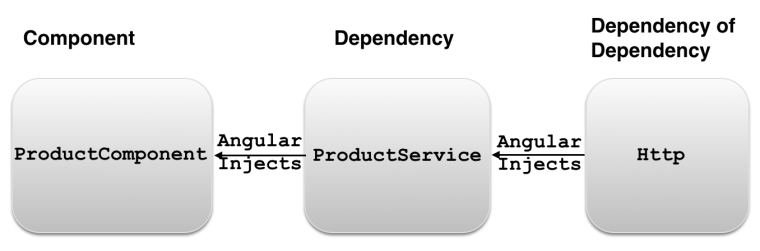
Pretty often a service would need to make an HTTP request to get the requested data. The ProductComponent depends on ProductService which will be injected using Angular DI mechanism. If the ProductService needs to make an HTTP request, it’ll have an Http object as its own dependency. The ProductService will need to import the Http object from Angular, and should have a constructor for injecting Http object. The following diagram shows that ProductComponent depends on ProductService, which has its own dependency: Http.

ch4_dependency_dependency

The following code snippet illustrates the Http object injection into ProductService and retrieval of products from the file products.json:

import {Http} from 'angular2/http';
import {ProductService} from "./product-service";

@Injectable
export class ProductService {
    constructor(private http:Http){
      let products = http.get('products.json');
    }
   // other app code goes here
   // will write a separate blog about using Http
}

The class constructor is the injection point, and we need to add the provider of object of the Http type. Angular offers a special object HTTP_PROVIDERS, which provides injectables for making HTTP requests and could be specified as an application-level dependency during the bootstrap. The application-level providers are available for all application components. The ProductComponent would need to explicitly specify the HTTP providers:

import {HTTP_PROVIDERS} from 'angular2/http';

class ProductComponent {

  constructor(private productService: ProductService) {}
  
  // The rest of the code goes here 
}
bootstrap(ProductComponent, [HTTP_PROVIDERS]);

Leaky Abstraction Detected. You need to specify the HTTP provider at the component level despite the fact that Http is used only inside the service (ProductComponent <-ProductService <- Http). This breaks encapsulation of the ProductService. In other words, the ProductService abstraction leaks. Imagine that ProductService is used in 10 different components, and for some reason we decided to update ProductService replacing HTTP with another way of getting product information. This would require code modification not only inside the ProductService, but also in those 10 components.

I'd like to keep the declaration of HTTP provider inside the ProductService, but currently it’s not possible. I raised this question at Angular’s repo, and you can join the discussion here

.

In one of the future blogs I'll show you how easy it is to replace one implementation of the service with another using Angular DI.

Stay tuned for more Angular 2 blogs. My other Angular-related blogs are here. Manning is publishing the drafts of our book “Angular 2 Development with TypeScript“. Starting on February 28, we’ll also teach an online class on Angular 2.

Getting familiar with Angular 2 Dependency Injection

My Angular 2 blogging series continues and today’s I’ll present you a high level overview of Dependency Injection (DI) in Angular 2.

Any Angular 2 application is a collection of components, directives, and classes that may depend on each other. While each component can explicitly instantiate its dependencies, Angular can do this job for you by using its Dependency Injection mechanism.

I’ll explain you how Angular 2 does it, but first let’s make sure that we are not confusing DI as a design pattern vs a specific DI implementation as the same design patterns can be implemented differently depending on the software you use. For example, in the Java world there are multiple implementations of DI. For example, Spring Framework has the most popular DI container. Java EE has its own implementation of Resource Injection and Context Dependency Injection. Angular 2 has its own implementation of the DI pattern.

DI and IoC Patterns

Imagine a fulfillment center that ships products. An application that keeps track of shipped products may create a product object and invoke a function that creates and saves a shipment record:

var product = new Product();
createShipment(product);

The function createShipment() depends on the existence of an instance of the Product object. In other words, the function createShipment() has a dependency: Product. The function itself doesn’t know how to create it. The calling script should somehow create and inject this object as an argument to the function createShipment().

But the thing is that the class Product should be implemented by the offshore team, and it’s not ready yet (oh, those Indians!). So you decided to provide a MockProduct as a substitute for an actual Product until the offshore team catches up.

In our two-line code sample it’s an easy change, but what if the function createShipment() has three dependencies (e.g. product, shipping company, and fulfillment center) and each of these dependencies has it’s own dependencies? Now creating a different set of mock objects for createShipment() would need a lot more manual code changes. Would it be possible to ask someone to create instances of dependencies (with their dependencies) for us?

This is what the Dependency Injection pattern is about: if an object A depends on the object of type B, the object A won’t explicitly instantiate the object B (as we did with the new operator above), but rather will get it injected from the operational environment. In other words, the object A just needs to declare, “I need an object of type B, could someone please give it to me?” The words of type are important here. The object A does not request a specific implementation of the object and will be happy as long as the injected object is of type B.

The Inversion of Control (IoC) is a more general pattern than DI. Rather than making your application to use some API from a framework (or a software container), the framework will create and supply the object(s) that the application needs. The IoC pattern can be implemented in different ways and DI is one of the ways to provide required objects. Angular plays a role of the IoC container and can provide the required objects according to your component’s declarations.

Benefits of DI and how Angular Does It

Angular offers a mechanism that helps registering and instantiating component dependencies. In short, DI helps in writing code in a loosely coupled way and makes your code more testable and reusable.

Loose coupling and reusability

Say you have a ProductComponent that gets product details using the ProductService class. Without DI your ProductComponent needs to know how to instantiate the class ProductService. It can be done by multiple ways, e.g. using new, calling getInstance() on some singleton object, or maybe invoking a createProductService() on some factory class. In any case ProductComponent becomes tightly coupled with ProductService.

If you need to reuse the ProductComponent in another application that uses different service for getting product details, you’d need to modify the code (e.g. productService = new AnotherProductService()). DI allows to decouple application components by sparing them from the need to know how to create their dependencies. Consider the following ProductComponent sample:

@Component({
providers: [ProductService]
})
class ProductComponent {
product: Product;

  constructor(productService: ProductService) {

     this.product = productService.getProduct();
  }
}

In Angular applications written in TypeScript you do this:

a) Register an object(s) for DI by specifying a provider(s), which is an instruction to Angular on how to instantiate this object when the injection is requested
b) Declare a class with a constructor that has the argument(s) of types that match provider’s types

When Angular sees a constructor with an argument of a particular type, it starts looking for a provider that specifies HOW to instantiate an object of this type. If the provider’s found in the current component, Angular will use it to instantiate an object and inject it to the component via its constructor.

Angular 2 inject object only via constructor’s argument, which greatly simplifies this process comparing to Angular 1.

In the above code snippet the line providers:[ProductService] is a shortcut for provide(ProductService, {useClass:ProductService}). We’re instructing Angular to provide a token ProductService using the class of same name. Using the method provide() you can map the same token to a different class (e.g. to emulate the functionality of the ProductService while someone else is developing a real service class).

Now that we’ve added the providers property to the @Component annotation of the ProductComponent, Angular’s DI module will know that it has to instantiate the object of type ProductService.

The ProductComponent doesn’t need to know which concrete implementation of the ProductService type to use – it’ll use whatever object was specified as a provider. The reference to the ProductService object will be injected via the constructor’s argument, and there is no need to explicitly instantiate ProductService inside ProductComponent. Just use it as in the above code, which calls the service method getDetails() on the ProductService instance magically created by Angular.

If you need to reuse the same ProductComponent in a different application with a different implementation of the type ProductService, change the providers line, for example:

providers: [provide(ProductService, {useClass:AnotherProductService})]

Now Angular will instantiate AnotherProductService, but your code that was using the type ProductService won’t break. In our example using DI increases reusability of the ProductComponent and eliminates its tight coupling with ProductService. If one object is tightly-coupled with another, this may require substantial code modifications should you want to reuse just one of them in another application.

Testability

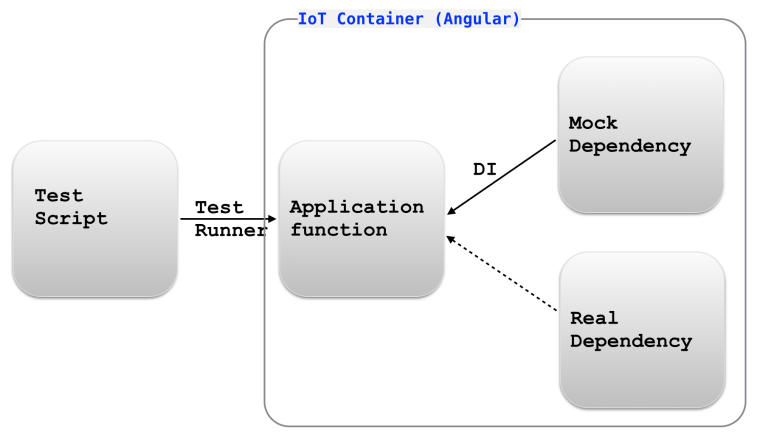
DI increases testability of your components in isolation. You can easily inject mock objects where if their real implementations are not available or you want to unit-test your code. Say you need to add a login feature to your application. You can create a LoginComponent (it would render ID/password fields) that uses a LoginService component, which should connect to a certain authorization server and check the user’s privileges. The authorization server has to be provided by a different department (oh, those Russians), but it’s not ready yet.

You finished coding the LoginComponent, but you can’t test it for reasons that are out of your control, i.e. dependency on another component developed by someone else.

In testing we often use mock objects, which mimic the behavior of real objects. With a DI framework you can create a mock object MockLoginService that doesn’t actually connect to authorization server but rather has hard-coded access privileges assigned to the users with certain ID/password combinations. Using DI you can can write a single line injecting the MockLoginService into your application’s Login view without the need to wait till the authorization server is ready.

ch5_di_testing

Later on, when that server is ready you can modify the providers line so Angular would inject the real LoginService component as shown below.

Injectors and Providers

Angular 2 has such concepts as injectors and providers. Each component has an Injector capable of injecting objects into other components. Any Angular application is hosted by some root component, so you always have a root injector available. An injector knows how to inject one object of the specified type into the constructor of another.

Providers allows you to map a custom type (or a string) to a concrete implementation of this type (or a value). We’ll be using ProductComponent and ProductService for all code samples in this chapter, and if your application has only one implementation of a particular type (i.e. ProductService), specifying a provider can look like this:

provide(ProductService,{useClass:ProductService});

IMPORTANT: The providers property is specified inside the @Component annotation, which allows Angular to register the class for future injection. No instance of the ProductService is created at this point. The providers line instructs the injector as follows: “When you’ll need to construct an object that has an argument of type ProductService create an instance of the registered class for injection into this object”.

The shorter notation of the above provider statement looks like this:

providers:[ProductService]

If you need to inject a different implementation of a particular type, use the longer notation:

provide(ProductService, {useClass: MockProductService});

Now we’re giving the following instruction to the injector:
“When you’ll need to inject an object of type ProductService into a constructor’s argument create an instance of the class MockProductService”.

The injector knows what to inject, and now we need to specify where to inject the object. In TypeScript it comes down to declaring a constructor argument specifying its type. The following line shows how to inject the object of type ProductService into the constructor of some component.

constructor(productService: ProductService)

The constructor will remain the same regardless of which concrete implementation of ProductService was specified as a provider. Below is a sample sequence diagram of the injecting process.

ch5_injector_time_diag

Injection With TypeScript vs ES6

TypeScript simplifies the syntax of injection as it doesn’t require using any DI annotations. Specifying the type of the constructor’s argument is all that’s needed:

constructor(productService: ProductService)

There is one requirement for the above line to work though: the TypeScript compiler need to be configured with the option “emitDecoratorMetadata”: true. With this option the generated JavaScript code will contain the metadata information about the argument type so Angular will know which type of the object to inject.

I use the SystemJS polyfill for on-the-fly TypeScript transpiling, we can add the following TypeScript compiler’s option in the configuration file for SystemJS:

typescriptOptions: {
  "emitDecoratorMetadata": true
}

If you’d be writing the class in ES6, its constructor would need the @Inject annotation with explicit type:

constructor(@Inject(ProductService) productService)

How to Create a Provider

The function provide() returns an instance of the Provider object, and this function can be called in different ways because the object creator can be a class or a factory (with or without dependencies).

* To map a type to an instance of a class use the function provide() where the second argument is an object with the useClass property.

* If you have a factory function that instantiates objects based on certain criteria use the function provide(), where the second argument is an object with the useFactory property, which specifies a factory function (or a fat arrow expression) that knows how to instantiate required objects. The factory function can have an optional argument with dependencies, if any.

* To provide a string with simple injectable value (e.g. a URL of a service ) use the function provide() where the second argument is an object with the useValue property.

In the next blogs I’ll write a sample app to illustrate the use of useClass, useFactory, and useValue.

I’m co-authoring the book “Angular 2 Development with TypeScript“, and Manning offers the electronic version of whatever content is ready (138 pages are available). Starting on February 28, we’ll also teach an online class on Angular 2, and you can use the promo code blogreader to get $50 off the price.

Angular 2: Passing Data to Routes

This blog was updated on July 26, 2016. The RC.5 version of the code is available at https://github.com/Farata/angular2typescript/tree/master/chapter3/router_samples

In the previous blog I did a high-level overview of Angular 2 router and wrote a basic routing application that demonstrated displaying different components in a predefined area of the window. We often need not only display a component, but also pass some data to it. For example, if we navigate from the Home to the Product Detail route we need to pass the product ID to the destination route. The destination route can access passed parameters using the class ActivatedRoute, which knows its URL segment, the outlet, and allows to access parameters passed to this route. I’ll illustrate the use of both classes by modifying the app from the previous blog.

Extracting parameters from ActivatedRoute

When the user navigates to the ProductDetail route, we need to pass the product ID to this route to display details of the particular product. Let’s modify the code of the application from the previous blog so the RootComponent can pass the product ID to ProductDetailComponent. The new version of this component will be called `ProductDetailComponentParam`, and Angular will inject the object of type ActivatedRoute into this component. The ActivatedRoute object will contain the information about the component loaded into outlet.

import {Component} from '@angular/core';
import {ActivatedRoute} from '@angular/router';

@Component({
  selector: 'product',
  template: `<h1 class="product">Product Detail for Product: {{productID}}</h1>`, // 1
  styles: ['.product {background: cyan}']
})
export class ProductDetailComponentParam {
  productID: string;

  constructor(route: ActivatedRoute) { // 2
    this.productID = route.snapshot.params['id']; // 3
  }
}
\

1. Display the received product ID using binding.

2. The constructor of this component requests Angular to inject the object ActivatedRoute.

3. Get the value of the parameter named id and assign it to the class variable productID, which is used in template via binding.

NOTE: In the above code sample we’ve used the property snapshot of ActivatedRoute to get the values of the parameter passed to the route. The snapshot` property represents a component loaded into the outlet at a particular moment of time. The class ActivatedRoute has another property called params of type Observable, which allows a component that’s loaded by the router to subscribe to the incoming parameters that may be changing over time. See this blog for details.

The ActivatedRoute object will contain all parameters that are being passed to this component. If you write your Angular application in TypeScript, you just need to declare the constructor’s argument specifying its type, and Angular will know how to instantiate and inject this object.

In the next code sample we’ll change the configuration of the product route and routerLink to ensure that the value of the product ID will be passed to the component ProdutDetailComponentParam if the user choses to go this route.

import {bootstrap} from '@angular/platform-browser-dynamic';
import {Component} from '@angular/core';
import {LocationStrategy, HashLocationStrategy} from '@angular/common';
import {provideRouter, ROUTER_DIRECTIVES} from '@angular/router';

import {HomeComponent} from './components/home';
import {ProductDetailComponentParam} from './components/product-param';

@Component({
    selector: 'basic-routing',
    directives: [ROUTER_DIRECTIVES],
    template: `
        <a [routerLink]="['./']">Home</a>
        <a [routerLink]="['./product', 1234]">Product Details</a> // 1
        <router-outlet></router-outlet>
    `
})
class RootComponent {}

bootstrap(RootComponent, [
    provideRouter([
        {path: '',            component: HomeComponent},
        {path: 'product/:id', component: ProductDetailComponentParam} // 2
    ]),
    {provide: LocationStrategy, useClass: HashLocationStrategy}
]);

1. This time there are two elements in the array given to routerLink: the path that the route starts with and the number that represents product ID.

2. The path property has an additional URL segment /:id.

The routerLink property for the “Product Details” link is initialized with a two-element array. The elements of the array build up the path specified in the routes configuration given to provideRouter(). The first element of the array represents the static part of the route’s path: /product. The second element represents the variable part of the path, i.e. /:id.

For simplicity we’ve hard-coded the ID to be 1234, but if the class RootComponent had a variable productID pointing at the corresponding object, we could have written { productID} instead of 1234. For the product detail route Angular will construct the URL segment /product/1234.

The following screenshot shows how the product detail view will be rendered in the browser:

ch4_basic_routing_product_detail_param

Note the URL. Angular router replaced the path /product/:id with /product/1234.

Let’s review the steps that Angular performed under the hood for rendering the main page of the application:

1. Check the the content of each routerLink to find the corresponding routes configurations.

2. Parse the URLs and replace the parameter names with actual values where specified.

3. Build the actual <a href=””> tags that the browser understands.

The next screenshot shows a snapshot of the home page of our application with the Chrome Dev Tools panel open.

ch4_basic_routing_product_detail_href

Since the path property of the configured Home route had an empty string, Angular didn’t add anything to the base URL of the page. But the anchor under Product Details link is already converted into a regular HTML tag. When the user clicks on the Product Details link, the router will attach a hash sign and add /product/1234 to the base URL so the absolute URL of the Product Detail view will become http://localhost:8080/#/product/1234.

Passing static data to a route

While most of the times parent components will be passing data to their children, Angular also offers a mechanism to pass additional data to components at the time of the route configuration. For example, besides the dynamic data like product ID we may need to pass a flag indicating if the application runs in production environment or not. This can be done by using the data property of your route configuration. For example, our route for the product details can be configured as follows:

{path: 'product/:id', component: ProductDetailComponentParam ,
                      data: [{isProd: true}]}

The data property can contain an array of arbitrary string key-values pairs. When the router will open ProductDetailComponentParam the data value will be located in the data property of the ActivatedRoute.snapshot:

export class ProductDetailComponentParam {
  productID: string;
  isProdEnvironment: string;

  constructor(route: ActivatedRoute) {
    this.productID = route.snapshot.params['id'];

    this.isProdEnvironment = route.snapshot.data[0]['isProd'];
  }
}

Passing data to a route via the data property is not an alternative to configuring parameters in the path property as in path: ‘product/:id’ but can come handy when you need to pass some data to a route during the configuration phase, e.g. is it a production or QA environment.

If you’re interested in learning Angular 2 in depth, enroll into one of our workshops. We’ll run the next public training   online starting from September 11, 2016. I can also deliver this workshop privately for your organization (send an email to training@faratasystems.com).

Angular 2 Router: High-Level Overview

Another update. Oops, they did it again. In RC.5 routing configuration has been changed. Will update this blog by the end of August of 2016.

This blog was updated on July 24, 2016.

Angular 2 framework (currently in RC.4) offers a simple way to implement client-side navigation for Single-Page Applications (SPA). The new component router (currently v.3.0.0-beta.2) allows you to configure routes, map them to the corresponding components, and arrange user’s navigation in a declarative way. While working on a routing chapter for our book “Angular 2 Development with TypeScript” I created a number of small applications illustrating various routing scenarios:

– Configuring routes in the root component
– Configuring routes in both root and child components
– Passing parameters to routes
– Using routing with both Hash- and History API-based strategies
– Using auxiliary (independent) routes

You can find these sample apps on Github where we host and update all code samples for the book (see the chapter3 folder). But in this blog I’ll do a high-level overview of Angular 2 routing and will show you a basic working example where the routing is configured in the root component of the application.

When you visit any Web page the location bar of your browser shows a URL (see, you already learned something new!). The URL consists of a protocol, domain name, port, and in case of GET requests may have parameters after the question mark:

http://mysite.com:8080/auction?someParam=123

If you change any character in the above URL and press Enter, this will result in sending a request to the server and page refresh, which is not what we want in SPA. In SPA, we want to be able to change a URL fragment that won’t result in the server request, but would update a portion of the Web page based on the JavaScript code that is already loaded to the browser.

Many years ago browsers started supporting a hash-sign (#) in the URLs, for example:

http://mysite.com:8080#/products/page/3

Any modifications to the right of the hash tag don’t trigger requests to the server, hence we can map these fragments to the client-side component to be rendered in the designated area of the Web page (in Angular 2 it’s identified by the tags <router-outlet></router-outlet>).

Then browsers started implementing HTML5 APIs, which includes History API that allows programmatically support the Back and Forward buttons as well as modify a URL fragment using the pushState() method. The history of all user’s navigations would be
stored on the client.

Angular 2 supports both location strategies using its classes HashLocationStrategy or PathLocationStrategy sparing you from adding the hash sign to the URL or calling pushState(). You just need to choose which strategy to use. I prefer hash-based navigation because a) it’s supported by all the browsers and b) History API-based navigation is unstable at this point.

Now let’s get familiar with the main players of Angular 2 navigation:

* Router – an object that represents the router during the runtime. You can use its methods navigate() or navigateByUrl() to navigate to a route either by the configured route path or by the URL segment respectively.

* RouterOutlet – a directive that serves as a placeholder within your Web page where the router should render the component

* provideRouter – maps URLs to components to be rendered inside the tag <router-outlet>

* RouterLink – a directive to declare a link to a route if the navigation is done using the HTML anchor tags. The RouterLink may contain parameters to be passed to the route’s component

* ActivatedRoute – an object that represents the route(s) that’s currently active

You configure routes for your app in a separate object of type RouterConfig and pass this object to the bootstrap() function. Router configuration is not done on the component level.

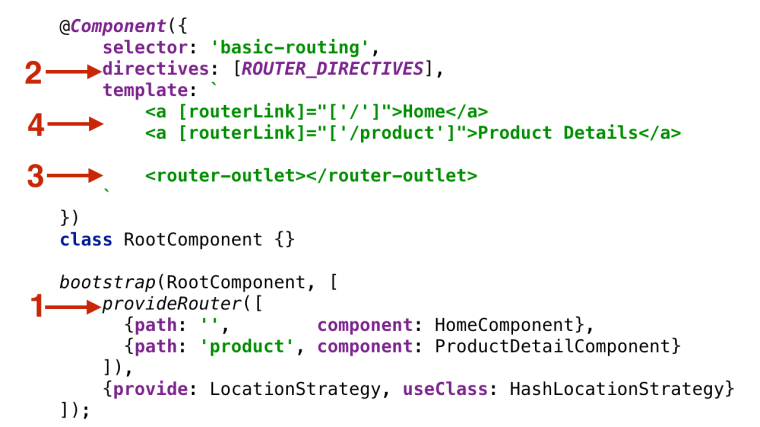
In a typical scenario, you’ll be implementing navigation in your application by performing the following steps:

1. Configure your app routes to map the URL segments to the corresponding components and pass the configuration object to bootstrap() as an argument. If some of the components expect to receive input values, you can use route parameters.

2. Add the property directives: [ROUTE_DIRECTIVES] to the @Component annotation. This will allow you to use the custom tag <router-outlet>, a property routerLink et al.

3. Define the viewport where the router will render components using the <router-outlet> tag.

4. Add the HTML anchor tags with bounded [routerLink] properties (square brackets denote property binding), so when the user clicks on the link the router will render the corresponding component. Think of a routerLink as a client-side replacement for the href attribute of the HTML anchor tag.

NOTE: Invoking the router’s methods navigate() or navigateByUrl() is an alternative to using [routerLink] for navigating to a route.

Here’s an illustration of the above steps:

ch3_router_4steps

The function provideRoute() takes the routes configuration that represents two URL segments that may be appended to the base URL:

* The empty string in the path means that there’s no additional URL segment after the base URL (e.g. http://localhost:8080), and the application should display the HomeComponent in the outlet area.

* The product path represents the URL segment product (e.g. http://localhost:8080/product), and the application should display the ProductDetailComponent in the outlet.

Let’s illustrate these steps in a sample application. Say we want to create a RootComponent that has two links Home and Product Details at the top of the page. The application should render either HomeComponent or ProductDetailComponent depending on which link the user clicks. The HomeComponent will render the text “Home Component” on the red background, and the ProductDetailComponent will render “Product Detail Component” on cyan.
Initially the Web page should display the HomeComponent as shown below.

ch4_basic_routing_home

After the user clicks on the Product Details link the router should display the ProductDetailComponent as shown on the next screenshot. Note the hash portion in the URL:

ch4_basic_routing_product_detail

The main goal of this exercise is to get familiar with the router, so our components will be very simple. Below is the code of HomeComponent:

import {Component} from 'angular2/core';

@Component({
    selector: 'home',
    template: '
<h1 class="home">Home Component</h1>
',
    styles: ['.home {background: red}'],
})
export class HomeComponent {}

The code of the ProductDetailComponent will look similar, but instead of red the property styles will define the cyan background:

import {Component} from 'angular2/core';

@Component({
    selector: 'product',
    template: '
<h1 class="product">Product Detail Component</h1>
',
    styles: ['.product {background: cyan}']
})
export class ProductDetailComponent {}

The [RootComponent] will define the routing of this application, and its code is shown next.

import {bootstrap} from '@angular/platform-browser-dynamic';
import {Component} from '@angular/core';
import {LocationStrategy, HashLocationStrategy} from '@angular/common';
import {provideRouter, ROUTER_DIRECTIVES, RouterConfig} from '@angular/router'; // 1

import {HomeComponent} from './components/home';
import {ProductDetailComponent} from './components/product';

@Component({
    selector: 'basic-routing',
    directives: [ROUTER_DIRECTIVES], // 2
    template: `
        <a [routerLink]="['/']">Home</a> // 3
        <a [routerLink]="['/product']">Product Details</a>
        <router-outlet></router-outlet> // 4
    `
})
class RootComponent {}

RouterConfig

bootstrap(RootComponent, [
    provideRouter([ // 5
      {path: '',        component: HomeComponent},
      {path: 'product', component: ProductDetailComponent}
    ]),
    {provide: LocationStrategy, useClass: HashLocationStrategy} // 6
]);

1. First we import all navigation-related directives and classes from @angular/router and @angular/common.

2. Since this component uses router directives we include ROUTER_DIRECTIVES in the annotation @Component.

3. Binding routerLink to routes (see callnote 5) using their paths / and /product.

4. The tag <router-outlet> specifies the area on the page where the router will render one of our components.

5. We’ve configured routes here. The empty URL segment represents the base URL.

6. During the application bootstrap we specify dependencies of the RootComponent in the square brackets.

In the above example we use HashLocationStrategy, which means if we configure the router with the URL segment product, Angular will add /#/product. The browser will treat the segment after the hash sign as an identifier of a specific segment of the Web page.

Note the use of brackets in the <a< tags. The square brackets around routerLink denote property binding, while brackets on the right represent an array with one element (e.g. [‘/’]). We’ll show you examples of array with two or more elements later in this chapter. The second anchor tag has the property routerLink bound to the route named ProductDetail.

In the above example HomeComponent is mapped to the path containing an empty string, which implicitly makes it a default route.

Here we’ve configured routes in the object and passed it as an argument to the provideRouter() function. The value in the routerLink will be matched with the configured path. In our case the <router-outlet> represents the area below the anchors.

The structure of the object that you can pass to provideRouter() is defined in the interface RouteConfig, which is an array of objects implementing the interface Route shown below (the question marks mean that the respective property is optional):

export interface Route {
    path?: string;
    pathMatch?: 'full' | 'prefix';
    component?: Type | string;
    redirectTo?: string;
    outlet?: string;
    canActivate?: any[];
    canDeactivate?: any[];
    data?: Data;
    resolve?: ResolveData;
    children?: Route[];
}

NOTE: Make sure that the file package.json includes “@angular/router”: “3.0.0-beta.2” in its dependencies section.

Handling 404 errors

If the user will enter a non-existing URL in your application, the router won’t be able to find the matching route and will print the error message on the browser’s console leaving wondering why not any navigation is happening. Consider creating an application component that will be displayed whenever the application can’t find the matching component.

For example, you can create a component named _404Component and configure it with the wild card path **:

provideRouter([
{path: '', component: HomeComponent},
{path: 'product', component: ProductDetailComponent},
{path: '**', component: _404Component}
])

Now, whenever the router can’t match the URL to any component, it’ll render the content of your  _404Component instead. The wild card route configuration has to be the last element in the array given to provideRouter(). The router always treats the wild card route as a match and any routes listed after the wild card’s one won’t even be considered.

That’s all for now. Stay tuned for more Angular 2 blogs. My other Angular-related blogs are here. Our next public online Angular 2 workshop starts on September 11, 2016.